MetaQuotes Trading Signals
Until recently, copying the trading signals of profitable traders presented a number of difficulties, stemming from the  need to use additional platforms or, worse, additional software. Therefore, to find truly successful traders, investors had to register with various services and undertake complex selection processes.
MetaQuotes is the leading developer behind the well-known Meta Trader trading terminal. We've all worked with this platform, but just a year ago, the developers delighted us with new news: the ability to copy trades of successful traders will now be available in the trading terminal.
You might be wondering, what's the difference between the MetaQuotes signal copying service and other similar signal copying services?
MetaQuotes has taken a broader approach to this, introducing the ability to copy and distribute signals directly through Meta Trader 4 and 5, which connects millions of users worldwide. From now on, you no longer need to copy signals through your broker's service.
Simply select a manager in the trading terminal, and the trading terminal will do everything for you. Moreover, the order execution speed is so high that you probably won't even notice the difference in the time it takes for the manager's order to open and the time it takes for it to open in your account.
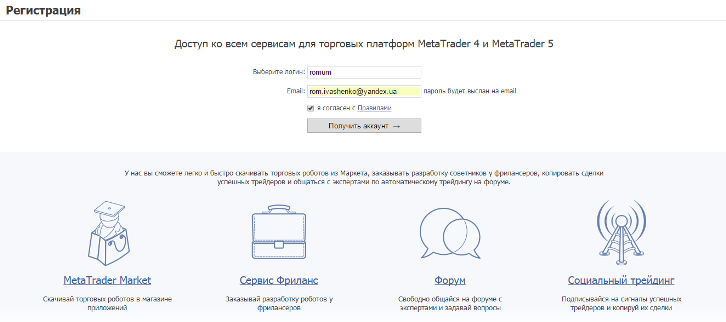
To start copying trading signals, you first need to register on the mql5.com . The registration process is very simple and takes just a couple of minutes. Simply enter your username and email address, then activate your account via the email sent to you.
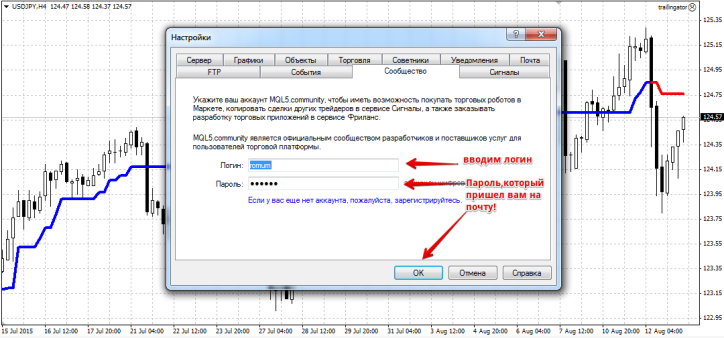
The next step is to establish a connection between the service and the Meta Trader 4 trading platform. To do this, launch your trading terminal and go to the Service tab, then go to Settings. Then, in the menu that appears, open the "Community" tab. You'll see two fields where you'll need to enter your username and password, which you registered on the mql5 community website. An example of MT4 authorization with the service is shown in the image below:
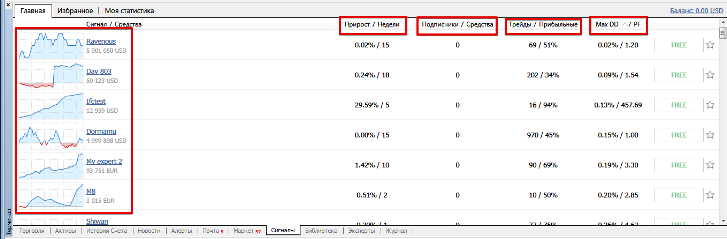
Once you've logged into your MT4 trading terminal with the mql5 website, you'll be able to copy trading signals or become a manager and issue signals yourself. To view the list of traders issuing signals in the "Terminal" panel of your MT4, open the signals tab.
A filterable list of managers will appear. The general list can be filtered by the following metrics: deposit growth, number of weeks the trader has been active, number of subscribers and funds, number of trades and their profitability percentage, maximum drawdown, and profit factor. You can also see a profitability chart for each manager.
The next step you can take is to learn more about the trading strategy of the person providing signals, their statistics, and general indicators. To do this, click on the manager's nickname. This will open the trader's personal page, with their key indicators listed on the left, including balance, account type (real or demo), maximum drawdown, number of weeks of trading on the account, number of trades, and percentage growth.
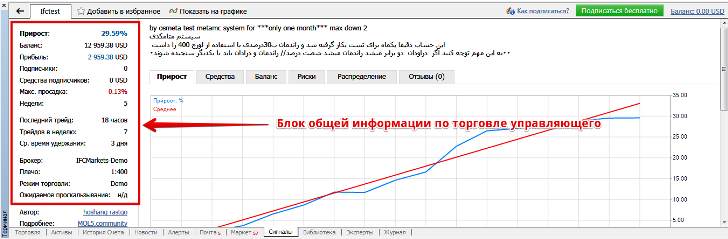
In addition to general information about your trading account, you can also view detailed charts showing your profit and equity growth as a percentage:
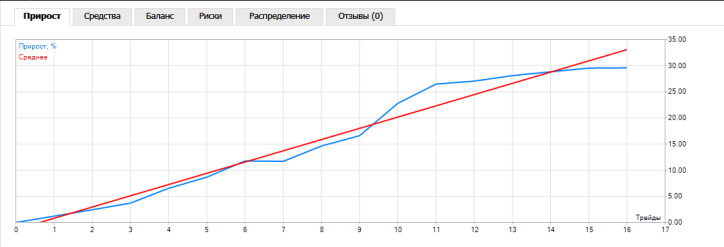
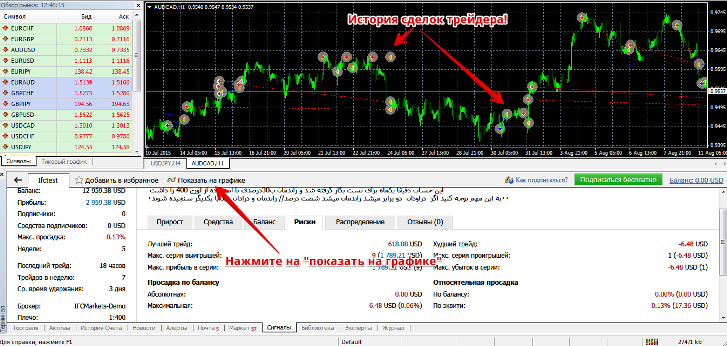
In the Risk tab, you can view trade profitability indicators, the maximum profitable position, a series of profitable positions, the maximum profit in a series of trades, relative and absolute drawdowns, the most unprofitable position, and more.

Manager statistics are so transparent that you can see all the information you need. Now for the service's unique feature, unique to MetaQuotes: you can view all the traders' positions on a trading chart. This greatly simplifies understanding the trader's trading strategy, and eliminates the tedious work associated with analyzing closed positions. To do this, click the "Show on Chart" tab in the account details window, and a chart with the manager's trading history will immediately appear.
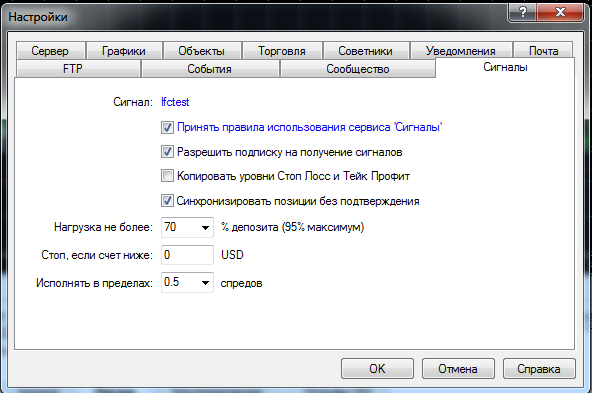
Once you've decided that this trader is right for you, simply click "Subscribe." A window will appear where you can limit your losses. You can set a deposit limit, which is a percentage of your deposit that will be used to calculate the lot size for opening a trade. You can also set a stop loss in your deposit currency; once this level is reached, all trades will be automatically closed.
A nice feature of the service is that you can copy signals for a fee or find a manager who distributes them for free. It's important to understand that traders who distribute signals for a fee have passed a month-long trading test and have been approved by MetaQuotes developers to distribute signals. A great feature is that it doesn't matter which broker you trade with, as all signals are copied directly from the trader's trading platform, without the need for an intermediary.
The opportunity to use this service exists with brokers Amarkets and Alpari.

