Trading calculator - calculate position size and risk per trade
Professional traders use a variety of useful tools to trade on the stock exchange.
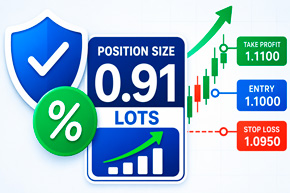
The trading terminal allows you to open trades and monitor quotes, but it doesn't always help you quickly determine a safe position size, potential loss, and required margin.
One such tool is a trading calculator.
It allows you to calculate the parameters of a transaction in advance and determine the volume with which to enter the market so that the potential loss does not exceed the established risk level.
The trading position calculator below is suitable for trading stocks, ETFs, cryptocurrencies, Forex currency pairs, stock indices, and CFDs.
Trade Position, a calculator for managing stock market risks
Continuing our review of the most useful and free scripts for effective trading, today we'll look at the MT5 Trade Position and Back Testing Tool.
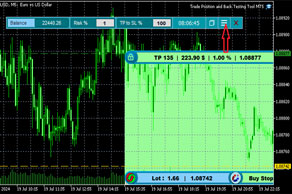
Essentially, this is a script that allows you to fairly accurately calculate the ratio of probable risk and possible reward, taking into account the size of the deposit.
Trade Position allows you to calculate the following important parameters of a stock exchange transaction:
Transaction size – taking into account the established risk percentage, the riskier the planned transaction, the larger its size.
Take profit and stop loss – based on the set risk level, displaying changes in the risk level when moving stop orders.
Tick indicator for the M1 timeframe
A tick in stock trading is the smallest change in the price of a financial instrument. For example, if a stock price is $20.00 and the minimum tick is $0.01, the next possible price for the stock could be $20.01 or $19.99, but not $20.005.
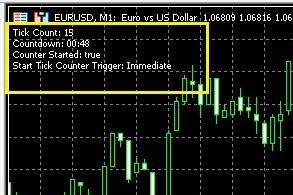
Tick counting in stock trading is used to analyze market volatility, that is, the degree of its changeability.
A large number of ticks in a short period of time may indicate high volatility, while a small number may indicate low volatility. This is important for traders, as volatility directly impacts the potential profitability and risk of trades.
Ticks are also used to create tick charts, which allow traders to see every price change and analyze market dynamics in more detail.
MMTrade script assistant for placing limit orders
The trader's trading platform allows you to place both market orders with immediate opening and pending orders that will open when the price reaches specified parameters.
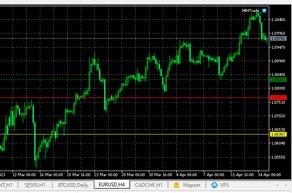
The simplest orders are buy stop and sell stop, as they are placed in the direction of the trend, above or below the current price.
Another matter is limit orders buy limit and sell limit, which are placed against the existing trend in the expectation of a price reversal or that the current trend is just a correction.
Besides the installation location, it is not always clear what parameters should be set for stop loss and take profit indicators.
Real-time overbought and oversold market indicator
As is known, the formation of prices in any market is influenced by the magnitude of supply and demand; these factors determine the direction of the trend.
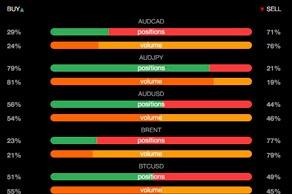
The more traders want to sell a product, the higher the likelihood of a price decline, and vice versa, a large number of people wanting to buy an asset increases the likelihood of an upward trend.
When the number of people willing to buy reaches its maximum, the market enters a state of overbought, but if there are significantly more sell orders on the exchange, this state is called oversold.
For more information on various market conditions, read the article at https://time-forex.com/tehanaliz/perekuplenost-pereprodannost
Script for determining the amount of slippage when opening orders
Market orders placed are not always executed at the price we see when opening a trade; the opening price may differ by several points from the quoted price.
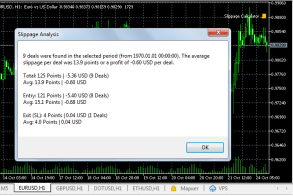
This process is called slippage; there are many reasons for slippage, but the size of the price deviation is more important.
Since this deviation can affect the financial result of the transaction when opening short-term transactions using the scalping strategy.
Therefore, it is important to know how many points the price deviates in your trading platform, and if the amount of slippage is quite large, then you may want to consider changing your account or broker.
Script minimum trailing stop step, from 1 point
Most professional traders prefer to use trailing stop instead of stop loss in their trading.
The advantages of a floating stop are more than obvious; its use allows you to achieve maximum profit from a single transaction while controlling the level of risk.
Overall, the tool is flawless, though traders sometimes complain that brokers limit the minimum trailing stop size and that they can't set the step at their own discretion.
The minimum level is often limited to 15 points, and in trading platforms of some brokerage companies, the minimum step is 5-10 points.
Indicator for displaying a Stop Out line on a chart
Almost everyone who starts trading on the stock exchange using leverage asks the question: what will happen if I lose my broker's money?
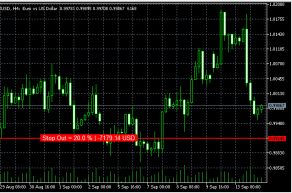
To prevent such situations from happening, there is a kind of stop loss from the brokerage company, which protects its funds.
This stop order is called Stop Out and its size is usually from 10 to 50 percent of the margin amount for the transaction.
Everything would be fine, but it's quite inconvenient to calculate when a position will be forced to close each time. A Stop Out script has been created to automate and visualize the process.
Forex Margin Calculator: A simple calculation of the funds required for collateral
You've probably often encountered a situation when opening a transaction, where your attempt to open an order is rejected.

And in the window for opening a new order, an unpleasant message appears: “Not enough money”, the culprit in this case is the excessively large volume of the position being opened.
Or, to be more precise, there is not enough money on deposit to open a new trade, even taking into account the available leverage.
The collateral funds that are blocked for a new transaction are called margin, and it is better to know in advance how much funds are required to avoid a refusal.
A script that helps you place an order when the market is closed
Sometimes you need to place an order but the market is closed.
When you try to open a new trade in the trading platform, you're rejected with a message stating that trading is currently closed.
It's logical to place an order immediately after the start of a new trading session, but this isn't always convenient, as forex sessions start at night after weekends, and it's not always possible. So
what should you do in this situation? The answer is quite simple: use a special script that allows you to schedule a pending order.
The tool is quite simple, so any trader will easily understand its basic settings.
A simple script for setting a trailing stop on Forex
There are many ways to make Forex trading more efficient and secure, and one such method is a trailing stop order.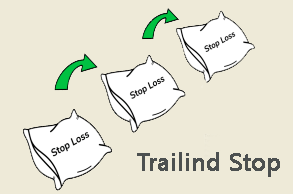 This trading platform feature allows you to maximize profits from an open order while simultaneously protecting against losses.
The only requirements for using this tool are that the open position is profitable and the trading program is running.
We previously described how to set a trailing stop directly within the trading platform.
However, many beginners still have questions about this topic. To simplify the process as much as possible, you can use the script below.
Scripts for Forex trading
The MetaTrader 4(5) trading terminal offers many additional features, but comfortable operation still requires the use of additional Forex scripts. These programs significantly simplify trading, thereby increasing its efficiency. They do not perform trend analysis or provide trading signals; they merely add certain functions to the trader's terminal.
Forex scripts allow you to place pending and instant orders with a mouse, close all orders with a single click, calculate the breakeven point, manage open positions, and offer a host of other features. All programs presented are completely free; after choosing the program you need, you can download it from our website.
Tipu Stops helper script for setting Stop Losses
Traders always have the most questions about placing a Stop Loss order to limit losses.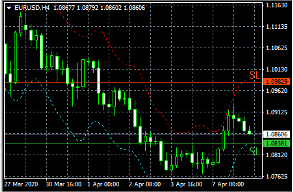
We've previously published several Forex scripts and indicators that help determine where to place a stop order.
Today, you'll learn about a similar script, the main advantage of which is its ease of use.
Tipu Stops is an advanced script; it doesn't simply randomly determine stop loss points, but rather uses classic technical analysis indicators.
This approach allows you to draw channels for buy or sell trades, depending on the direction in which you choose to open the order.
Make the wait more enjoyable with Game Fiftee Puzzle
In trading, there are often moments when you have to wait a long time for the price to reach a certain level on Forex.
To occupy yourself, some people talk on the phone or listen to music, but you can also play a simple game right in the trader's terminal.
So to speak, you can usefully spend time training your mental and logical abilities, as this is precisely what this game is designed for.
We're all familiar with the offline version of 15 from childhood: you simply need to arrange 15 numbers in a specific order on a square field.
The game's developers have created a script that can easily be used in the MetaTrader 5 trading platform, directly on top of the currency pair chart.
Trader Assistant (MT5 Trade Assistant)
It just so happens that some trade Forex, while others try to make it easier by creating various Forex programs and scripts.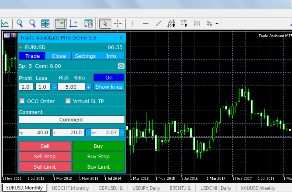
Today, we'll talk about the Trade Assistant program, which acts as a trader's assistant when placing orders.
It helps place market and pending orders, taking into account the risk relative to the deposit, and also sets stop order sizes.
This means you don't have to worry about the trade size every time your deposit changes; you can simply set the risk percentage relative to your balance.
But this is only a small part of the script's capabilities, which is simply impressive in its functionality and visualization.
Gap statistics script for a currency pair
The phenomenon of Forex gaps has caused many traders considerable trouble, as they prevent stop orders from being triggered.
More precisely, they are triggered, but only after the price gap has closed and at the closing price.
There are also many strategies that use gaps as entry signals, guided by the principle that every price gap must close.
Therefore, it's crucial to choose a currency pair that rarely experiences price gaps or, conversely, to find an instrument with the largest gaps.
For this purpose, a script has been developed to analyze Forex gap statistics across currency pairs.
Script for pending orders at a specified time
Trading using pending orders is quite multifaceted; there is simply a huge number of strategies based on them.
The standard features of the MetaTrader trading terminal only allow you to limit the duration of a pending order.
However, sometimes you need to set the order to take effect after a certain time, meaning you need to delay the placement of a pending order.
This is done to allow the price to move a certain distance and then open a position at a more favorable price.
You can add a new feature to the trading terminal by installing scripts for placing pending Forex orders, which will set Buy Stop and Sell Stop on a specific day and at the desired time.
Money management script
Most professional traders say that making money on Forex is quite easy, but keeping the money you earn is much more difficult.

One losing trade can easily wipe out the profits from five successful ones.
Therefore, a money management system that regulates capital management aspects and profit-loss ratios comes first.
Many beginners neglect this aspect, preferring to plan trade volumes solely based on the desired profit.
This is largely due to the process of calculating safe trade volumes. It's okay if you're dealing with one or two positions, but what if you have a dozen open orders?
A simple script that allows you to determine volatility over a period
Volatility , an indicator such as a currency pair or other trading asset, often raises many questions among traders.
Its value helps when planning future profits and finding better market entry points.
Volatility can also be used to select the most dynamic trading instrument.
Determining volatility is a painstaking and time-consuming process, but thanks to specialized scripts, it can be done in minutes.
We previously provided a similar Forex script on the page: http://time-forex.com/skripty/skr-volotilnost; it provides data by hour and day of the week.
What does the AccountInfoSample script show in the trader's terminal?
The online trading industry is constantly evolving, and new auxiliary tools are emerging every year, significantly simplifying the analytical process. 
In addition to indicators and technical analysis tools, the MT4 platform can integrate Forex scripts—special programs written in MQL4.
These add-ons can be used for various purposes:
trading automation:
placing or canceling pending orders
; making trading more convenient
; information functions.
The last group of scripts is the most frequently used.
These programs are designed to systematize trading data, allowing traders to objectively evaluate the effectiveness of a strategy, correct errors, and make appropriate adjustments.
Automatic stop loss and take profit
Dynamic trading, such as scalping, pipsing, or grid trading, requires traders to be extremely fast. 
However, at such a high pace, especially when scalping, it's virtually impossible to set stop orders or profit targets promptly and accurately.
Naturally, this situation leads to losses, as a huge number of losing trades must be closed manually, and it's difficult to keep track of them all.
Naturally, not everyone can cope with such conditions, so many simply abandon scalping and pipsing altogether.
However, professionals have long since found a solution to this problem, and they are assisted by special auxiliary advisors or Forex scripts.
Page 1 of 4
- To the beginning
- Back
- 1
- 2
- 3
- 4
- Forward
- To the end

