Automatic stop loss and take profit
Dynamic trading, such as scalping, pipsing, or grid trading, requires traders to be extremely fast. 
However, at such a high pace, especially when scalping, it's virtually impossible to set stop orders or profit targets promptly and accurately.
Naturally, this situation leads to losses, as a huge number of losing trades must be closed manually, and it's difficult to keep track of them all.
Naturally, not everyone can cope with such conditions, so many simply abandon scalping and pipsing altogether.
However, professionals have long since found a solution to this problem, and they are assisted by special auxiliary advisors or Forex scripts.
Automatic Stop Loss and Take Profit is a simple assistant advisor whose main task is to set pre-set stop loss and take profit values for manually opened orders or for orders opened by other trading experts.
This Expert Advisor isn't a robot that opens orders automatically; its purpose is solely to support existing trades. Therefore, the script can be used on virtually any time frame or currency pair.
Installing the Automatic Stop Loss and Take Profit Expert Advisor:
Unlike some other similar free Expert Advisors, the Automatic Stop Loss and Take Profit Expert Advisor isn't included in a library, but is distributed completely free of charge through the MT4 developers' Marketplace.
Therefore, you can install this utility in two ways: through the Marketplace or via the standard installation directory.
The first installation method is fairly quick. To do this, open the trading terminal and navigate to the "Market" tab, which is located in the "Terminal" panel.
This panel provides information about your account status. Then, be sure to switch to the "Utilities" view and select a list containing only free products.
Find Automatic Stop Loss and Take Profit and download it. The terminal should create a “Markets” folder in your list of advisors, which is where the robot will be located.
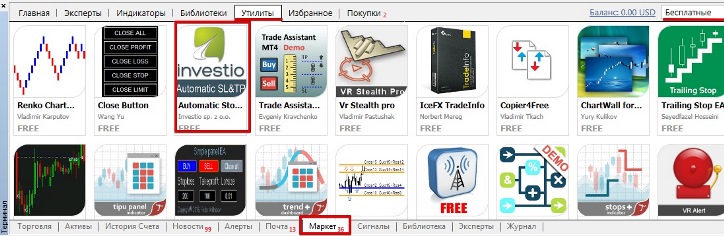 The second traditional installation method is to place the downloaded EA file in the Experts folder of your platform data directory.
This method is useful if the EA is removed from the Market for any reason. The download link is at the end of this article. After
installation using either method, be sure to restart the Meta Trader 4 trading terminal or update it, as the robot will not appear in the list of experts.
Automatic Stop Loss and Take Profit Application and Settings
As we've already noted, the Automatic Stop Loss and Take Profit advisor is designed solely to assist traders, simplifying the process of setting stop orders and profit targets during dynamic trading.
The robot's algorithm is very simple: it should be applied to any currency pair or time frame.
Once applied, the robot will set a take profit and stop loss for all new open orders, regardless of the instrument the advisor is working on, as it works with the window containing the list of open trades, not the chart.
Therefore, it is enough to keep the robot constantly on one chart so that it sets stops and profits for all symbols.

The advisor settings contain only the necessary minimum of variables. Specifically, in the stop_loss line, you can set the stop order size in points, and in the take_profit line, the profit size in points.
In conclusion, it's worth noting that Automatic Stop Loss and Take Profit is an extremely effective solution for all traders who simply don't have time to set stop orders and take profits manually, or who want to automate this routine process as much as possible.
Download Automatic Stop Loss and Take Profit.
Similar scripts:
of stop orders - http://time-forex.com/skripty/skript-risk
Trailing Stop Setting Assistant - http://time-forex.com/skripty/trailing-stop

