Trailing Master Script
One technique for preserving profits and minimizing losses is using atrailing stop.
However, in many cases, the standard, familiar trailing stop doesn't meet all the requirements and doesn't solve the problems a trader might face.
Therefore, auxiliary scripts and advisors come to the rescue, significantly expanding the functionality of a standard order.
You'll learn about one such Forex script in this article.
The Trailing Master script is an auxiliary advisor for traders that automatically performs both mass and individual trailing of orders when the price reaches a specified profit level.
It's worth noting that Trailing Master actually works with a trader's existing trades and doesn't execute them itself, so it can work with any trading asset and on any time frame.
A notable feature of this particular auxiliary robot is that it is able to recognize orders required for tracking both by the code assigned by another advisor and by the comments that can be assigned to orders in the independent position opening mode.
Installing the Trailing Master script
Trailing Master, although more often referred to as a script, is designed as a separate advisor that can monitor the market 24/7 and perform actions, unlike a script, which only triggers when applied to a chart.
The robot itself appeared in 2016, was furthermore publicly disclosed and posted completely free of charge in the official library of MT4 trading terminal developers.
Thus, all users of this trading terminal, without exception, can install it without any additional downloads.
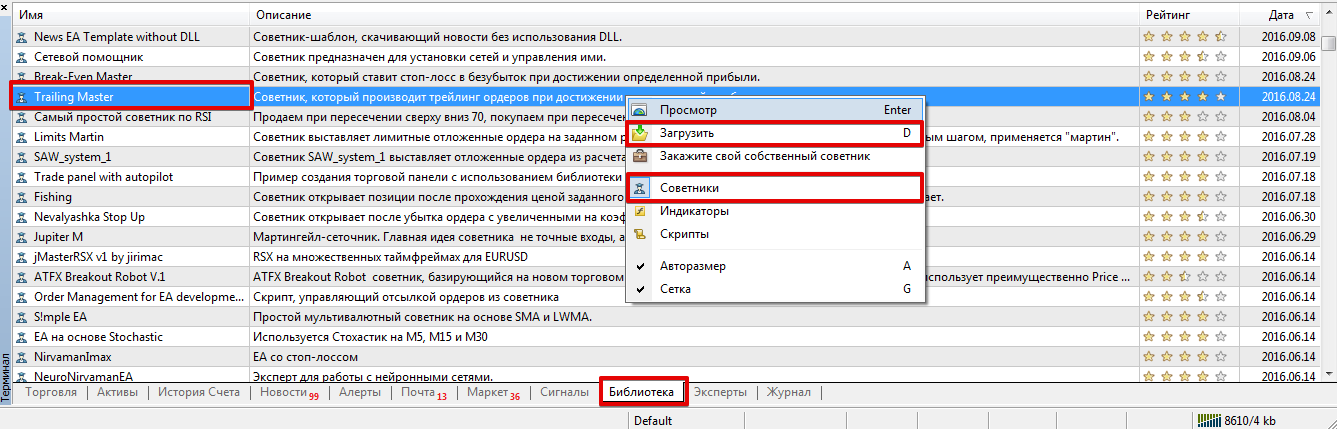
To install Trailing Master, you'll need to use the built-in library. To do this, launch the trading terminal where you plan to use the EA, and scroll to the very bottom, where you can view your trade history and monitor your balance.
Open the Library tab and start sorting, making it so that only advisors are displayed in the list.
Find Trailing Master in the list, based on the development dates for 2016, and install it using the additional menu, following the instructions in the image below:
If any issues arise, such as the developer deleting a script from the library, you can use the standard installation method. Download the advisor file at the end of this article and move it to the appropriate folder in the terminal's data directory, specifically the folder named "Expert."
The next step after installation is to update the platform using the additional menu in the "Navigator" panel or simply restart the terminal.
How it works: Trailing Master settings
: The function is quite simple: it moves your stop order to the entry point when the price reaches a predetermined profit target, which you specify in the advisor settings.
The robot can work with the entire order series or track specific orders, for example, other advisors or orders you manually opened with an assigned comment.
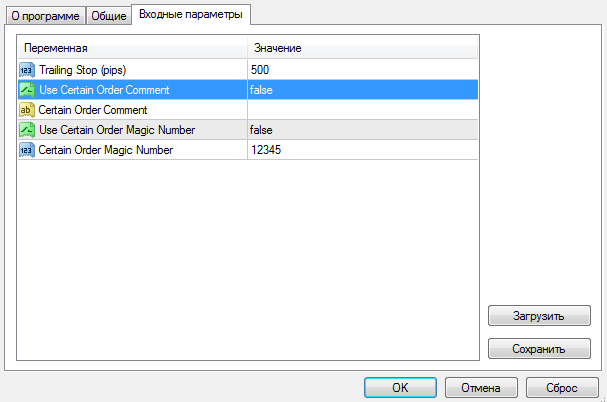
In the Trailing Stop line, you can set the trailing stop size in points. The Use Certain Order Comment variable enables order tracking by comment, and you can specify the comment itself in the Certain Order Comment variable.
The Use Certain Order Magic Number variable enables order tracking by Magic Number, and you can specify the number itself in the Certain Order Magic Number line.
The Trailing Master script, unlike a standard trailing stop, is more convenient because it can track open trades in real time for you.
Moreover, if you use other advisors or grid strategies, the expert will significantly save you time and eliminate routine work.
Download Trailing Master

