Limit Orders Pro Script: A Universal Grid Trader's Assistant for All Situations
The job of an analyst is to make beautiful predictions, and if they don't come true, to be able to competently explain why.

Traders rarely make long-term plans. Moreover, most trading strategies are focused not on forecasting but on managing the consequences of price action.
This is why, amid market unpredictability, grid trading strategies have become increasingly popular. Like fishermen, traders set traps along the price's path and profit from virtually any movement.
However, working with grids has its drawbacks, one of which is the enormous amount of routine work required with pending orders, which not all traders can handle.
The price of any mechanical error is huge losses. This is why most traders always use either expert advisors or auxiliary Forex scripts that can solve a range of problems. You will learn about one such tool in this article.
A notable feature of the Limit Orders Pro script is its multitasking capabilities. The robot can not only open a grid with limit orders in a given direction, but also modify and independently delete them.
This script is a universal assistant and can be used on any trading assets and time frames available in the MT4 trading terminal.
Installing the Limit Orders Pro script in MT4
The Limit Orders Pro script is a relatively new development; programmers created it and placed it in the official MT4 library in 2017.
Thus, today Limit orders Pro is freely available and distributed free of charge, which allows you to install this script in two ways - through the library or the standard way.
Functionality and settings
Limit Orders Pro is one of the most feature-rich scripts for working with a grid of pending limit orders. When applying an instrument to a chart, you'll see a settings line, the key one being the "Type of transaction.".
In it, you can choose to open a buy or sell grid, modify an existing grid, or delete it altogether pending ordersSo, let's take a closer look at the script settings.
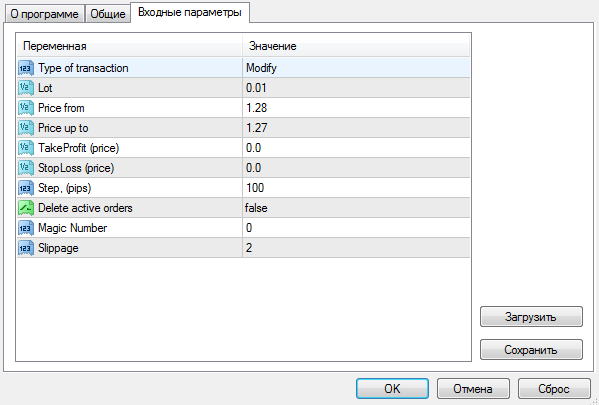
In the "Type of transaction" line, you can select the action type. Specifically, if you select "Buy," limit buy orders will be opened, and if you select "Sell," limit sell orders will be opened.
You can also select "Modify" or "Delete" in this line, allowing you to change the profit and stop orders for an open grid or delete orders.
The script implements a function for setting pending orders for a range, which automatically limits the size of the required grid. To do this, you only need to specify the minimum and maximum range in the "Price from" and "Price up to" lines.
The "TakeProfit" and "StopLoss" variables allow you to set the profit and stop orders for your order grid, and the "Lot" variable specifies the order volume. The "Step" variable allows you to set the distance between pending orders.
In the "Delete active orders" variable, you can enable the deletion of either all pending orders or only those that failed.
The "Magic Number" variable allows the script to find only its own orders and not others, and the "Slippage" variable allows you to limit the opening of orders in the event of significant slippage.
Download Limit Orders Pro
Advisor using the FOREX SETKA TRADER

