What does the AccountInfoSample script show in the trader's terminal?
The online trading industry is constantly evolving, and new auxiliary tools are emerging every year, significantly simplifying the analytical process. 
In addition to indicators and technical analysis tools, the MT4 platform can integrate Forex scripts—special programs written in MQL4.
These add-ons can be used for various purposes:
trading automation:
placing or canceling pending orders
; making trading more convenient
; information functions.
The last group of scripts is the most frequently used.
These programs are designed to systematize trading data, allowing traders to objectively evaluate the effectiveness of a strategy, correct errors, and make appropriate adjustments.
The use of this script is for informational purposes only and does not imply automation of the trading process.
AccountInfoSample can be downloaded for free from specialized forums and websites, and then installed in the root folder of the trading platform according to the standard instructions.
The script may also be installed by default on your trading platform, depending on your broker. At least, it's installed on my MT5 trading platform.
To effectively use the script, novice traders should pay attention to its functional tasks.
Features of the AccountInfoSample script
After installing the program in the root folder of the terminal, it will be displayed in the "Navigator" panel:
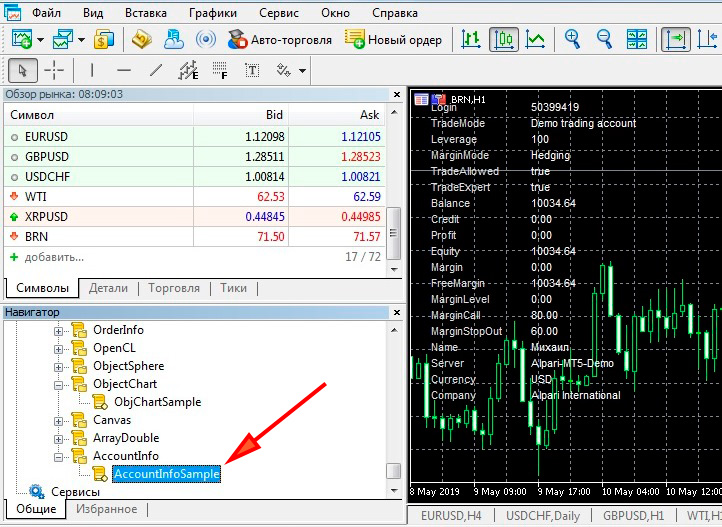 When launching the program, you won't need to change any input parameters. If the script is working correctly, trading information will be displayed in the price chart window on the left side: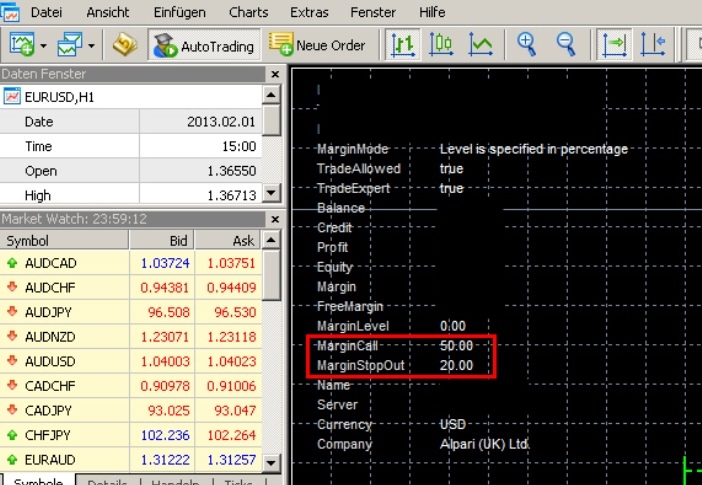
Margin Mode: level is specified in percentage – the margin level is specified as a percentage (this notification is displayed when using leverage in trading).
Trade Allowed and Trade Expert. These values should be set to "true" to confirm the program is working correctly.
Balance – the current trading account balance.
Profit – the total profit on open orders.
Equity – available funds.
Margin – the minimum margin required to maintain open positions.
Free Margin – free margin. It is recommended that this indicator not fall below 250%. If the trade volume is calculated in accordance with capital management standards, the free margin will not be less than 800% when trading with a leverage of 1:500. Keep in mind that the broker's financial support level is reduced to 1:100 on Friday evenings.
Margin Call and Stop Out are the minimum margin levels required by the broker's trading terms. Upon reaching these levels, current trades will be closed and the financial result will be forcibly fixed.
Currency is the account's base currency.
Company is the name of the broker's parent company.
This information can be used to control margin levels, which is especially important for traders who prefer to simultaneously trade multiple currency pairs with low correlation coefficients.
Conclusion
AccountInfoSample is a free information script for MetaTrader terminals that displays up-to-date information about a trading account.
This can be used to control margin levels, preventing forced closure of existing positions with fixed losses.
This tool is especially useful for traders using leverage greater than 1:200.

