A script that helps you place an order when the market is closed
Sometimes you need to place an order but the market is closed.
When you try to open a new trade in the trading platform, you're rejected with a message stating that trading is currently closed.
It's logical to place an order immediately after the start of a new trading session, but this isn't always convenient, as forex sessions start at night after weekends, and it's not always possible. So
what should you do in this situation? The answer is quite simple: use a special script that allows you to schedule a pending order.
The tool is quite simple, so any trader will easily understand its basic settings.
After you download the file at the end of the article, copy it to the "Scripts" directory of your trading platform. Restart the program and apply the pending order "Exhibited by Hand" from the "Scripts" section to the chart of the selected asset.
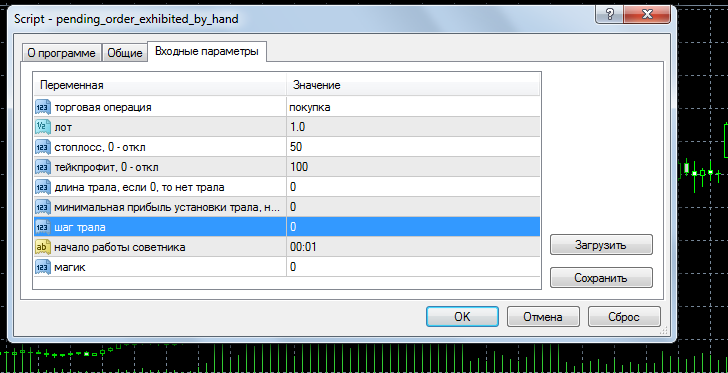
At the same time, we set the necessary settings:
- Trading operation – buy or sell, we set the direction of the planned transaction
- Lot – order volume
- Stop loss and take profit are stop order parameters that will always be useful.
- Trailer length – the size of the trailing stop if you want to use it
- Minimum trailing profit – trailing stop
- The advisor's start time is the time the script will be executed. Check the time in your trading platform to see how it matches the market opening time.
Setting a zero value will disable stop orders. If the market opens with a gap , the trade will be opened at the first available price.
After adding to the chart, you will see the following message in the upper right corner:
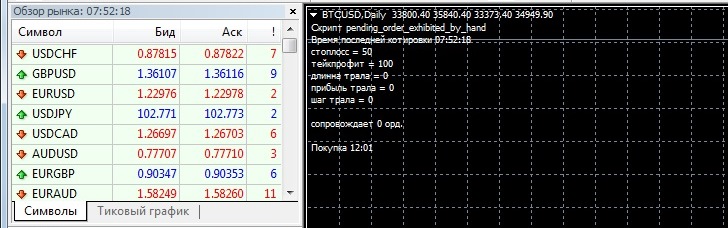
Then all that's left to do is wait for the set time to arrive and open the order.
I haven't tested whether the order opening script will work when the trading platform is offline, so check this feature yourself.
The tool can also be used to simply open trades at a specific time, but only at the start of trading.
Download the pending order script exhibited by hand.

