Script minimum trailing stop step, from 1 point
Most professional traders prefer to use trailing stop instead of stop loss in their trading.
The advantages of a floating stop are more than obvious; its use allows you to achieve maximum profit from a single transaction while controlling the level of risk.
Overall, the tool is flawless, though traders sometimes complain that brokers limit the minimum trailing stop size and that they can't set the step at their own discretion.
The minimum level is often limited to 15 points, and in trading platforms of some brokerage companies, the minimum step is 5-10 points.
After you download the tool at the end of this article and copy it to the Experts\Market folder of your MetaTrader 5 trading platform, it will appear in the navigator in the Expert Advisors section.
Then you can move on to adding to the chart and setting up the basic parameters:
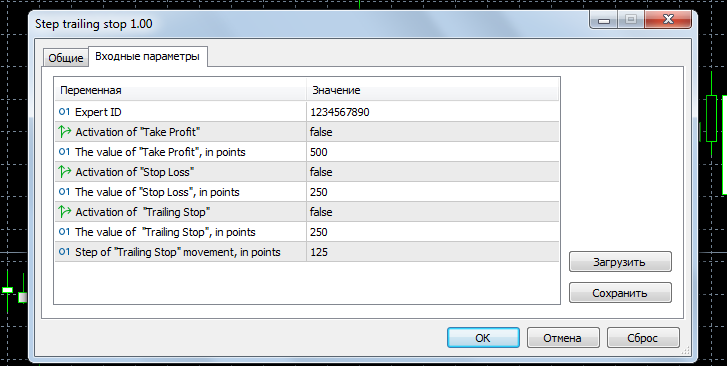
It's safe to say that the setup itself isn't difficult at all, and any trader can handle it:
Expert ID – script indicator number
Enable Take Profit activation – false (do not use) or true (enable)
Take Profit order size, set in points
Enable Stop Loss order activation Stop Loss order
size, set in points
Enable Trailing Stop tool
Trailing Stop size, set in points
Trailing Stop movement step, set with an accuracy of 1 point
An interesting feature of the tool is that when using it, you can also set parameters for stop loss and take profit orders.
This will provide additional protection for your deposit in the event of an unexpected shutdown of the trading platform, as trailing stop is only triggered when MetaTrader is enabled, while stop loss is triggered in any case.

