Invisible Stops: An Expert Who Can Keep Your Confidentiality from a Dishonesty Broker
One of the problems when working with brokers is the lack of access to the real interbank market for transactions, when all operations are virtual and conducted within the company.
You might ask, why would a broker do this? What's the point of bringing traders to the real market if nine out of ten participants are going to lose?
It's easier for a broker to arrange virtual trades and take traders' deposits for themselves than to leave them at the mercy of the market. There's virtually no difference between trading internally or on the interbank market, as long as the broker withdraws profits.
However, this operating system presents a certain conflict of interest. A company will never be interested in efficient traders, so unscrupulous brokers often interfere with traders' trading.
The most important tool in the hands of a dishonest broker is the stop order and the trader's profit, which the company may not execute, postpone, or fix at its convenience.
Manipulating quotes in today's environment is impossible, as such incidents would be quickly identified and made public, but stop orders and profits remain the most vulnerable areas.
Installing the Invisible Stops advisor
The robot, called "Invisible Stops," is somewhat reminiscent of a regular script. All it does is set a stop order and take profit.
It does this without sending a message to the server. This means the broker can't see your profits or stop orders, meaning it can't influence your trading in any way.
Installing the robot in the trading terminal is extremely simple, as the development itself is included in the official MT4 developer library, allowing us to install it in two ways.
To install the Invisible Stops robot through the library, launch your MT4 trading terminal and go to the Terminal tab, where you can find up-to-date information on your balance.
Then, go to the Library tab and perform a simple sort to display only advisors. Find the robot named "Invisible Stops" in the list and load it using the additional menu, as shown in the image below:
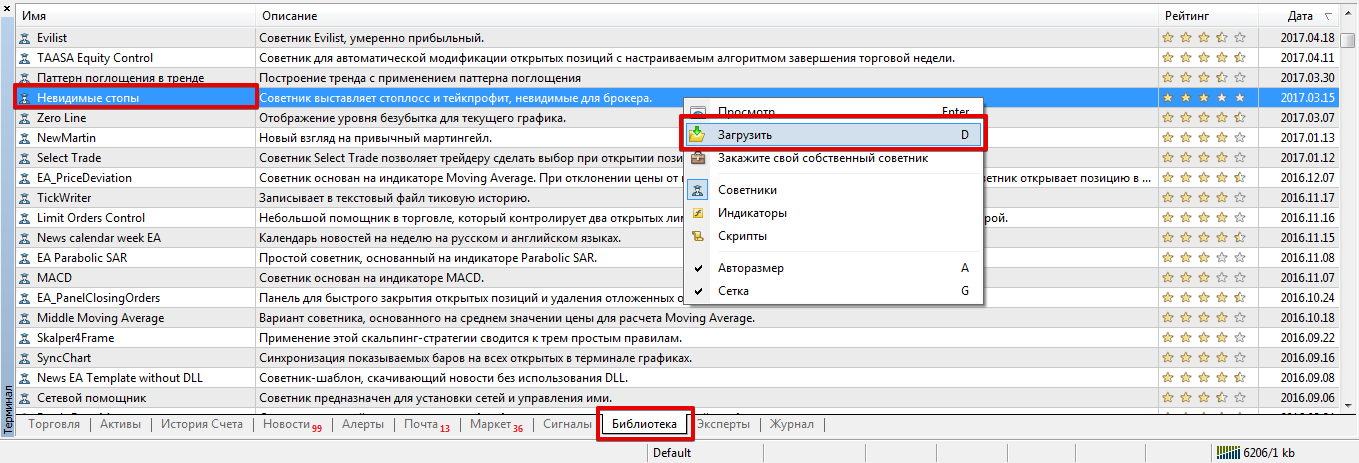
If installation using the standard procedure was not successful, install the robot using the standard procedure.
To do this, you will need to download the expert file at the end of the article, and then drop it into the appropriate folder in the data directory, namely, into the folder called Expert.
After installation, be sure to restart your trading terminal or update it in the Navigator panel. To start the expert advisor, drag it onto the chart of the currency pair you plan to trade.
How the script works
This advisor does not open trader positions, but rather actively manages them and locks in either profit or loss.
In terms of its operating principle, the advisor simply monitors price changes, and if the price deviates from the trade opening point by a certain number of points specified in the settings, profit or loss is fixed.
Therefore, the advisor can only record profit and stop orders when the mode is enabled. Since the trade is closed immediately, rather than through a pre-issued order, the broker simply doesn't see your profit and stop orders.
By the way, the expert advisor is an assistant and works regardless of the time frame or asset you set it on, the main thing is that it is on the chart of the pair for which you opened the trade.
The settings contain only three variables that a trader can customize based on the risks they observe in their personal trading. The "Stop Loss" and "Take Profit" variables set profit and risk limits in points, while the "Slipage" variable sets the maximum slippage to set profit and stop orders.
In conclusion, it's worth noting that the Invisible Stops advisor can protect you and your strategy from unauthorized broker intervention, and can also be of great benefit to scalpers who simply don't have time to set stops and take profits during active trading.
Download the "Invisible Stops" advisor

