MMTrade script assistant for placing limit orders
The trader's trading platform allows you to place both market orders with immediate opening and pending orders that will open when the price reaches specified parameters.
The simplest orders are buy stop and sell stop, as they are placed in the direction of the trend, above or below the current price.
Another matter is limit orders buy limit and sell limit, which are placed against the existing trend in the expectation of a price reversal or that the current trend is just a correction.
Besides the installation location, it is not always clear what parameters should be set for stop loss and take profit indicators.
This script not only places pending limit orders, but also sets their size in accordance with the trader's settings:
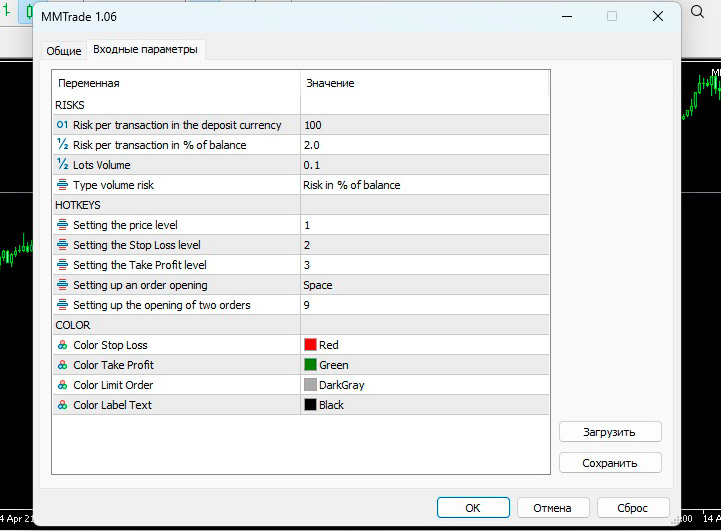
Depending on these settings, the trade size and stop order value are set
Risk per transaction in the deposit currency – risk in the deposit currency of the leveraged leverage
Risk per transaction in % of balance – the risk amount as a percentage of the deposit
Lots Volume – fixed transaction size in lots
Typr volume risk – you need to select the risk option on the basis of which the order will be calculated
Setting the – 1, 2, 3 keys set the opening price, stop loss, and take profit
Setting the order opening – the key to open an order
Setting up the opening of two orders - a key to open two limit orders simultaneously
There are also color settings, it is recommended to change them in accordance with the background of your chart
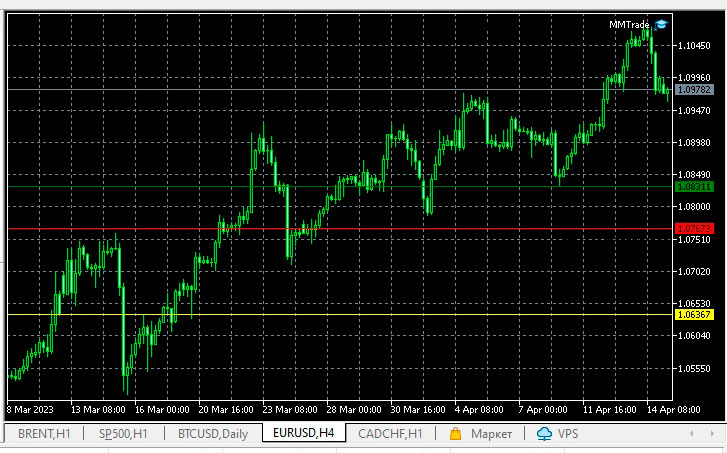
The script for placing pending orders is quite simple; to do this, you need to complete a few simple steps:
- Download the MMTrade script and copy it to your trading platform in the experts “Market” folder, then add it to the chart of the selected asset
- When you press 1, the price of the pending order is set
- When you press 2 – stop loss
- When you press 3 – take profit
- Space – opens an order
- Press 9 – opens two similar orders at once:
For example, after adding a script to the chart, press "1" and a price line appears. Hold "1" and use the mouse to move the price to the desired value. The same applies to stop loss and take profit.
When I pressed the "Space" key, the order did not open. I had to change the key in the settings, and then everything worked.
Overall, this is a rather interesting tool that will be useful for those who like to use buy limit and sell limit orders in their work.
Limit Order Strategy - https://time-forex.com/strategy/st-limit-order

