Volatility Script
Volatility of a financial asset is the most underestimated market characteristic, which is the reason why many traders fail.
The thing is that volatility Displays the range of price movement in points over a given unit of time.
This indicator allows every trader to set specific goals for themselves that a particular currency pair can achieve within a day or even a couple of hours.
The VolScript volatility script is a dedicated application for MT4 trading that allows you to track current and average market volatility.
It's worth noting that, unlike many similar scripts and indicators that determine volatility, VolScript displays its hourly change and also provides daily statistics.
VolScript is able to determine the volatility of any financial asset present in your MT4, making it a multi-currency tool.
Installing the VolScript script
The VolScript volatility script is a custom development, so to use it, you need to download the script file at the end of the article and then install it in the MT4 trading terminal.The VolScript installation procedure is practically no different from installing any other script; the process itself follows a standard pattern. You only need to drop the VolScript file into the appropriate folder in the terminal's data directory.
To access the data catalog, launch your trading platform and open the "File" menu in the upper left corner. A list of options will appear, including "Open Data Catalog" and launch it.
After launching the directory, a list of system folders will appear on your monitor screen. Among them, find a folder called Scripts and drop the VolScript file downloaded earlier at the end of the article into it.
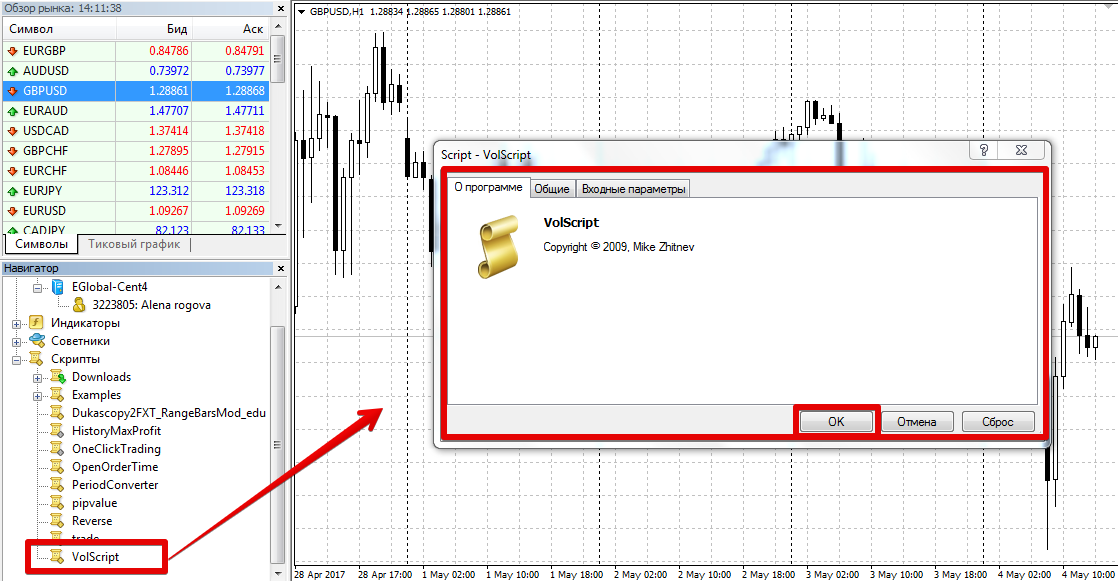
In order for the terminal to be able to see the new one that has appeared script It must be updated in the Navigator panel or the platform must be restarted.
After restarting the platform, VolScript will appear in the list of scripts. To use it, drag its name onto the hourly chart of any currency pair you choose.
Working with the script. Settings
The VolScript volatility script provides data to the user in the form of a table in the left corner of the chart.
In the table, you can see the volatility of a particular asset for a certain period by hour, day, as well as the overall volatility for each hour.
This data can serve as an excellent statistical source for building your own trading system strategies taking into account volatility.
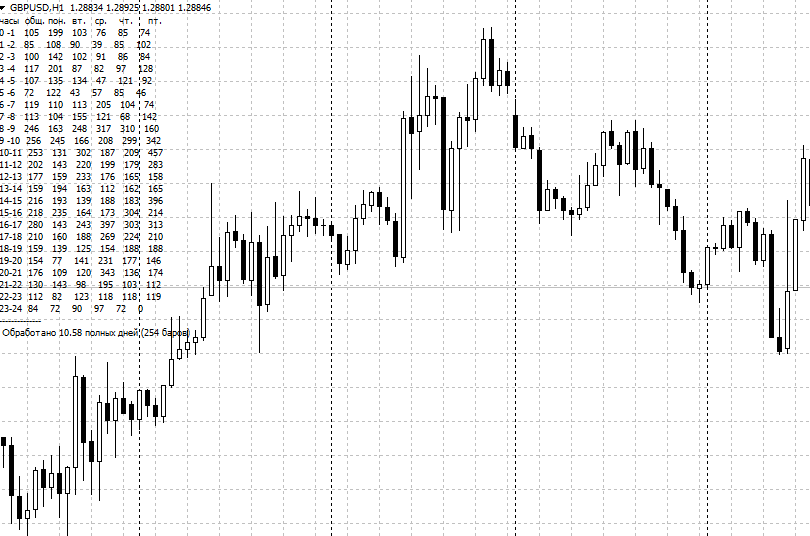
If we talk about settings, there is only one parameter N.
Since the volatility value is very dynamic and there is no need to measure activity over the entire historical period, the author has created a variable in which you can specify the number of days for the study.
In conclusion, it is worth noting that the VolScript script is an excellent assistant for collecting information about the volatility of an asset on different days and times of day.
Its only drawback is the tabular format with small font, which undoubtedly causes difficulties in processing the obtained data.
Download the volatility script.

