Trading statistics with the Iprofit Custom script
Each trader has their own goals: some stop trading when they reach a certain profit, others when they reach a certain percentage of their deposit, and some stop trading after they reach a certain percentage of their losses.
Regardless of the strategy a trader uses, the key is to have clear objectives and constraints that prevent them from giving in to animal instincts and the desire to win back losses or conquer the Forex market.
However, in practice, maintaining such statistics is not easy, as it requires ongoing additional calculations or registration with special monitoring services.
That's why special informational indicator assistants were created to allow you to see all your trading statistics on your account without resorting to third-party services.
It's worth noting that the Iprofit Custom indicator is an informational aid and does not provide any market entry signals.
This is why you can confidently use the indicator on all currency pairs and time frames, as the tool provides general account information without any link to a specific instrument.
Installing the Iprofit Custom indicator
The Iprofit Custom indicator is a custom development created by Russian programmer Igor Kim specifically for tracking account statistics on the MT4 trading terminal.
That's why, in order to use the indicator, you'll need to download the tool file at the end of the article and then install it in your MT4 trading terminal.
The Iprofit Custom installation procedure follows a standard procedure and is no different from installing any other custom indicator. Specifically, you'll need to copy the downloaded indicator file to the appropriate folder in your terminal's data directory.
To access the data directory, launch your MT4 trading terminal and click the File menu in the upper left corner. Then, in the list of options that appears, find the line labeled "Open Data Directory" and click it.
After launching the data directory, a list of the platform's system folders will be displayed on your monitor screen. Among these, find the folder named Indicators and drop the previously downloaded Iprofit Custom indicator file into it.
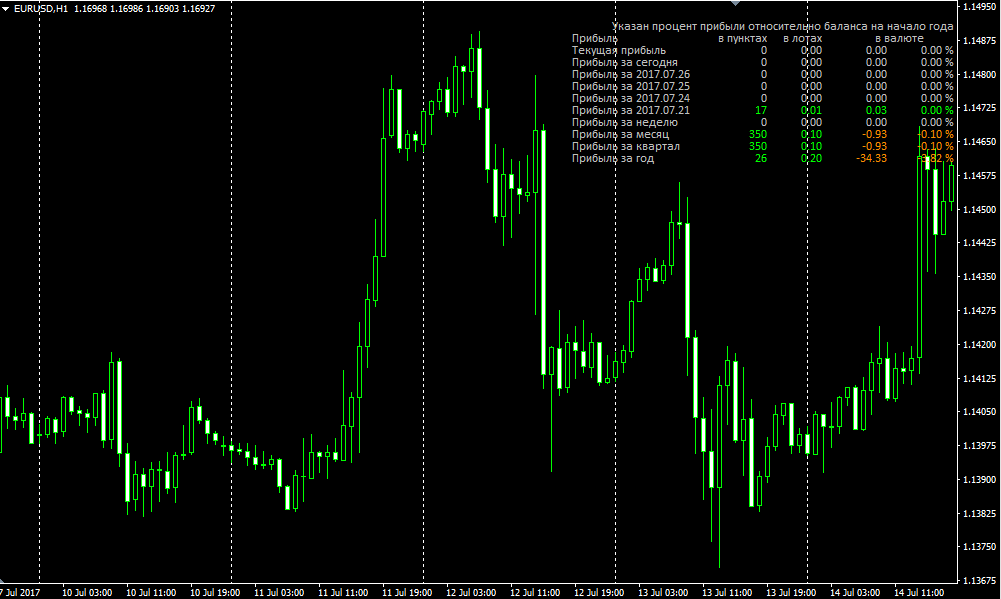
The next step after installation is to update the terminal in the navigator panel or restart the trading terminal. After restarting, Iprofit Custom will appear in the list of custom indicators, and to view account statistics, simply drag the instrument name onto the chart.
Iprofit Custom indicator table data. Settings
After applying the Iprofit Custom indicator to the chart, you'll see four columns. The first column displays profit in pips, the second column displays profit in lots, the third column displays profit in the deposit currency, and the fourth column displays profit as a percentage.
Also, for convenience, the indicator highlights profit in green and loss in red.
In the table you can see data on profit for the current period, per day, for the last five days by day, profit for the week, for the month, for the quarter, and also for the year.
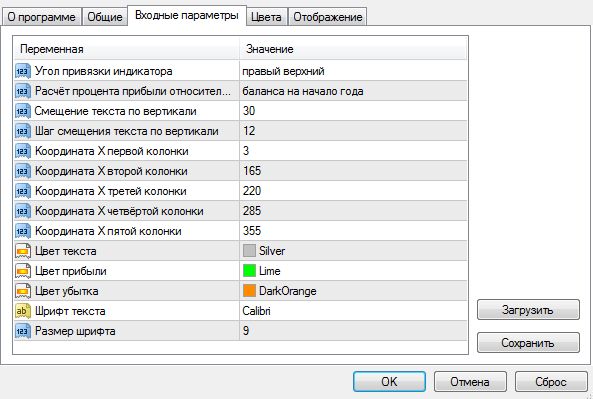
Regarding the indicator settings, all parameters relate only to visualization and are in Russian. For example, in the "Indicator Anchor Angle" field, you can select the exact corner of the chart where the statistics table will be located.
The "Profit percentage calculation relative to" line allows you to choose the option to calculate profit relative to the current balance, the balance at the beginning of the week, the balance at the beginning of the month, quarter, and even the year.
This line actually allows you to keep statistics from the day you need, rather than getting general data on your forex account.
The "text vertical offset" and "text vertical offset step" variables allow you to shift the table a certain distance from the edge of the graph by a specified number of pixels.
Finally, it's worth noting that the Iprofit Custom indicator allows traders to constantly see their own statistics, eliminating the need for third-party monitoring services and the need to track the deeper, more unnecessary data that such services provide.
Download the Iprofit Custom script

