Trade Predator Advisor Script
The speed of opening a position plays a crucial role for traders who prefer news trading or scalping on sharp market fluctuations.
However, while the "One Click" extension for the MT4 trading platform allows you to quickly open a position, setting stop orders and profits takes a considerable amount of time.
For a trader whose profit is measured in a few points, such a delay is comparable to losses.
And if traders using a static lot can somehow mitigate this situation by quickly opening a trade with one click, what should a trader using a dynamic lot do, risking a certain percentage of risk per position?
The only way to solve the problem is to use auxiliary assistant programs, and in this article we will discuss one of them.
The Trade Predator advisor doesn't open trades automatically without a trader's command, so it can be used on absolutely all currency pairs and time frames without fear of accidentally opening a position.
Installing the Trade Predator Advisor
The Trade Predator advisor was created to expand the functionality of the MT4 trading terminal. Therefore, to use the expert advisor in practice, you will need to download the expert advisor file at the end of this article.
The Trade Predator Expert Advisor is installed in the same way as any other custom expert advisor. Specifically, you will need to copy the downloaded expert advisor file to the appropriate folder in the data directory.
To access the data directory, launch your MT4 trading terminal and select the File menu in the upper left corner. A list of options will appear, including the line labeled "Open Data Directory" and launch it.
After launching the data directory, a list of the platform's system folders will appear on your monitor screen. Among them, find the folder named "expert" and drop the previously downloaded Trade Predator advisor files into it.
In order for the terminal to be able to see the installed expert, it must be updated in the navigator panel or restarted.
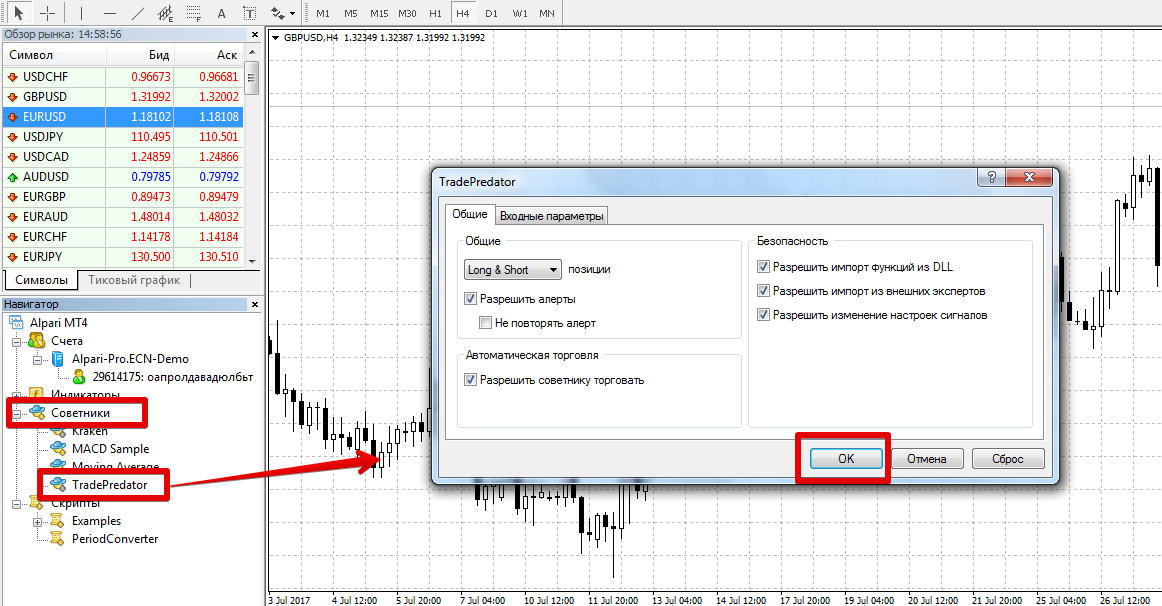
After restarting the platform, Trade Predator will appear in the list of advisors. To start using it, simply drag the robot's name onto the chart of the currency pair you plan to trade.
Algorithm for using the Trade Predator advisor
As noted at the beginning of the article, Trade Predator is an auxiliary advisor that allows you to significantly speed up your work with orders by pressing hot keys on your keyboard.
After applying the instrument to the chart of the traded currency pair You will see two horizontal lines of red and blue color.
The red line indicates the stop order placement, and the blue line indicates the potential profit. Also in the lower right corner is a summary of the profit and stop order in points, the profit-to-loss ratio, and the order type that will be immediately opened after pressing the hotkey.
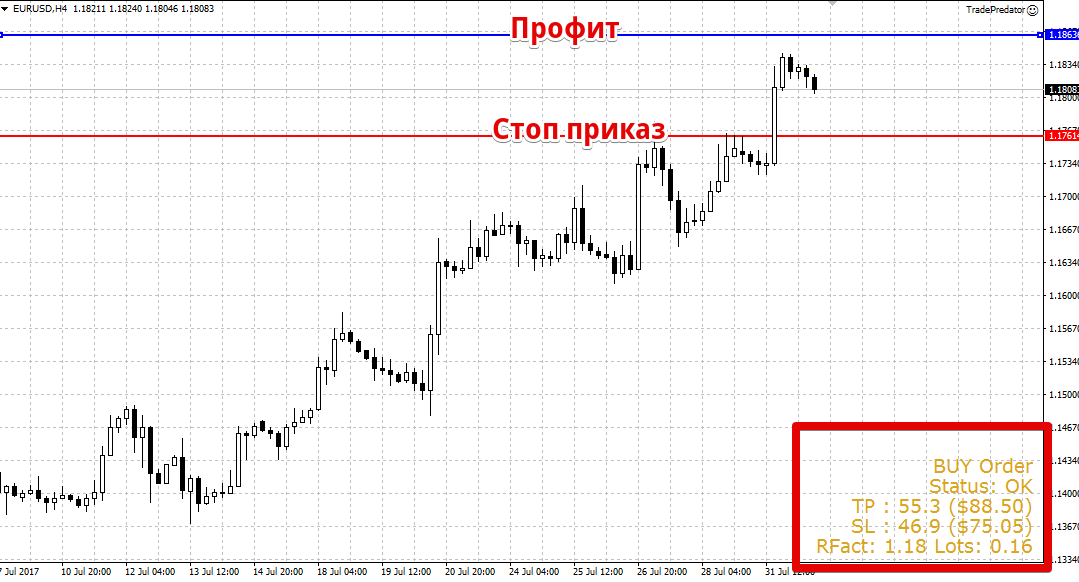
In order to move the stop order and profit to the required points before opening a position, you need to press the "W" key on the keyboard and then use the mouse to directly place horizontal levels on the chart.
The "D" button automatically switches the order type from buy to sell, while the "X" button directly opens the order. You can close an open order early, rather than at profit or stop loss, by pressing the "C" key.
Trade Predator Expert Advisor Settings
The Trade Predator advisor's settings allow you to select the lot calculation type and set a number of parameters that will save you from unnecessary keyboard manipulation.
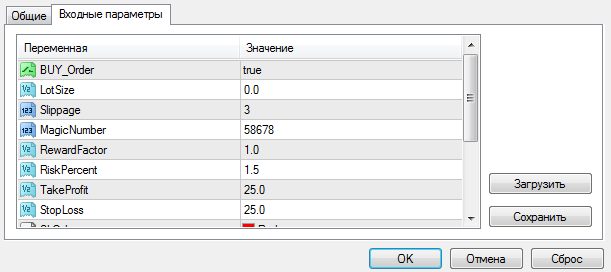
So, in the Buy order line, you can select the mode for opening trades. Specifically, if you select false, the expert will place profit and stop order lines only for sales, and if you leave it by default, profit and stop order lines will be placed on the chart exclusively for purchases.
The advisor has two lot size calculation options: dynamic and static. If you want the advisor to open a position with a consistent lot size, regardless of capital growth, enter the desired volume in the Lot Size field.
If you need a dynamic lot, leave the default settings and specify the risk percentage per trade in the Risk Percent field. The Take Profit and Stop Loss variables allow you to set a stop order and profit in points.
In conclusion, it is worth noting that the Trade Predator advisor is simply an indispensable assistant for traders who prefer scalping and scalping strategies, as well as for traders who don't want to waste time calculating lots when using money management.
Download the Trade Predator Advisor.

