Strategy Evaluation Script
Any trading strategy is sooner or later subject to more thorough testing using various indicators by the trader.
Profit factor, expected value, winning and losing streaks, maximum and average drawdown, profit-to-loss ratio, and average winning and losing trades—all these indicators characterize a strategy and allow traders and investors to understand its potential.
In this article, you'll learn about a special script that will evaluate your trading strategy in seconds based on your trade history and give it a qualitative assessment.
Tradingsystemrating is a custom script developed for the MT4 trading terminal, the main purpose of which is to evaluate your trading strategy applied to your account.
The script evaluates the selected strategy using two methods. The first strategy evaluation method was described by Van Tharp in his book "Super Trader.".
For the script it doesn’t matter which currency pair or time frame You apply it because the initial data for it are already closed transactions that are in the account history of your MT4 trading terminal.
Installing the Tradingsystemrating script
The Tradingsystemrating script, despite its usefulness, is not installed on the MT4 trading platform by default, but is nothing more than a custom development.
That's why, in order to use it, you will first need to download the script file at the end of the article, and then install it directly into your MT4 trading terminal.
Installing Tradingsystemrating is no different from installing any other custom script and follows a standard procedure. Specifically, you'll need to drop the previously downloaded script file into the appropriate folder in the terminal's data directory.
You can find more detailed instructions on installing scripts by following the link http://time-forex.com/praktika/ustanovka-indikatora-ili-sovetnika.
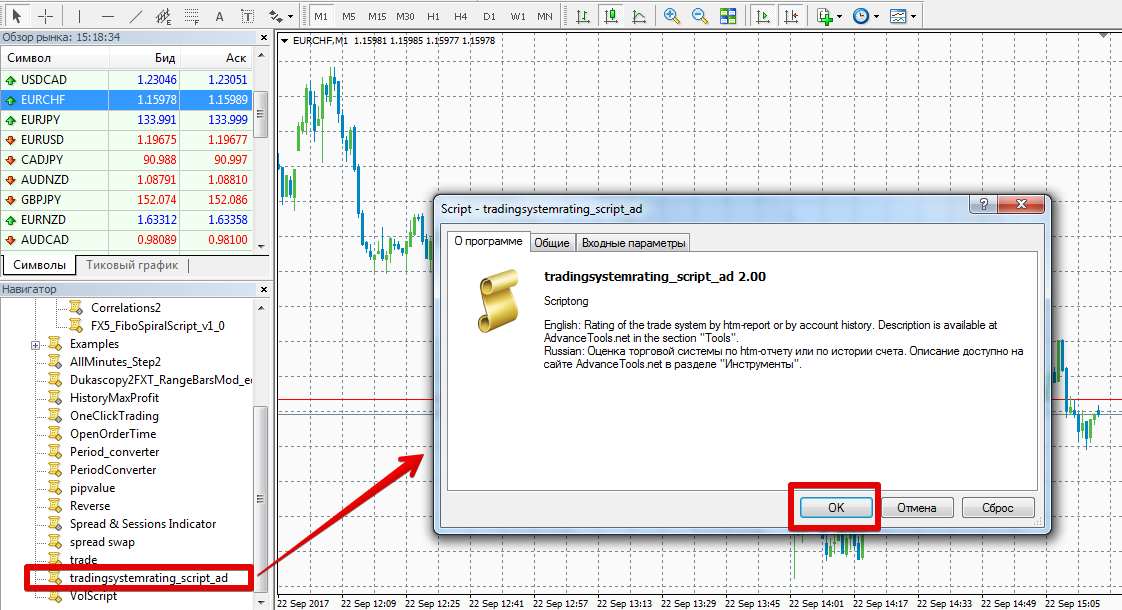
After restarting the trading terminal, Tradingsystemrating will appear in the list of scripts, and to start using it, simply drag the name onto the chart.
Working with the script. Deciphering the values
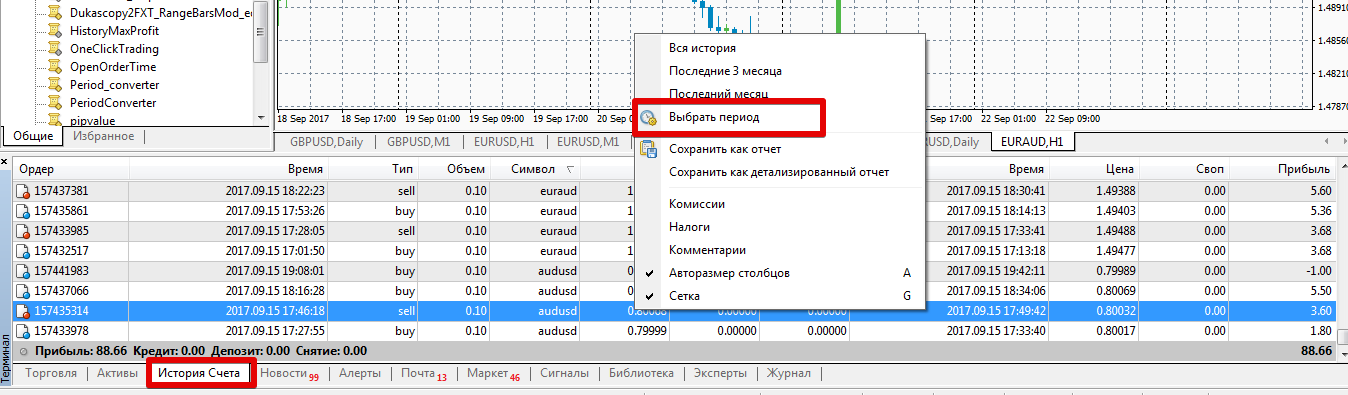
Before dragging a script onto a chart, you should clearly define the period of your trading history for which you would like to evaluate the strategy. Once you've decided, go to the "Terminal" panel and open the "Account History" tab.
Hover your mouse over any trade and right-click to bring up the additional menu. In the list of options that appears, click "Select Period" and specify the date from which to display the trade history.
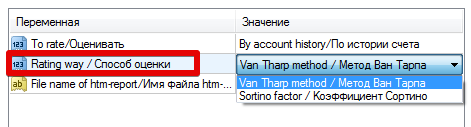
Apply the script to the chart, having first selected the strategy performance evaluation method in the settings. You can choose either the Van Tharp or Sortino methodology.
After applying the script to the chart and processing the initial information, a pop-up window will appear on the chart containing information on the number of transactions, the desired coefficient, deviation, and mathematical expectation of the strategy.
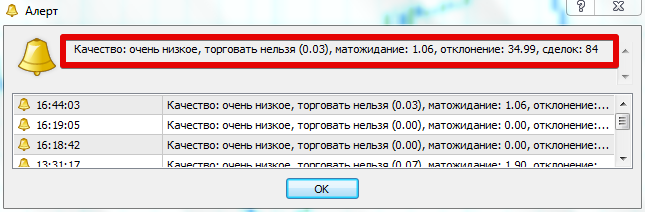
If we talk about the values of the coefficients according to the Van Tharp methodology, then values from 0.16 to 0.20 characterize it as very low quality, values from 0.20 to 0.25 characterize the strategy as average quality.
Values from 0.25 to 0.30 indicate good quality of the strategy, while values from 0.30 to 0.50 indicate excellent quality.
If, as a result of evaluating a strategy with a coefficient from 0.50 to 0.70, we can say that you have an excellent strategy, and from 0.70, your strategy is the Holy Grail.
In conclusion, I would like to note that evaluating a strategy using the methods of Sortino and Van Tharp will be able to once and for all put an end to the issue of the quality of profitability of your trading Forex strategies.
Download the strategy evaluation script.

