Stop-loss moving script for Forex
One of the biggest problems that both beginner and more experienced traders face is closing a position prematurely.

This approach to the market, in which traders close profitable positions at the slightest opportunity, results in a risk-to-reward ratio that's far from in the trader's favor.
A real way to combat this situation is to use a trailing stop.
However, trailing, as it is commonly used in the MT4 trading platform, is far from ideal, as when the price begins to correct, the position is closed early, resulting in lost profits.
This is why many traders use two-way trailing, which involves moving the stop order to follow the price at a certain distance. If desired, the process can be automated using Forex scripts.
For example, one of such tools is the StopLossMove stop loss moving script
A notable feature of the script is the ability to select the stop order dragging mode. The program can operate similarly to a standard trailing stop, and can also move the stop order at a specific distance from the price, regardless of its direction.
The StopLossMove script is a universal addition to your trading platform, and it can work on all assets present in your terminal.
Installing the StopLossMove script
The stop-loss moving script is a custom development that has been actively used by traders since 2006.
Since the script is not included in the trading platform by default, in order to use it you will need to download the StopLossMove file at the end of the article, and then install it on your MetaTrader 4 trading terminal.
The procedure for installing the StopLossMove script is no different from installing any other custom technical analysis tool, namely, you will need to drop the downloaded script file into the appropriate folder in the terminal data directory.
You can find more detailed instructions on installing custom tools, including scripts, by following the link http://time-forex.com/praktika/ustanovka-indikatora-ili-sovetnika.
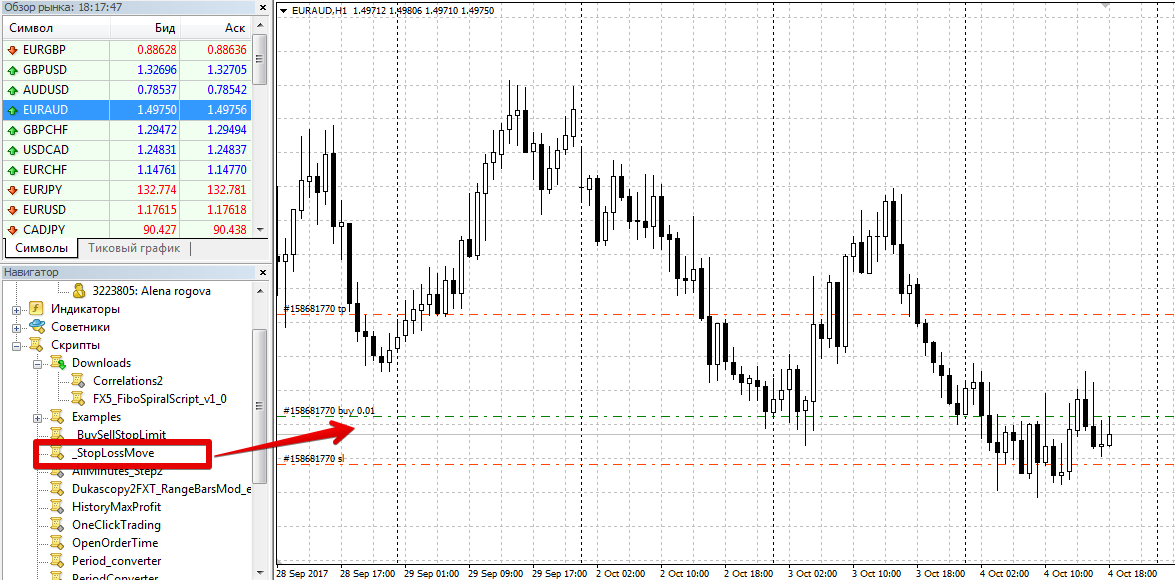
After updating the trading terminal or after a full platform restart, StopLossMove will appear in the list of scripts in the navigator panel. To use it, drag the instrument name onto the chart.
How the script works. Settings.
The StopLossMove script can operate in two modes: as a standard trailing stop, dragging the price a specified number of points toward profit. Or, it can automatically move the stop order following the price a specified distance, regardless of the price move.
It's worth noting that when applying the script to the chart, you won't see the settings, as you do when applying expert advisors and other technical analysis tools.
To enter your own parameters, you need to edit the script code. To do this, launch the Meta Editor in the top toolbar, then open the script in the editor.
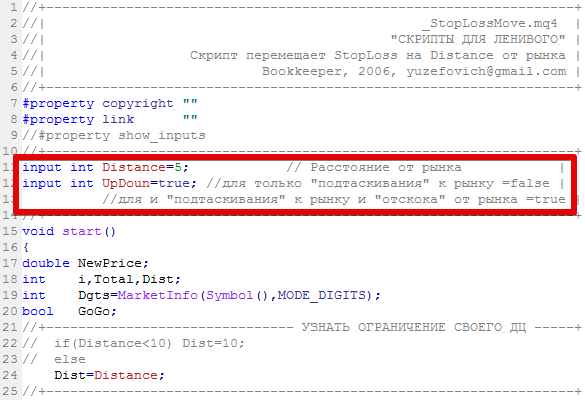
In the Distance line, you can specify the distance from the current price at which the stop order should move.
The UpDoun variable allows you to select the script's operating mode. Specifically, if you specify True, the script will move the stop order both on a rise and on a rebound, while if you specify False, the script will operate according to the classic trailing stop.
Finally, it's worth noting that the stop-loss moving script is an auxiliary program that primarily saves time when working with open orders.
One of the script's drawbacks is the inability to make adjustments without basic code editing.
Download the stop-loss moving script.

