Trader's web terminal.
Often, the list of offered trading platforms also includes a web terminal. What is it used for, what functionality does it offer, and whether 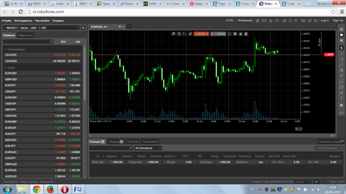 it makes sense to use this trading option.
A web terminal is a trader's terminal located on the brokerage company's website. This means that to trade, simply open an account and log in; there's no need to download or install anything on your computer.
To log in, you'll need an existing trader account and access credentials. A link to the web terminal is usually available in your personal account.
Why do you need such a terminal?
First of all, you don't have access to your own computer to monitor your open trades in places where you're not available, such as at work or while on vacation.
For example, you work in an office, and not every beginner will approve of installing third-party software on your work computer, especially if it's related to stock trading. With a web terminal, however, all you need to do is visit a specific website.
What can you do with the online platform?
Almost everything—open and close trades, conduct technical analysis, monitor open positions, and trade with one click.
Several dozen indicators are available for technical analysis, and you can also use ready-made templates. While there aren't many, they are present.
You can also trade on real, demo, and cent accounts.
What are the disadvantages of the web terminal?
First of all, there's no automated trading, meaning you can't install an expert advisor, nor can you install other third-party scripts. Traders are forced to use existing tools for trading.
This is perhaps the only noticeable drawback.
You can use the online terminal on the websites of such brokers as RoboForex, InstaForex, EXNESS Limited.

