Trader's Mega Calculator 1.4
Computer advancements help to significantly simplify a trader's trading process, as well as simplify many of the routine actions we perform daily.
One such routine task is the daily calculation of the lot size for each currency pair, the calculation of the pip value, and the adjustment of the resulting data based on money management.
If a trader works with a single instrument, they know all the input data by heart, so calculating all the risks in a matter of seconds is no problem.
However, if you're a multi-currency trader who uses multiple currency pairs simultaneously, keeping track of all the data in your head is quite difficult, so you constantly waste precious time on calculations or searching for information on the broker's website.
Naturally, time is money, because the further we move from the entry point, the less profitable the position becomes. This is why auxiliary Forex calculator programs are an excellent solution.
The program includes several built-in emulators that allow you to visually calculate how many trades it will take to reach your goal, as well as how many trades it will take to drain your account using a specific capital management model.
Installing the Trader Mega Calculator program
The Trader's Mega Calculator 1.4 program is a standalone app that doesn't require MT4 or any other trading terminal to function. To get started, download the program at the end of this article and then install it on your computer.
The installation process is no different from installing any other program: you'll need to run the installation file, specify the location where the data will be stored on your drive, and agree to the licensing requirements.
Once the program is installed, its icon will appear on the desktop, and after launching you will see this:
Program Functionality:
After launching the program, you'll see six different tabs at the very top: "About the Program," "Forex Currency Pairs," "Assistant," "Deposit Growth," "Deposit Drain," and
"For Smart People." To fully understand the program's functionality, let's explore each tab individually.
About the Program:
This tab displays the developer's contact information, including their Skype and email addresses. Additionally, this tab displays a list of other products created by this developer, both free and paid.
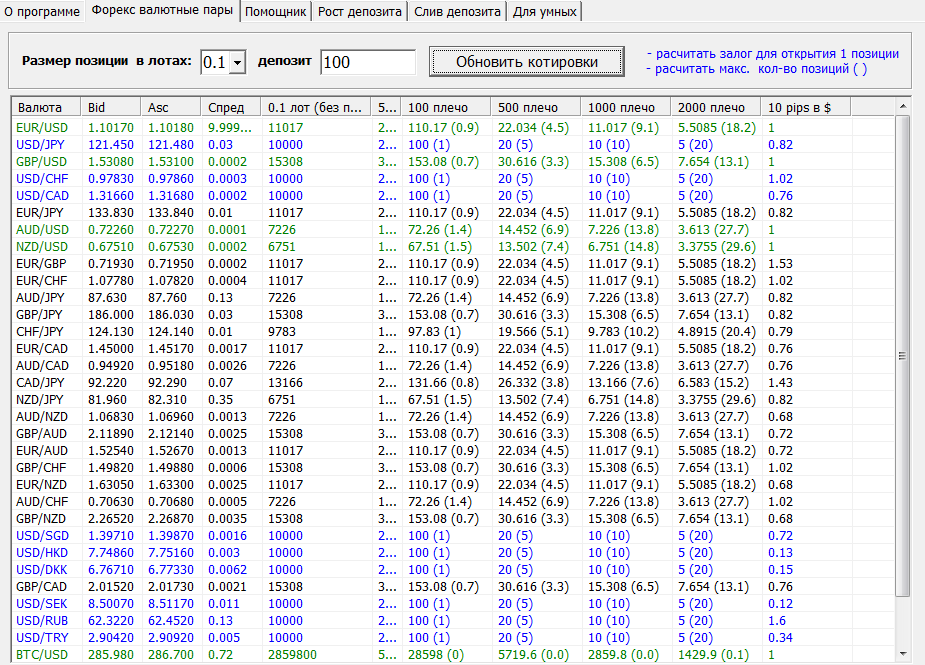
Forex Currency Pairs:
This tab displays a list of currency pairs and their spreads. In addition to basic data, this window also allows you to calculate the margin amount for your selected lot, whether it's unleveraged, with leverage of 1:50, 1:100, 1:500, and so on.
You can also see in parentheses next to each margin size how many positions you can open simultaneously for a given lot with the balance specified in the settings. The table is updated once per minute, and if you don't have an internet connection, it will use historical data.
Assistant tab:
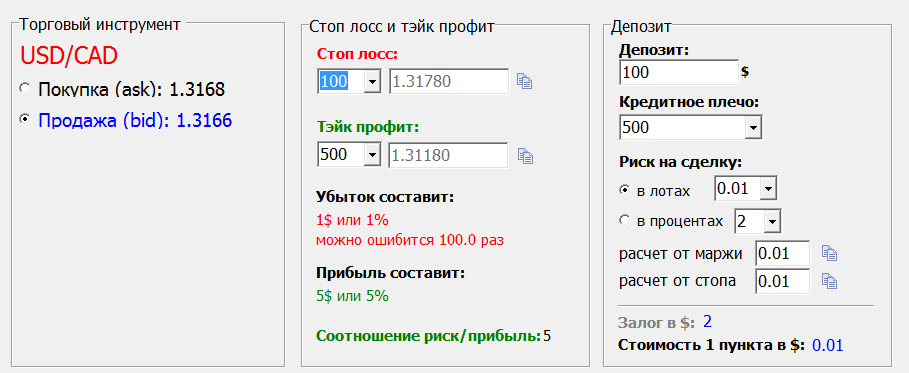
In this tab, you can calculate the potential loss and profit you can make by opening a position with a specific lot.
To have the calculator calculate your potential profit or loss, enter the stop loss and profit size in points, the currency pair, the deposit size, and leverage.
After you enter all the necessary data, the program will automatically calculate and return the result.
Deposit Growth Tab:
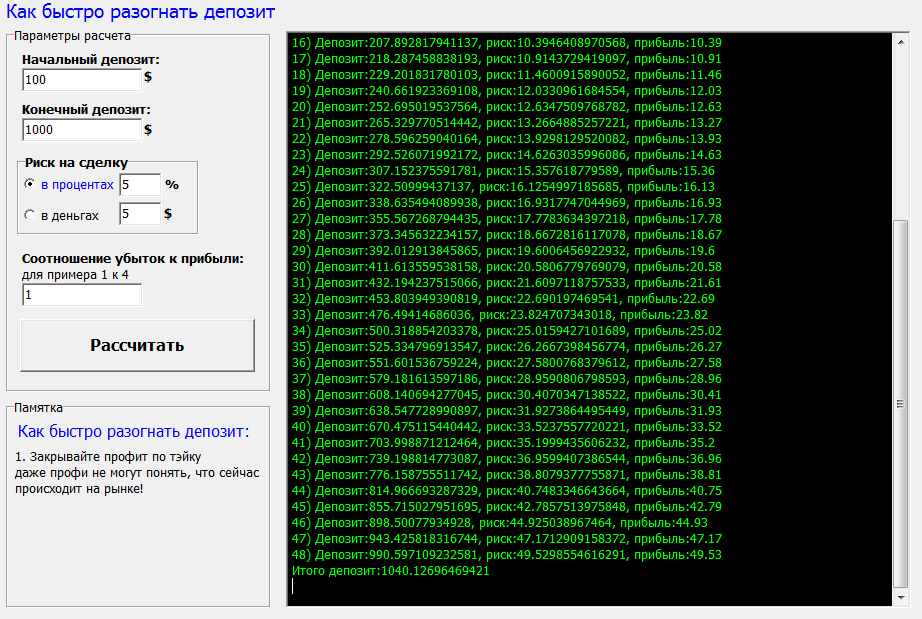
This tab allows the program to calculate how many positions it will take to reach a specified profit target using a certain risk percentage of the deposit or a specific deposit amount.
For the program to perform all calculations, you must specify the initial deposit, the final deposit, the risk per trade as a percentage or a specific dollar amount, and the risk-to-reward ratio.
After you enter all the information, the program will perform a detailed calculation in the right column.
Deposit Drain Tab:
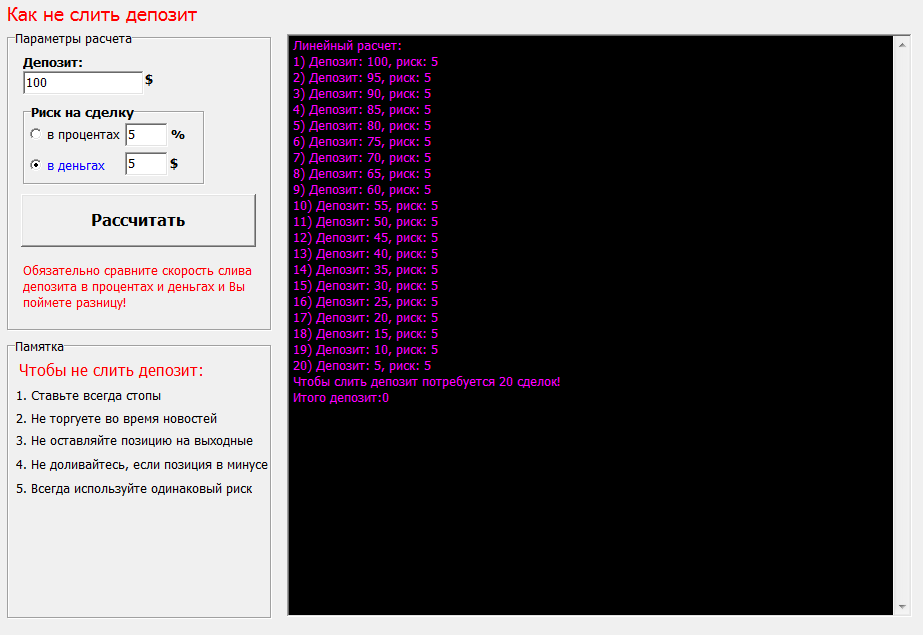
In this tab, you can perform actions similar to the Deposit Growth tab, but in this case, the program calculates how many positions it takes to completely drain your account.
To perform the calculations, enter the deposit amount and the risk per trade in either a percentage or dollars. The program will then perform detailed calculations in the black window on the right.
Smart Tab:
This tab allows you to calculate the probable profit or loss for a specific series of trades.
Unlike the previous two options, you can specify a criterion such as the percentage of profitable trades out of the total, allowing you to perform calculations and simulate the behavior of your manual trading strategy.
Finally, it's worth noting that the Trader Mega Calculator 1.4 program significantly saves you time, which you would otherwise waste on repetitive, routine tasks.
Download the Trader Mega Calculator.

