Trading calculator - calculate position size and risk per trade
Professional traders use a variety of useful tools to trade on the stock exchange.
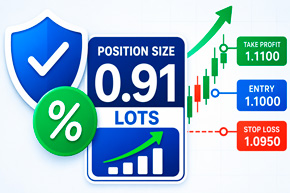
The trading terminal allows you to open trades and monitor quotes, but it doesn't always help you quickly determine a safe position size, potential loss, and required margin.
One such tool is a trading calculator.
It allows you to calculate the parameters of a transaction in advance and determine the volume with which to enter the market so that the potential loss does not exceed the established risk level.
The trading position calculator below is suitable for trading stocks, ETFs, cryptocurrencies, Forex currency pairs, stock indices, and CFDs.
Trading Position Calculator
Determines the position size taking into account the deposit, acceptable risk, stop-loss, commission and leverage.
Transaction parameters
Calculation result
Trading calculator capabilities
The calculator allows you to calculate the main parameters of a future transaction:
- recommended position volume;
- the number of shares, coins or units of another asset;
- acceptable risk in account currency;
- actual loss when stop loss is triggered;
- the full cost of the position;
- the required margin taking into account leverage;
- distance from entry point to stop;
- potential profit at take profit;
- risk-reward ratio;
- brokerage commission size;
- breakeven price;
- the size of the deposit after a profitable or unprofitable transaction.
The tool supports both long and short trades. Therefore, it can be used both when buying an asset in anticipation of a price increase and when opening a position for a decline.
How to set up a position calculator for trading
To obtain the correct result, you must fill in the main fields of the calculator sequentially.
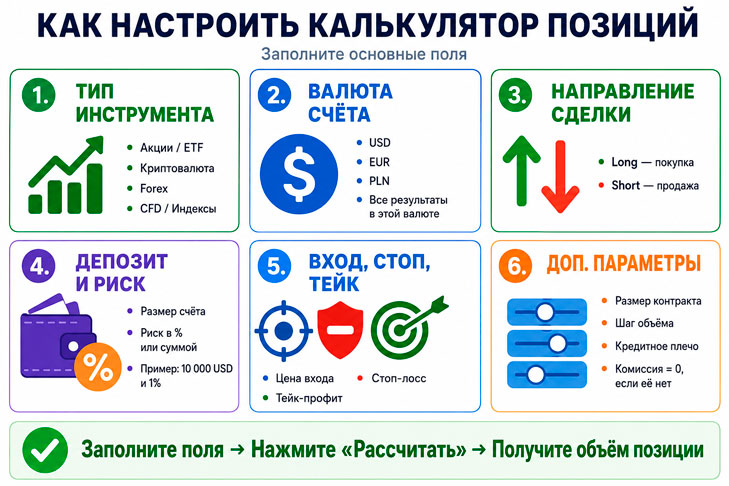
Instrument Type - First, select the asset you plan to trade:
- stocks or ETFs;
- cryptocurrency;
- Forex;
- CFDs or stock indices;
- another financial instrument.
When you select a category, the calculator can automatically insert standard values for contract size, minimum volume step, and leverage.
Account Currency - Specify the currency in which your trading account is opened. This can be US dollars, euros, Polish zlotys, or another available currency.
All monetary results – risk amount, margin, commission, profit and loss – will be shown in the selected currency.
Trade Direction - For an up trade, select Long, and for a down trade, select Short.
For a long trade, the stop-loss should be below the entry price, and the take-profit should be above it. For a short trade, the opposite is true: the stop-loss is placed above the entry price, and the take-profit is placed below it.
Deposit Amount – Enter the actual amount in your trading account before opening a trade. The calculator uses this amount to determine your acceptable risk and verify sufficient funds.
After receiving a profit or loss, the deposit amount changes, so it is advisable to update the data before each new transaction.
Risk per trade - Risk can be set in two ways:
- as a percentage of the deposit;
- a fixed sum of money.
For example, with a $10,000 deposit and a 1% risk, the maximum acceptable loss is $100. Professional traders typically limit the risk per trade to a small portion of their capital. The higher the risk limit, the faster the deposit can shrink during a series of losing trades.
Entry Price - Enter the expected price to open the position.
For a market order, you can use the current quote. If you plan to place a pending order, you should specify the price at which the trade should be opened.
Stop Loss Price - Stop loss determines the level at which a losing position should be closed.
The distance between the entry price and the stop loss has the primary impact on position size. The further the stop loss is, the smaller the trade size should be while maintaining the same risk.
Take-profit price - Enter the price at which you plan to lock in your profit. The trading calculator will then calculate your potential financial return and risk/reward ratio.
If the target has not yet been defined, the field can be left blank. In this case, the potential profit and risk-to-reward ratio will not be calculated.
Contract Size - Contract size shows how many units of the underlying asset are contained in one lot or contract.
For stocks, the contract size is typically equal to one share. On Forex, one standard lot often corresponds to 100,000 units of the base currency. Conditions may vary for CFDs and cryptocurrencies. The exact value should be verified in the trading instrument specifications with your broker.
The volume step is the minimum amount by which the position size can change.
For example:
for shares the step can be 1;
for Forex - 0.01 lot;
for cryptocurrencies - 0.001 or 0.0001 coins.
The calculator rounds the obtained result down so that the actual risk does not exceed the set value.
Leverage - When trading without using leverage, the value should be set to 1.
If the broker provides leverage of 1:5, enter 5 in the field. For leverage of 1:30, enter 30.
Leverage reduces the amount of equity required to open a position, but does not reduce the potential loss when the price moves to the stop-loss.
Brokerage commission - Specify the percentage and, if necessary, a fixed commission for executing a transaction. If there is no commission, then 0.
Commission costs affect the actual financial result, especially for small targets and frequent trades. Therefore, the trading position calculator takes into account not only price changes but also additional trading costs.
How to correctly evaluate the calculation result
After clicking the calculation button, the main indicator will be the recommended position size. This shows how many shares, coins, lots, or contracts can be bought or sold at the set risk level.
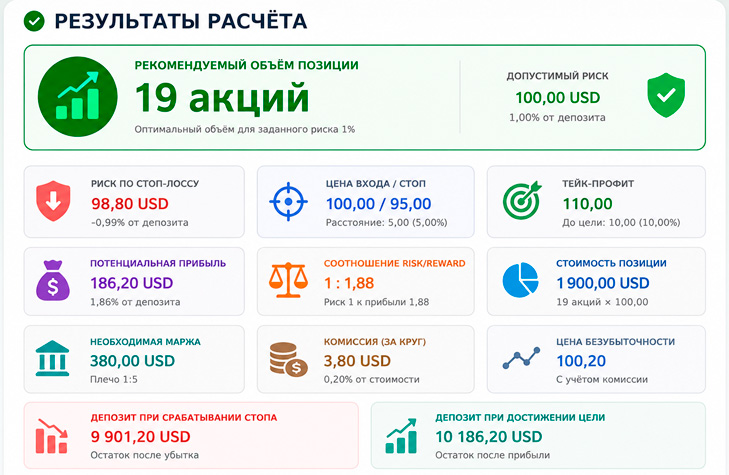
When analyzing the result, there are several more values to pay attention to.
Actual Stop Loss - The actual loss must be equal to or slightly less than the set risk. A slight difference may occur due to rounding of the volume according to the minimum increment.
Required Margin - This indicator reflects the amount of funds that will be required to open a position taking into account leverage.
If the required margin approaches the entire deposit, the account may be left with too little available equity. This increases the likelihood of a forced position closure during unfavorable market movements.
Potential Profit - The calculator shows the profit that can be made by reaching the set take profit. The calculation takes into account position size and trading fees.
Risk/Reward Ratio - The Risk/Reward ratio allows you to compare potential profit with potential loss.
A 1:2 ratio means that for a possible profit of $200, the trader risks $100.
Break-Even Price - The break-even price shows the level at which the result of the trade after taking into account the commission will be approximately zero.
Recommendations for using the calculator
Before each trade, it's recommended to re-enter the current deposit amount. After a profit or loss, the safe deposit amount for the next position is adjusted.
Don't artificially move your stop-loss closer to your entry price just to increase your trade size. Your stop-loss should be determined by your trading strategy, market structure, and current volatility.
Particular attention should be paid to the contract size. An error in this field can lead to incorrect position calculation, especially when trading currency pairs, indices, and CFDs.
Before sending an order, it is recommended to compare the received volume with the parameters specified in the trading terminal and the broker's specifications.
A trading calculator helps you evaluate trade parameters in advance and avoid accidentally exceeding your risk tolerance. It's especially useful when trading multiple assets, as the same price movement can lead to completely different financial results.
Using a trading position calculator, you can determine a safe trade size, calculate potential losses, required margin, commissions, and potential profits.
This tool doesn't eliminate market risk or guarantee profit, but it does make capital management more consistent and disciplined. Regular use of the position calculator eliminates the need to trade with random volumes and allows you to make decisions based on pre-established risk management rules.