PIAdviser Analyzer Advisor
To become a successful trader in the Forex, stock, or cryptocurrency markets, a trader must have a sufficient deposit, knowledge, and, most importantly, experience.

Many beginners tend to believe that the biggest challenge is the deposit size, citing a very small account size as the reason for all their failures.
However, the reality is that while theoretical knowledge and the required deposit size can be remedied, practical experience and the ability to apply this knowledge to the exchange are far from universal.
Experience ultimately comes at a cost, as traders either progress from novice to professional over many years, constantly losing money while learning from their mistakes, or they pay professionals to train them for the necessary experience.
However, there is another option: using specialized Forex analysis programs that provide comprehensive analysis and signals based on their built-in technical algorithm. We will explore one such advisor in this article.
A nice feature of PIAdviser is its multitasking, as the program is capable of tracking not only the foreign exchange market, but also the stock market, futures, indices, which makes it a particularly useful program for all categories of traders, regardless of which markets are traded.
PIAdviser is not a trading advisor in the sense that forex traders understand it, where the program trades for the trader. Rather, it is an assistant that provides excellent signals and initial data that the trader must carefully analyze.
Installing PIAdviser. Configuring the program
PIAdviser is an independent program, therefore it does not matter which trading terminal you use.
To install, you'll need to register on the company's official website, as you won't be able to access the program without the login and password sent to your email address.
The installation process itself is no different from installing any other program or game. After downloading the advisor itself, you'll need to run the installation file in your personal account and specify the storage location on your computer.
It's important to understand that PIAdviser is a paid product, so you'll need to pay 900 rubles per month to use it.
But there's good news: the developers offer a free demo mode for a few weeks, which allows you to evaluate the program, collect some statistics, and decide for yourself whether to use it. We actually took advantage of this opportunity!
When you first launch the program after installation and enter your login and password, which will be sent to you by email, a settings dialog box will appear.
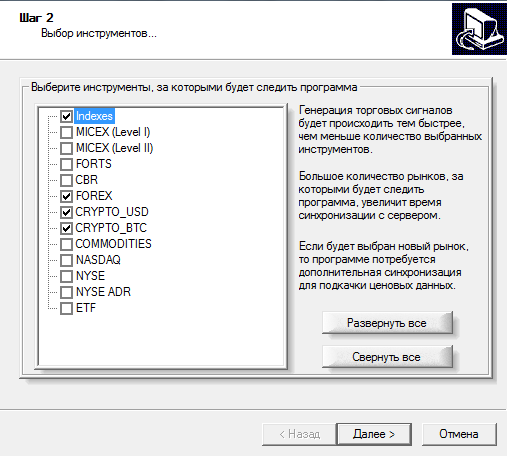
In the first window, the program will offer you a list of exchanges and their assets that you can select. The selected assets are monitored and signals are generated.
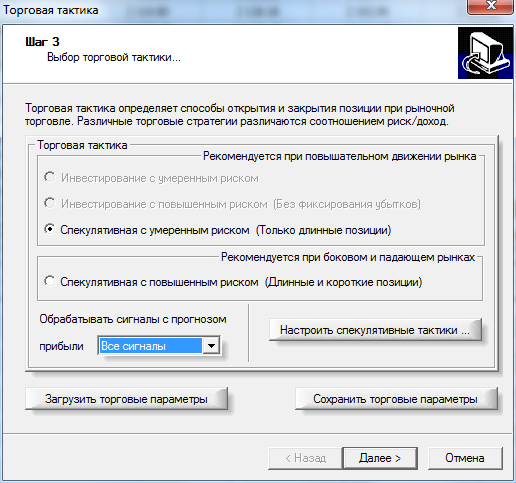
After you click "Next," a new window will appear where you can select the trading strategy type and its basic operating principles.
The program offers a choice of moderate- or high-risk investing, a moderate-risk speculative strategy for trending markets, and a high-risk speculative strategy designed for sideways markets.
In this same window, you can also configure the alerts based on the probability of the forecast being fulfilled. There are three options for alert probability: all scenarios, medium- and higher-probability scenarios, and high-probability scenarios.
The higher the probability of the forecast being fulfilled, the less frequently the trader will receive trading recommendations.
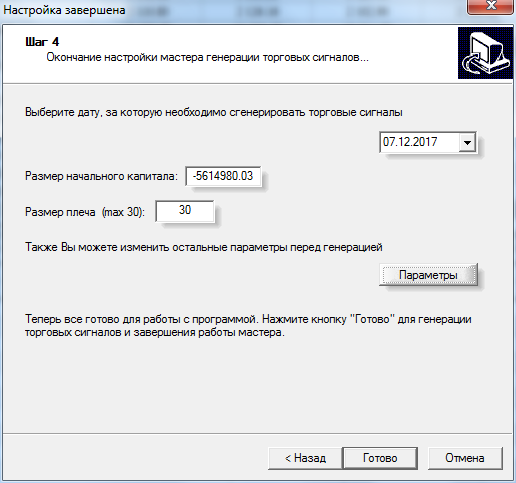
After you click "Next," another window will appear, asking you to specify your deposit amount, leverage, and the start date for the analysis.
Clicking "Parameters" will also allow you to set the broker's commission and various costs.
Working with the program. Basic principles.
After launching, PIAdviser can be roughly divided into three workspaces. The left side displays information on your current portfolio, a list of assets, and, most importantly, your balance.
The center section displays a list of trading assets, and below are the program's forecast signals.
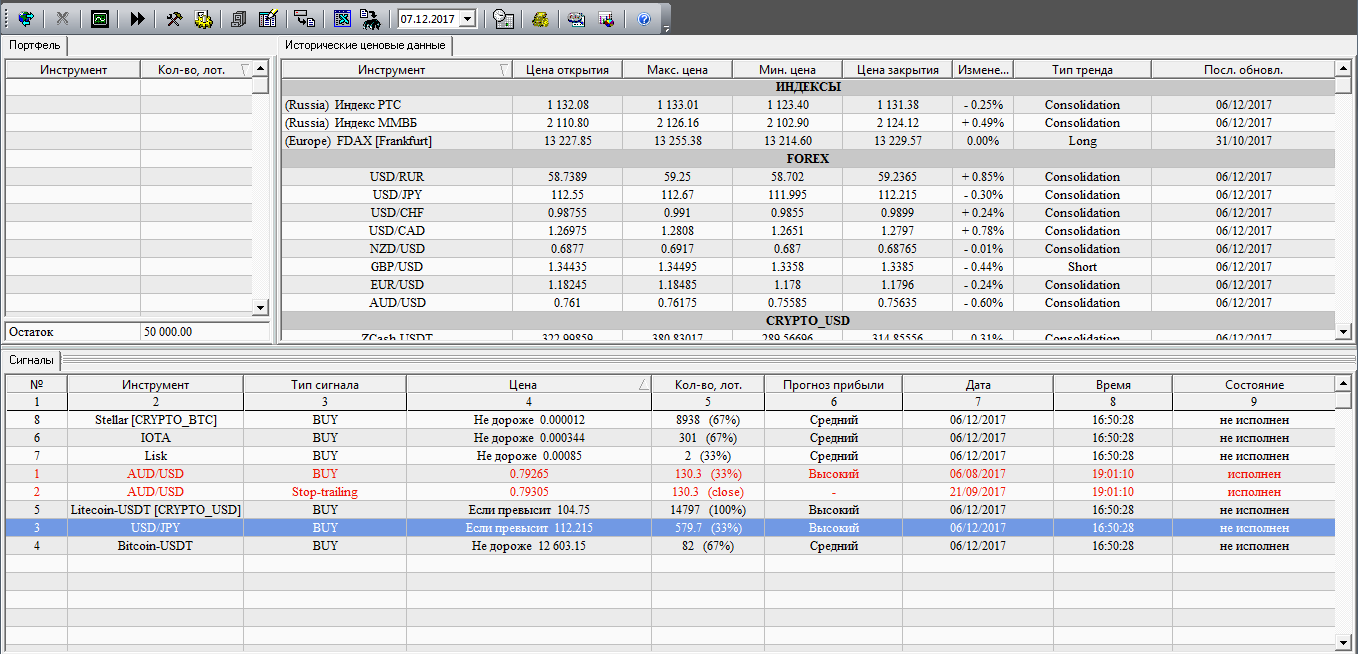
To view the signal's priority and explanation in the table below, double-click the chart. A detailed explanation window will appear.
This window will detail the forecast itself, the level to be broken, and the trade type and volume to open to maintain risk management for the specified balance. The signal explanation window looks like this:
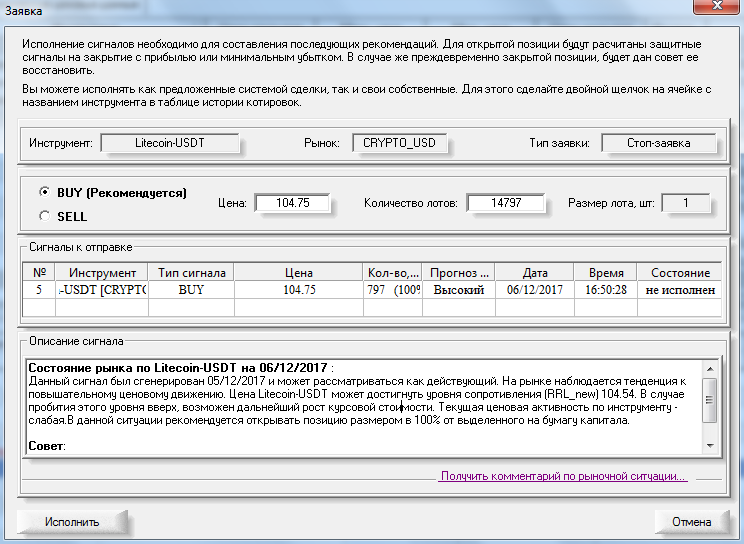
The program also features an "Execute" function. If you choose to execute a forecast, the program will remember the trade and track it, which will ultimately allow you to collect statistics on the signals and understand the effectiveness of your trading and the signal program itself.
In conclusion, it's worth noting that the PIAdviser advisor analyzer is an excellent option that will allow you to quickly start trading without any experience.
However, it's important to understand that the actual implementation of the signals is entirely up to you, so if this isn't convenient for you, you can choose a trading advisor from our website and download it completely free - http://time-forex.com/sovetniki.

