TraderStar Program
The profession of a trader involves working with a huge volume of analytical and financial data, which is used to make trading decisions.

Typically, this material is found using various programs and applications. The more tasks a trader faces, the more applications and information sources they must utilize.
For example, as a trader, conducting technical market analysis, you might be looking directly at the trading terminal while simultaneously browsing a number of news sources,
as well as online quotes for important indices, which simply aren't available due to the specifics of your broker and the markets you trade.
TraderStar is a stock browser that incorporates all the basic functions a trader needs to analyze markets. This enabled the developers to integrate a range of technical and fundamental solutions into a single app, while also enabling the tracking of virtually all stock market assets.
TraderStar has also become a dream come true for many programmers, as the indicators built into the platform are written in the very popular Java-Script language, allowing you to program your ideas without learning additional languages, as is the case with MT4 or MT5.
Installing TraderStar. Program appearance
To install TraderStar, download the program file at the end of this article. The installation process itself shouldn't be difficult, as you'll only need to run the special file and agree to the user agreement. The program will prompt you to update, but you don't have to do so.
Once you've specified the installation path and the installation is complete, a program shortcut should appear on your desktop. After the first launch, you'll see the following program view:
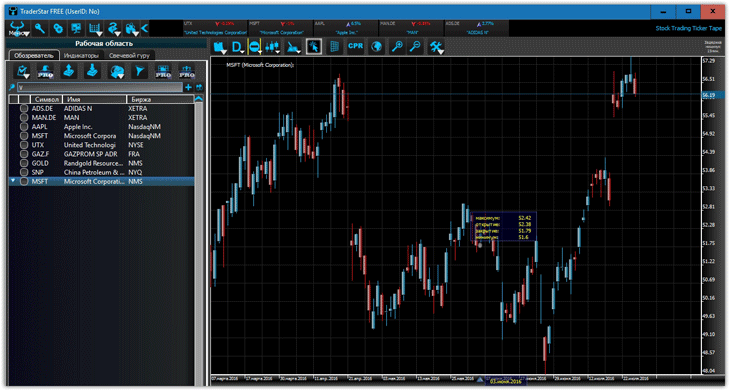
The program's appearance can be roughly divided into two parts: the workspace, where all the important functions are located, and the chart itself, where you can perform technical analysis.
The TraderStar workspace
consists of three functional tabs: Explorer,
Indicators, and Candlestick Guru.
tab
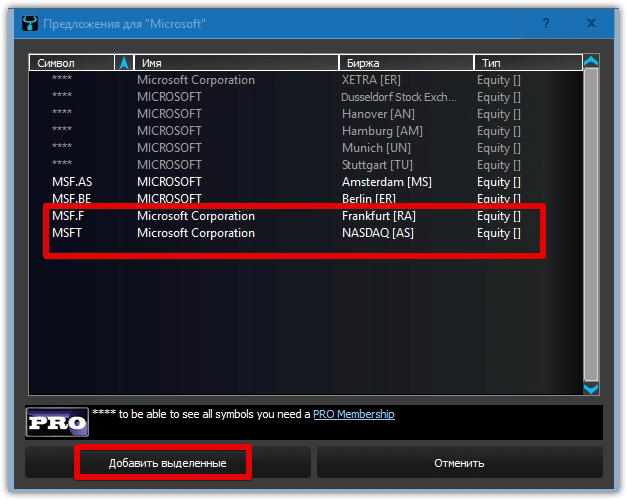
allows you to search for the desired asset and apply a number of filters to select the desired asset. When you first launch the program, you'll see a couple of indices and stocks.
To add an instrument of interest, enter the company or asset name in the search bar. A list of exchanges whose quotes you'd like to use will appear. Once you've selected the desired asset, simply select it and click "Add Selected."
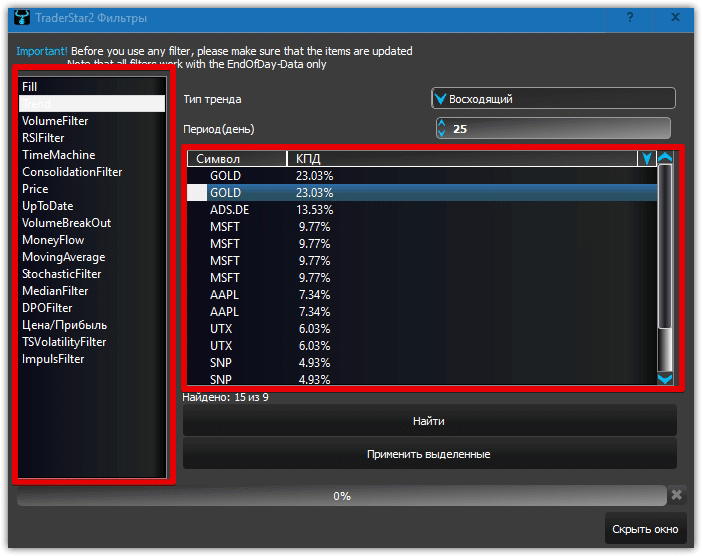
You can also use special filters to find specific assets. For example, the most common trend filter allows you to find assets that have been rising or falling over a specified number of days. In addition to this filter, the program offers 16 other options for selecting the desired asset based on specified criteria.
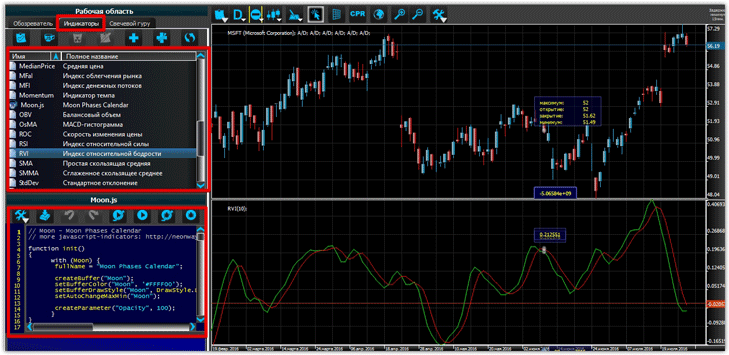
TraderStar is renowned for its extensive selection of technical indicators , with the latest version boasting 45. This list includes both the "Standard Set" and a number of custom tools not found in the MT4 trading platform.
indicator
to a chart, double-click its name, and it will automatically appear. Directly below the list of indicators is an editor where you can edit or add new features to an indicator.
Candlestick Guru
features a unique algorithm that automatically recognizes and highlights 21 candlestick patterns on the chart. Among the patterns, you can even find such rare ones as gravestones, belt grabs, dark clouds, and many others.
It's worth noting that all these candlestick patterns are only available in the pro version, which costs just $13.
The free version, which we're reviewing, only offers two patterns: Doji and Harami. To avoid cluttering your chart with a ton of different signals, you can choose the candlestick patterns that you find most effective.
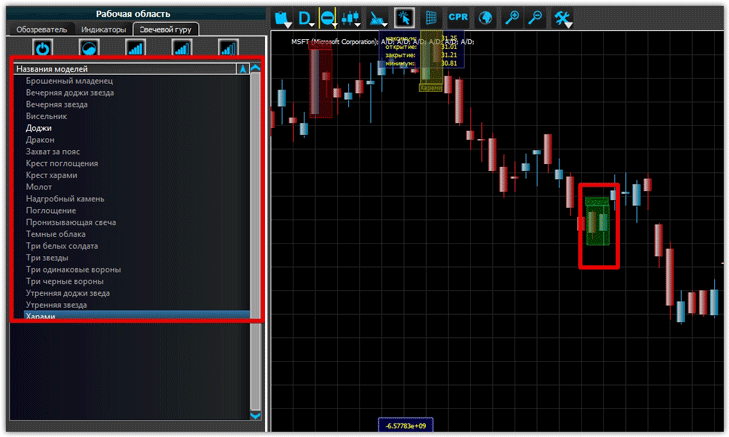
The program
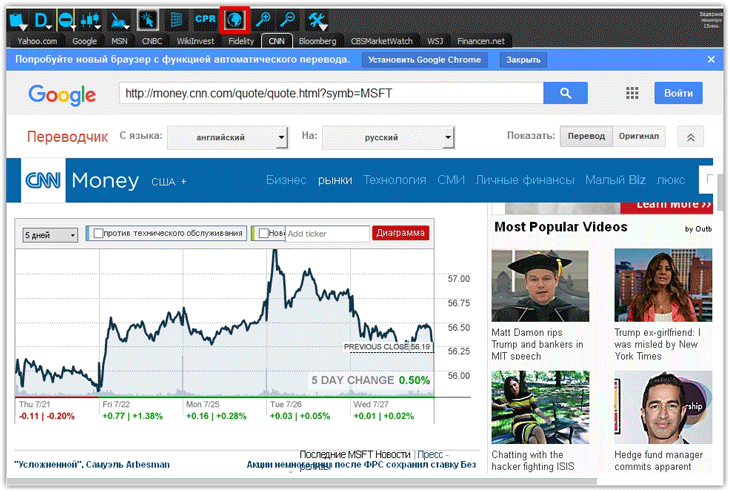
offers three chart types: bar, line, and candlestick. Time frames include daily, monthly, quarterly, and yearly. Directly above the chart is an earth icon, which displays web information.
Clicking it will launch a browser with the most popular economic websites, where you can find the latest news on stocks, indices, and more.
In conclusion, it's worth noting that TraderStar is a professional program that allows you to fully cover the entire spectrum of technical and fundamental analysis in a single application.
Download TraderStar

