Universal EA Trading System: A Simple Expert Advisor Builder for Beginner Traders
The Universal EA trading system is an advisor constructor that allows you to build simple and complex strategies without programming knowledge, based on standard technical indicators.

It's worth noting that, unlike many other Forex builder programs, this one allows you to enter up to six signal instruments simultaneously.
It also features six filters, making it possible to recreate even the most complex strategies.
The builder also offers multiple options for lot calculation and money management.
Martingale is also available.
The Universal EA is designed for the two most popular platforms: MT4 and MT5. It's worth noting that the builder is available for a fee of $50.
There is a demo version for MT5, and you can use the Universal EA on the USDJPY currency pair completely free of charge, allowing you to evaluate the builder's functionality before deciding to purchase it.
You can add the Universal EA system to your trading terminal in two ways.
The first and easiest way is to go to the "Market" tab in the toolbar and enter the name of the expert in the search, then click the install button.
The second option is to download the expert advisor file at the end of the article and install it in the MT5 trading terminal yourself. To do this, simply open the platform's data directory via the File menu.
Next, open the MQL5 folder and find the Expert folder inside. Open the Expert folder and drop the downloaded Universal EA file into it.
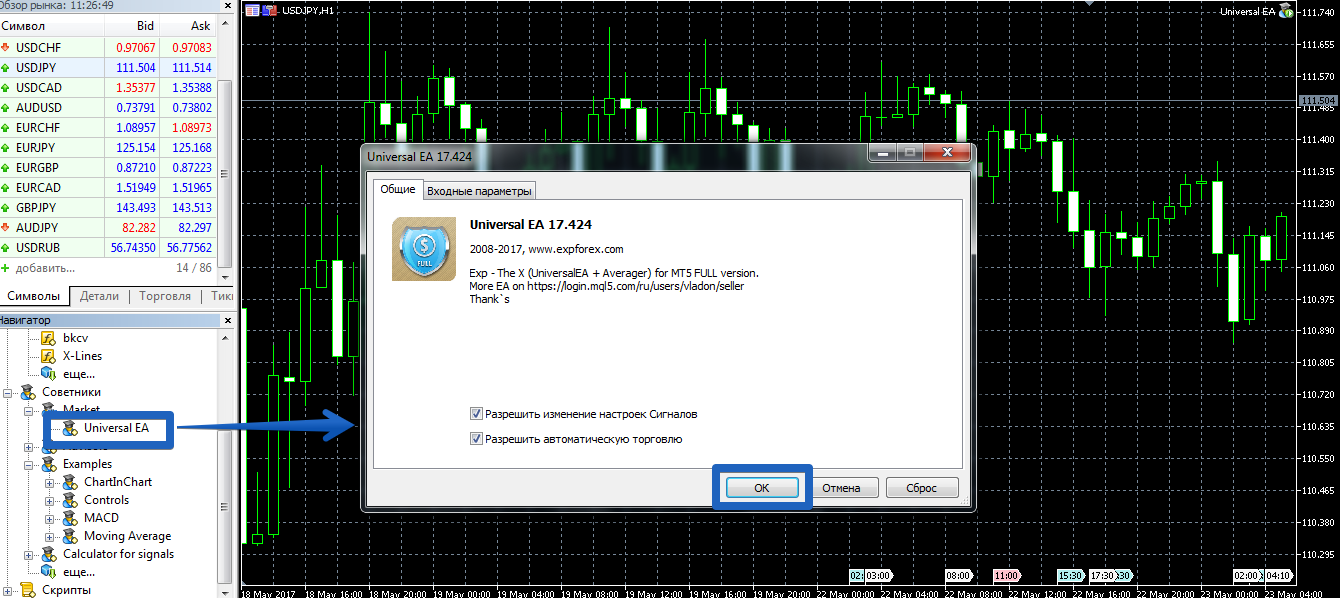
For the terminal to reflect changes to the installed files, you must restart it or refresh the navigator panel. After restarting the platform, open the USDJPY chart and place the Universal EA on it.
Features. Settings.
The Universal EA builder includes 11 different standard indicators and strategies based on them.
Additionally, the builder can work with both regular and pending orders, and you can enable both classic martingale and averaging. So, let's take a closer look at the builder's parameters:
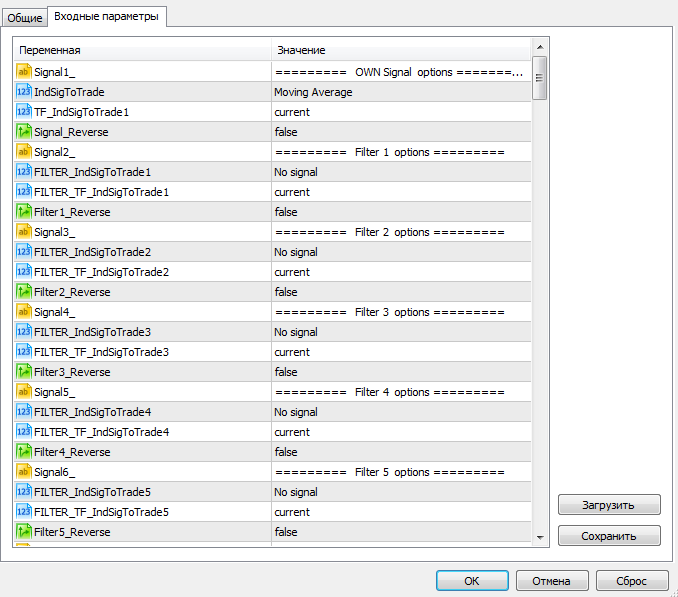
For ease of use, all EA parameters are divided into blocks. Using the IndSigToTrade 1, 2, 4, 5, and 6 variables, you can select signal indicators to use when building your strategy.
In the FILTER IndSigToTrade field, you can select indicatorsto filter signals received from signal indicators.
The TF IndSigToTrade 1, 2, and 3 variables allow you to specify the time frame from which the signal indicator should receive its signal, while the TF IndSigToTrade2 variable allows you to set the time frame for filters.
The ReverseSignal variable enables position reversal; if a new strategy signal appears, the trade is automatically closed and a new one opened in the opposite direction.
The EA also features the ability to reverse a position when a stop loss is reached, and you can set the stop loss value in the Open OppositePositionAfterStoploss field.
In the VirtualStops field, you can enable or disable the display of the stop loss and profit on the broker's server.
The StopOrderUSE variable enables the use of pending orders. You can specify the offset from the signal point for a pending order in the StopOrderDeltaifUSE line.
In the Martin line, you can specify the multiplier for the next lot if the underlying position is closed by a stop order.
In DynamicLot, you can enable dynamic lot calculation, with the risk percentage of the deposit specified in the LotBalancePcnt line.
You can also enable averaging in the AverageUSE line. The distance between orders is specified in the Distance line, and the multiplier is specified in the LotsMartin line.
As an example, I suggest looking at the trading report of an expert advisor based on a classic martingale and a moving average in the image below:
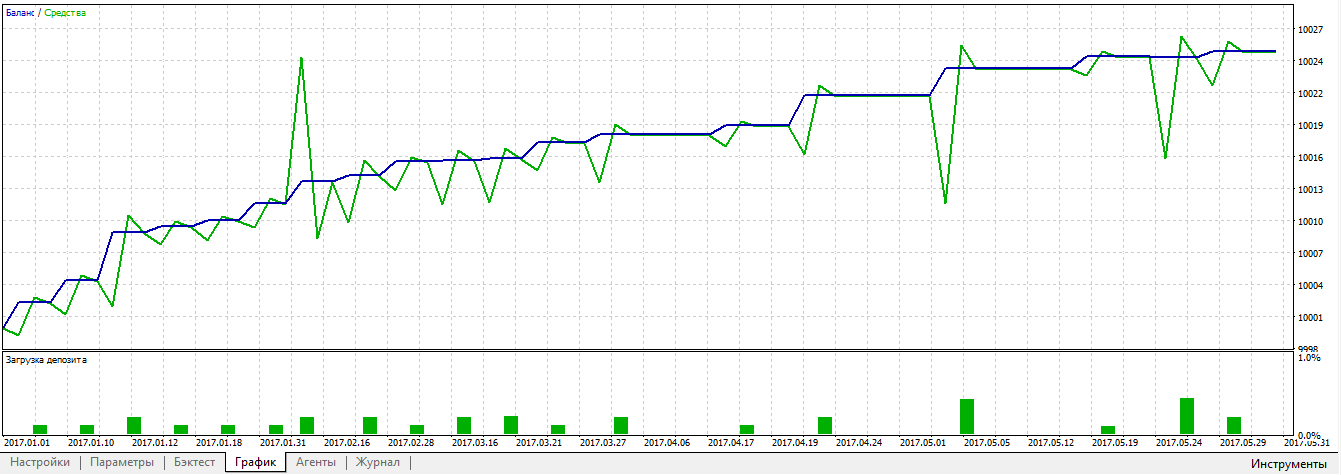
In conclusion, it's worth noting that the Universal EA system is a fully-fledged builder that allows you not only to create and test all sorts of forex strategiesbut also to use your own developments on a real account.
Download the Universal EA builder.

