Report Manager program
The currency market, despite the vast number of advisors, indicators, and other Forex programs, is far from a simple object of analysis. 
While beginners initially actively pursue profits using advisors, over time they come to a deep understanding of the importance of at least preserving their own money.
To achieve these goals, loss diversification tools are used, various strategies are employed, trading is conducted on multiple assets simultaneously, and other tactics are also employed.
However, using such methods makes it very difficult to plan and develop even a basic understanding of potential drawdowns, profitability, and a number of other indicators.
However, there is a way out of this situation, and Report Manager will help you with this.
Report Manager is an independent assistant program that allows you to study reports generated in the MT4 strategy tester in detail and, based on several statistics, create a general picture of the behavior of advisors on the account.
In simple terms, Report Manager can combine several different reports and show how our balance and drawdown will change when multiple Expert Advisors are used simultaneously on a single trading account.
The program generates a unified report regardless of whether the tester was used for a single trading asset or for different assets.
Installing Report Manager
: Report Manager is a completely independent application that works with reports generated by the Strategy Tester, but is not dependent on versions 4 or 5 of the trading terminal.
To install, run the setup file, which is available for download at the end of this article, agree to the licensing terms, and specify the installation location.
It's worth noting that on Windows 7 and 10, an error may occur during installation.
To avoid this, run the installer only as Administrator.
It's also worth noting that the program doesn't create a shortcut on the desktop; it must be launched directly from the folder where you installed it.
Here's what the program looks like:
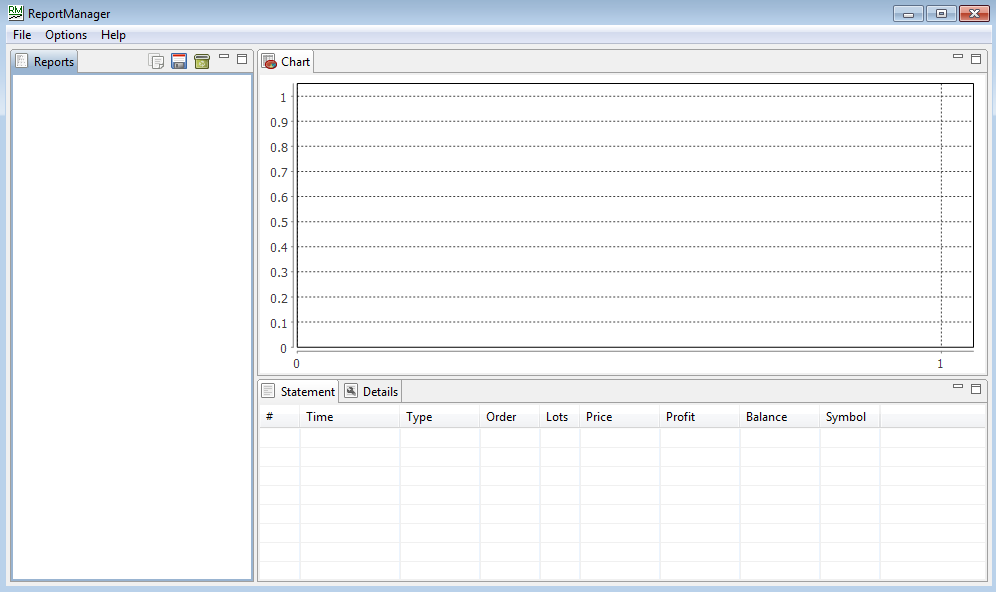
A step-by-step guide to using Report Manager
1. Generating Reports
As we've already noted, the Report Manager works with pre-built reports, which you can generate after testing your Expert Advisor in the Strategy Tester.
This is done very simply: after testing, switch to the "Report" tab and click anywhere in the table to open the auxiliary menu.
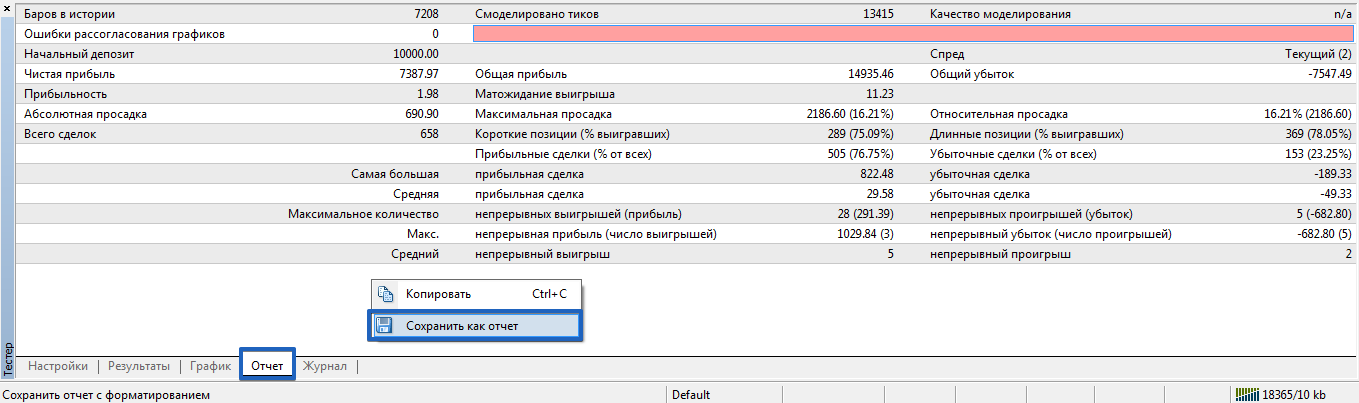
Select "Save as Report" from the menu, then give it a convenient name and save it to your desktop. Repeat this process for several advisors whose data you need.
2. Loading reports into the program.
Loading templates is extremely simple. Open the Report Manager, open File in the left corner, and select Open Reports.
To avoid loading the file multiple times, simply hold down the Ctrl key and select the reports you want to combine.
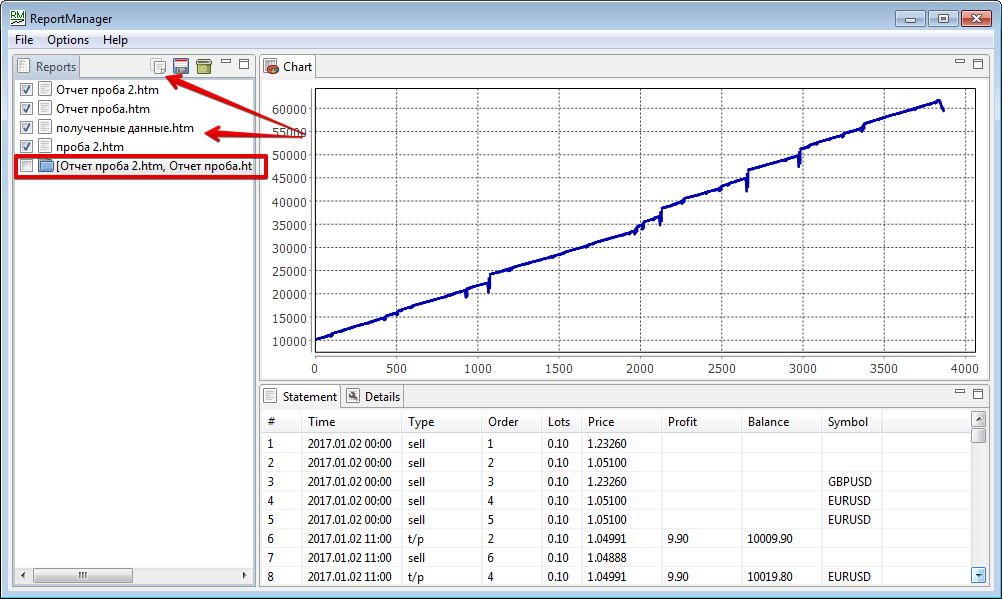
All reports must appear in the list, and clicking on any of them will display a graph and detailed information.
3. Generating a consolidated report.
Once you've downloaded all the necessary templates, you can begin generating a consolidated report tailored to your balance size.
First, open the "Optical" menu and change the balance size to the desired value. Then, select the reports you want to combine and press Shift+Enter on your keyboard, or click the button.
A separate folder will appear, which is your general combined report. To view it, simply double-click it.
4. Studying Statistics:
In the right pane of the program, after opening the generated template, you can observe the overall balance dynamics, and below it is a list of transactions sorted by opening time.
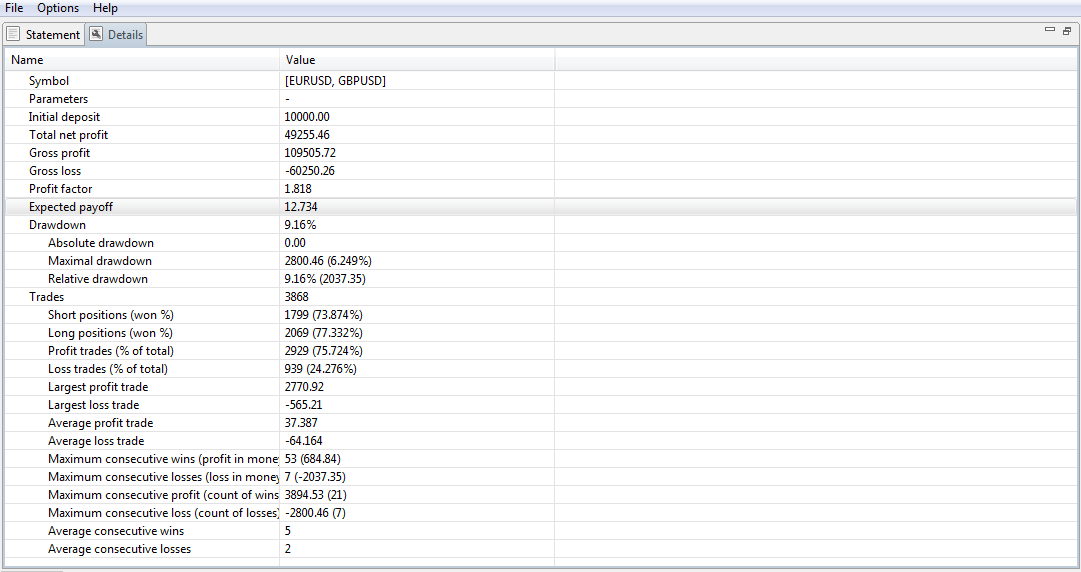
To view the statistics, click the "Details" button under the chart. In the generated table, you can see the maximum drawdown, profit factor, percentage of losing and winning trades, mathematical expectation, and a number of other important statistics.
Report Manager is an excellent application that allows traders to understand the potential drawdown during the planning stage when using the selected advisor portfolio.
And most importantly, it allows them to choose the optimal deposit size for portfolio trading based on the data obtained.
Download Report Manager

