Talking MetaTrader: Making the platform a pleasant experience
When actively using the MT4 and MT5 trading platforms, you've probably noticed that the terminal constantly emits sound alerts.
Whether it's connecting to the server and publishing news or triggering a market signal if your indicator supports this feature.
You'll agree that the sound alerts feature is very useful and makes our trading much more convenient, allowing us to stay informed about any events occurring in the trading terminal.
However, many people find these types of audio alerts completely irritating, as not only are the sounds very harsh and jarring, but it's also sometimes very difficult to figure out what exactly the platform is notifying us about.
However, few people know that the MT4 terminal can literally talk.
The platform's settings are so flexible that you can easily replace all the annoying sound alerts and insert your own recordings and commands. This article will show you how.
Nowadays, it's quite easy to record any audio file using third-party programs that can be easily downloaded from the Internet.
However, there is no need to worry too much, since any computer running the Windows operating system has the ability to record audio.
Each user can record their voice by dictating the desired command into the microphone of headphones or a laptop, or directly from any online service if they don't have a headset.
To start the sound recording, open the Start menu, then select All Programs and find the folder with the Accessories list.
In the list of standard programs, select "Sound Recorder", after which a player line with a recording slider will appear.
If you encounter any difficulties while recording, such as the microphone not working or if you want to record directly from third-party programs, go to the sound settings (right-click on the volume icon in the lower corner of your desktop) and select the desired recording device.
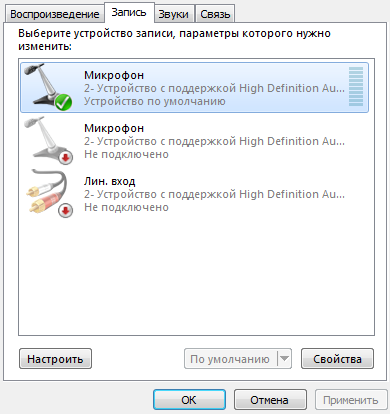
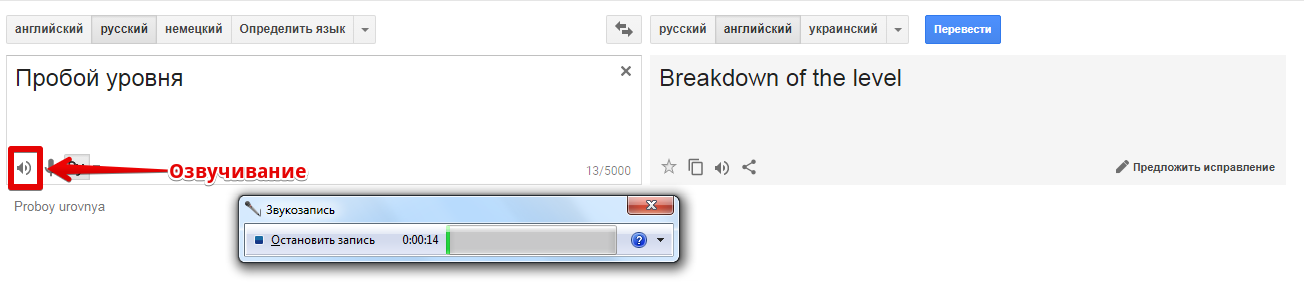
If for some reason you don't want to listen to your own voice, you can use the Google Translate girl's voice.
To do this, enter a voice command in the translation line and click on the voice playback icon, and simultaneously turn on the sound recording, then save the resulting audio file.
Setting up sound alerts. Platform settings
Once you have recorded audio messages for certain commands or events in the MetaTrader trading terminal, these files must be placed in the appropriate folder of the terminal data directory.
To do this, find the location where MetaTrader is installed on your computer (usually the Programs Files folder on drive C) and among the list of system folders, find the folder called Sound and drop your sound recordings or favorite melodies into it.
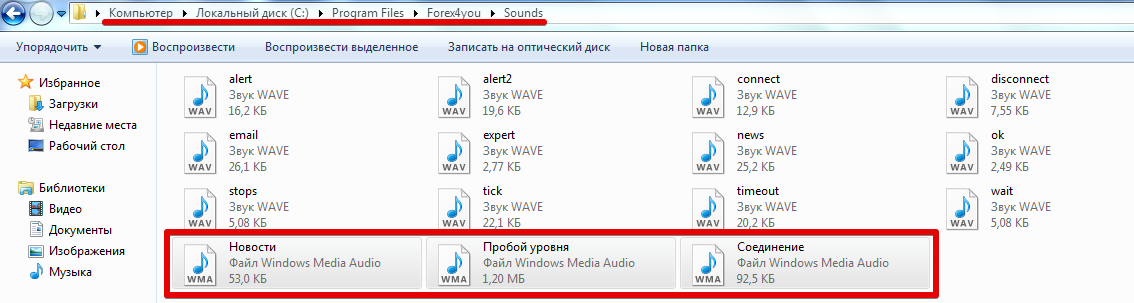
After you've restarted the platform, you can proceed directly to the settings and replace the default sound alerts with your own. To do this, in the open trading terminal, go to the "Tools" menu and click "Settings.".
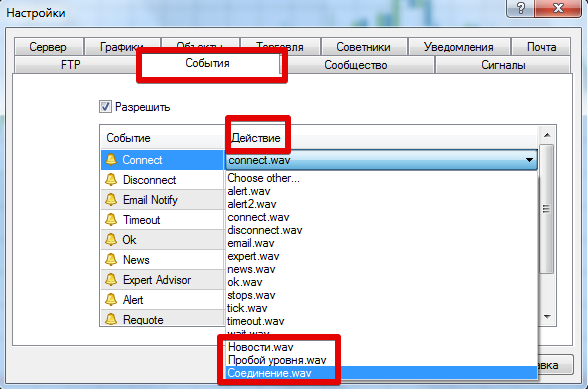
For a quick launch, you can also press Ctrl+O on your keyboard. Then, in the window that appears, select the "Events" tab.
A table will open with the function name in the left column and the audio file in the right column. Double-click the audio file name next to the selected function and select the one you recorded earlier. Example:
In addition to changing the standard sound alerts, you can also set up your own custom alerts, for example, when the price breaks through a certain level.
To do this, in the "Terminal" panel, where you monitor your balance and open trades, switch to the "Alerts" tab. Then, right-click to open the additional menu and click "Create" in the list of options that appears.
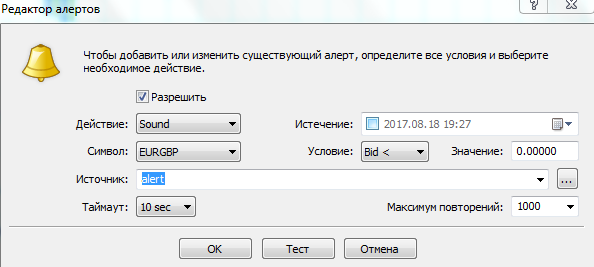
A window will appear in front of you in which you can specify the type of notification, namely sound, email, create a special file, and so on.
Also in this window, you can select a currency pair and set the criteria for your level, both time (sound alert at a certain time) and price (price above or below the specified level), and set your audio file for the alert.
In conclusion, I would like to note that the flexibility of MetaTrader settings allows you to not only customize the chart, but also work with alerts.
Moreover, in addition to changing the standard sounds, you can create custom alerts, which, unfortunately, only a limited number of traders are aware of.

