Mobile Forex and stock market trading in just a few clicks
It's not always possible to trade Forex from a desktop computer or laptop; sometimes they're simply not at hand, and you need to urgently close an order or, conversely, open a new deal.
This is precisely where a trading terminal installed on a smartphone, iPhone, tablet, or other mobile device comes in handy.
Mobile trading – full-fledged Forex trading using mobile devices with an internet connection – allows you to monitor the status of open orders at any time and enter the market at the most opportune moments.
It's advisable not to use this option as your only option; the desktop trading terminal still offers greater capabilities than its mobile version.
Now let's move on to what you need to trade from a mobile device.
Since this article was written, the situation has changed significantly; you can now download a mobile trading platform from almost any broker's website. These platforms work not only on iPhones and smartphones, but also on tablets.
Each device has its own version of the trading platform, with minimum processor and RAM requirements. Therefore, be careful when choosing, as insufficient resources will cause the trader's terminal to freeze and lead to losses.
Minimum equipment requirements:
1. Processor power – not less than 400 MHz, 500 MHz recommended.
2. RAM capacity – from 64 megabytes, not to be confused with data storage memory.
3. Internet connection speed – from 512 Kbps.
4. Screen size – diagonal from 4 inches, trading on a smaller screen is quite inconvenient, but possible.
This means you can trade on the exchange using virtually any mobile device purchased in the last couple of years. Mobile trading apps don't consume a lot of resources and are easily installed on a smartphone or iPhone.
Mobile Forex can be conducted from devices running Symbian (Nokia), Android, Windows Mobile, iPhone, Windows Phone 7 and some other variants.
However, today, universal mobile platforms are being released that work seamlessly on any device, regardless of its operating system. And even if your device doesn't meet the minimum requirements, you'll be notified during the installation process.
Installing programs for mobile trading
Once you've downloaded the required software, proceed to installation. The mobile platform will download directly to your device from the broker's website. After installation, launch the downloaded file and install it. Once installed and launched, you'll see the following screen:
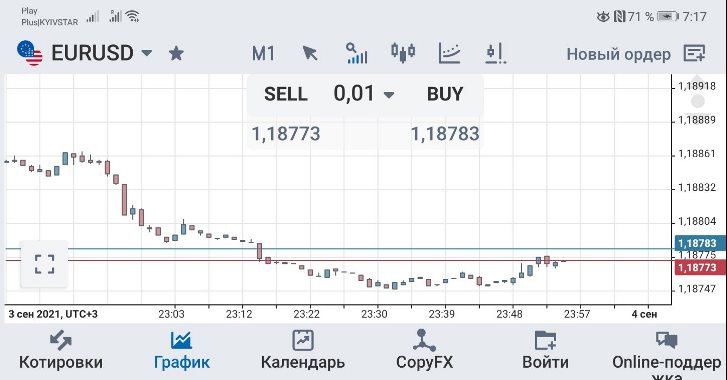
If desired, the same MetaTrader 4 or 5 can be downloaded from Google Play - https://play.google.com/ And then, directly during installation on a mobile device, enter the parameters of your broker.
The specifics of this process depend on whether you'll be using a smartphone, iPhone, or tablet for trading. You'll likely need to download a version of the terminal specifically for your device.
These terminals operate slightly differently from full-featured options, but they always include all the basic functions. Furthermore, they fully synchronize with the desktop trading platform installed on your personal computer. This means you can perform some transactions from home and then monitor the status of your Forex trade using mobile trading.
To make your work more convenient, find out if your broker's website has a mobile version. If so, you'll be able to not only conduct mobile Forex trading but also conduct financial transactions.

