Advisor 10 pips multiplus
The 10 pips multiplus advisor is an implementation of the most popular breakout trading strategy based on the previous day's high or low. The idea of trading breakouts of important levels is far from new and is quite simple to explain.

You've probably all noticed more than once that when you open a daily candlestick chart, the candles follow almost exactly one after another, without any deviations, forming a clear trend.
The strategy's logic essentially boils down to the fact that if the price breaks the previous candle's low, it will close directly below it and continue its downward movement. If the price breaks the previous candle's high, it should hold above it and continue the upward trend.
From a logical standpoint, the essence of the strategy is very clear and explainable, but one should not forget about the concept of volatility, when the price can move in both directions and break two orders, and close in the middle of the previous candle.
Installing the 10 pips multiplus advisor
The 10 pips multiplus advisor is designed exclusively for the MT4 trading platform, so to test it and get started, you need to install it. To do this, go to the "expert" folder in your data directory and paste the advisor downloaded at the end of this article into it.
Next, simply go to the navigator panel and refresh the settings by right-clicking the toolbar. It's worth noting that the EA is multi-currency and only works with the following currency pairs: EURUSD, USDCAD, GBPJPY, USDJPY, AUDUSD, NZDUSD, and CHFJPY.
Since the strategy is based on a breakout of the previous day's high or low, the time frame you use the EA on doesn't matter, as the algorithm won't change. To start trading, drag the EA onto any of the listed currency pair charts:
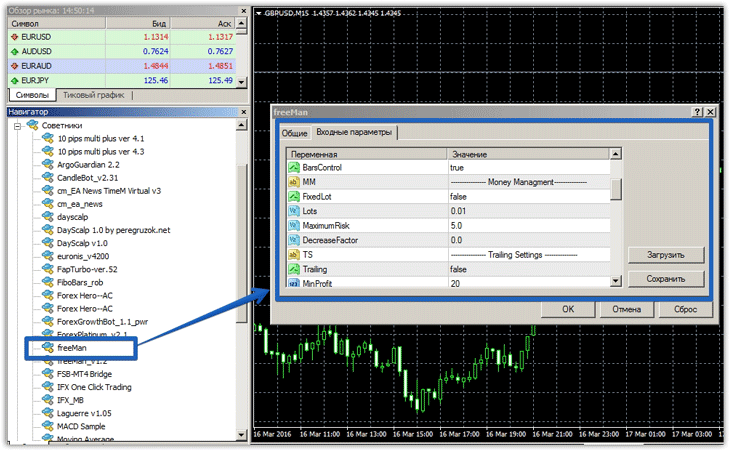
10 pips multiplus settings
The expert advisor's developers have created basic settings, but the martingale itself remains hidden from the user. The Lot line specifies the initial position volume for the first order. If you leave everything at default, the expert advisor will calculate the position volume automatically.
The Slippage parameter controls price slippage, and the Take Profit line specifies the trade profit. Lines v_1…v_10 indicate the currency pairs the Expert Advisor can trade. You can also enter the currency pairs you'd like to trade.
The filtr line specifies the offset from the extremum for entering a position using specific currency pairs.
The Distans line specifies the distance in points before the price reaches the previous day's high or low, after which you'll hear a sound alert. The Sound line allows you to turn the sound alert on or off. The advisor also has a MagicNumber parameter, which allows the advisor to ignore orders opened manually or by another expert.
Backtesting 10 pips multiplus
The advisor opens a very small number of orders, so the author recommends working with all currency pairs simultaneously, which allows for hedging risks and increasing profits. The first test was conducted on the EURUSD currency pair from January 1, 2015, to March 10, 2016. The results are below:
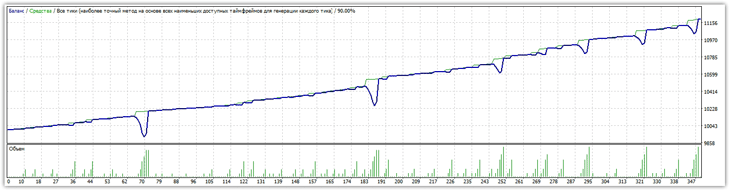
The chart shows a rather attractive balance curve, but it's worth noting that the expert advisor's return was only 12 percent, despite a drawdown of up to 47 percent. In terms of strategy profitability, 71 percent of trades were closed in the black.
Test results on the GBPUSD currency pair:
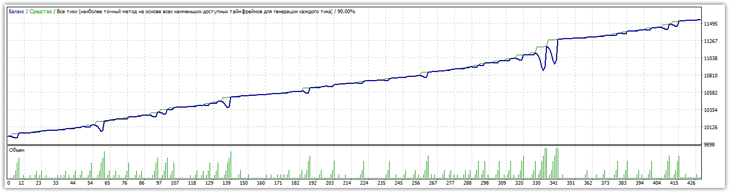
For the GBPUSD currency pair, the advisor behaved more conservatively and was able to generate 15 percent profit with a maximum drawdown of 22 percent.
Overall, the 10 pips multiplus advisor demonstrated an excellent return curve, but the risks remain high. When trading with multiple currencies, the risk of experiencing a significant drawdown during automatic lot calculation is very high, so you should manually specify a lot size that is acceptable for your deposit after detailed testing.
Download the 10 pips multiplus advisor.

