FreeMan Advisor – the embodiment of an indicator strategy
Many traders on various Forex forums constantly debate the effectiveness of standard  indicators, and in most cases, everyone agrees that they are ineffective.
In fact, this thought has crept into the mind of almost every trader who uses technical analysis.
This is why, year after year, we can observe the emergence of more and more new technical analysis tools.
The race for the Holy Grail is nothing new, but in practice it becomes clear that future profits depend not on the indicator, but on the person using it.
The signal generation process is simple: when the RSI indicator with different periods is in the overbought zone, and the moving average's slope indicates a downtrend, the EA sells. If the RSI indicator lines are in the oversold zone, and the moving average's slope indicates an uptrend, the EA buys.
Installing FreeMan
FreeMan is a proprietary development, distributed completely free of charge, designed for trading on the MT4 trading terminal. Therefore, to use and test the Expert Advisor, you must first install it. To do this, access the MT4 data directory via the File menu and place the Expert Advisor in a folder named Expert.
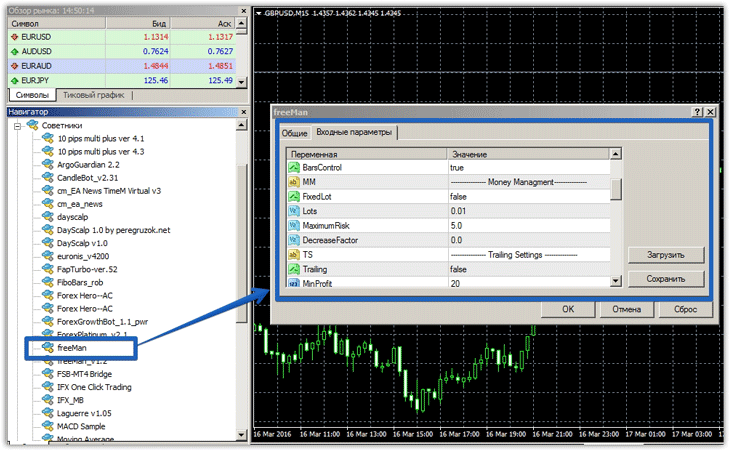
After updating the installed components, the Expert Advisor is ready for operation and testing. FreeMan uses a universal trading strategy that works on any currency pair, but the author himself recommends using the Expert Advisor on a 15-minute chart of the GBP/USD currency pair. To start trading, drag it onto the currency pair chart:
FreeMan settings
The expert advisor's author has fully integrated all necessary and unnecessary settings into the EA, so this section will be especially important for inexperienced traders. By default, the EA calculates the lot automatically, so you can enable a static lot in the FixetLot line and specify its size in the Lot line.
The Maximum Risk line specifies the maximum acceptable risk per position as a percentage. In the Trailing block, you can enable a trailing stop. The TrailingStop line specifies the trailing stop size, and the Trailing Step line specifies the trailing stop step.
Also in this block, the MinProfit line specifies the minimum profit in points after which the EA will begin trailing the position. The most important settings block is the RSI Teacher. The RSI Period and RSI Period2 lines specify two different indicator periods.
The RSI Level Buy/SELL 1 and 2 lines indicate the RSI level from which the buy or sell will occur. You can also enable a moving average trend filter in the Trend Filter line. However, you must specify the moving average period in the MAFilter line.
Testing an expert on history
The first test was conducted on the EUR/USD currency pair on a 15-minute chart with default settings. The initial deposit was $300, and the testing period was from January 1, 2015, to March 10, 2016. The results are below:

Over this long period, the Expert Advisor only opened two trades, and the profit remained at the initial balance. Therefore, we optimized the Expert Advisor using the RSI Period and RSI Period2 settings, as well as MAFilter. The optimization results are below:
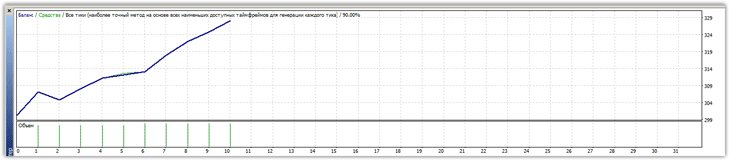
The second test was conducted on the GBP/USD currency pair on a 15-minute chart with default settings. The initial deposit was $300, and the testing period was from January 1, 2015, to March 10, 2016. The results are below:
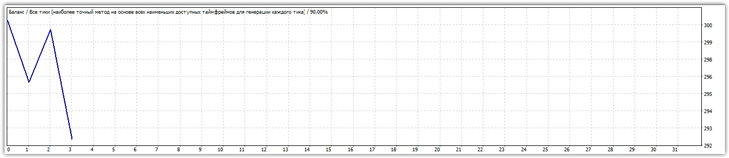
As in the first example, the EA was only able to open three trades, closing two of them with losses. Therefore, we optimized the EA using the same parameters as above. Optimization result:
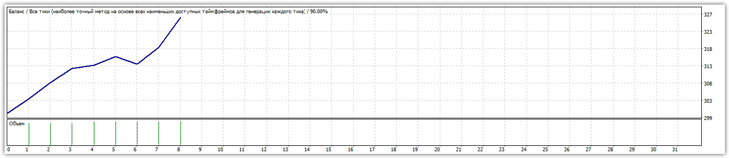
In summary, the FreeMan advisor is only suitable for the most patient and conservative investors, as the 10 trades after optimization will bore even the most patient trader.

