Piplaser Advisor
Many traders often have the misconception  that scalpers and pipsers open dozens, if not hundreds, of orders per day.
In fact, the number of open orders does not characterize the type of advisor, since scalping is characterized by short positions that are held in the market for a short period of time and have small profits, while pipsers, as a rule, differ from scalpers only in the size of the profit, which can be several pips.
Therefore, when testing any pips operator or scalper, don't be surprised that the advisor can open one position per day, or even less, because the important thing is not the number of entries, but their quality.
This expert simply dispels all the myths about scalpers having to make a huge number of trades to maintain profitability. In fact, this expert can make one trade every two days, which you won't even have time to notice when it opened or how quickly it closed.
Piplaser's developers strived to make the expert advisor accessible to everyone, specifically by developing an algorithm that allows it to operate with a minimum deposit, which can be less than $50 on a classic account. To achieve this, the advisor is based on a highly accurate trading strategy that generates a small number of signals and short targets of a few pips, thus minimizing the deposit burden.
Installation
The Piplaser scalping advisor was developed for the MT4 trading platform, so you should install it before testing. To do this, open the trading terminal and go to the File menu and open the data folder. After downloading the advisor, you'll see two files at the end of this article: one is the advisor itself, and the other is a DLL file.
Place the Expert Advisor itself in the Expert folder, and the .dll file in the Libraries folder. Then, open the Navigator panel and refresh it. The Expert Advisor itself is designed to work on a 15-minute chart of the USD/CAD currency pair. After dragging the Expert Advisor onto the currency pair chart, a settings window will appear, which we'll discuss below:
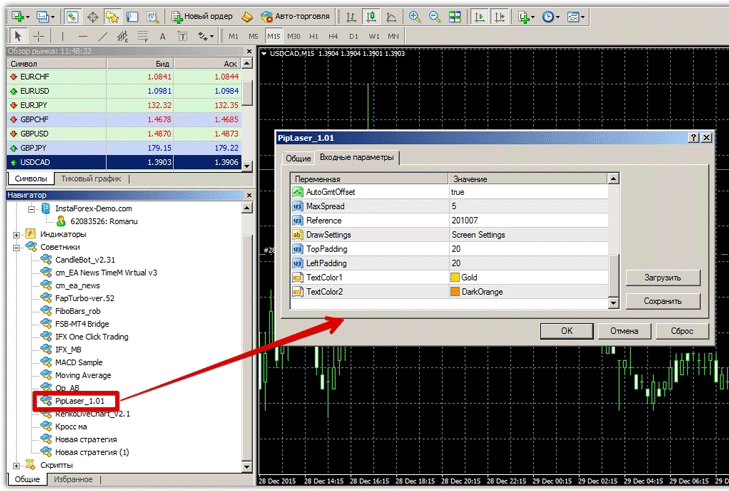
Piplaser scalper advisor settings, optimization recommendations
The Expert Advisor features dynamic lot calculation, so in the MinLotSize settings, you should specify the minimum lot size the Expert Advisor can start trading with. In the MaxLotSize settings, you should limit the maximum lot sizeto prevent the Expert Advisor from operating with increased risk as your account capital grows. The TradeLevel setting specifies the risk percentage for each position based on the available funds in the account.
Since the expert advisor is a clear scalper and pipser, it features protection for stop orders and profits from the broker, which can be enabled in the StealthMode line. This protection means that the expert advisor doesn't send stop order and profit data to the broker's server, but instead monitors these parameters independently at all times, without any prior setup.
In the PipTarget line, you can change the advisor's profit, and in the StopLoss line, you can limit your risks in points per position.
In the TimeProtect settings line, you can change the time within which Piplaser must close positions with a profit. After this time, the expert will lock in the profit that is currently in place.
When it comes to optimization, the first parameters to adjust are PipTarget and StopLoss, as they have the greatest impact on the EA's profitability. Keep in mind that this is a night-time EA that operates during the Asian trading session, so a profit margin of 5-10 pips is normal.
Testing the robot on history
To confirm the expert advisor's profitability, we decided to run it in the strategy tester with default settings for the period from January 1, 2014, to December 29, 2015. The test results are below:

As stated in the introduction, the expert advisor can safely be called a boring scalper, as it only opened 174 trades in two full years of testing. However, it's encouraging that the expert advisor doesn't use any martingale or averaging, and instead maintains stable performance over long periods of time.
Of course, this expert advisor won't earn you hundreds of percent in a month, but keeping a safe scalper in your portfolio is not only profitable but also helps you hedge risks wisely, especially if you enjoy automated trading.
The best broker for testing is www.alpari.com
Download the Piplaser scalper advisor.

