Advisor for deposit acceleration - White Bear.
Most beginning traders often feel the need for a sufficient deposit. You'll agree that  the vast majority of us entered the forex market not because of a good job or a comfortable lifestyle, but rather in search of money and self-fulfillment.
Therefore, unfortunately, almost every second trader doesn't have enough money even for a minimum deposit, let alone the large accounts needed to actually trade to truly experience the joys of being a trader. This is why, sooner or later, the question arises: "How can I increase my deposit?"
There are many different strategies for increasing your deposit, and this is primarily done with the help of scalping advisors, which can generate increased profitability in a short period of time.
The "White Bear" advisor is an aggressive scalper whose primary goal is to quickly increase your deposit with relatively acceptable risks.
This expert advisor is designed for the Meta Trader 4 trading platform, so you'll need to install it first to get started. To do this, after reading this article, scroll to the end of the article and download the archive containing the expert advisor. Open your terminal via the File tab and navigate to the data directory.
Once you've opened the directory, find the Expert folder and place the file there. Once you've installed the expert advisor in the terminal, find the navigator panel and drag it onto the EUR/USD chart on a five-minute time frame. A settings window will appear, which we'll discuss below:
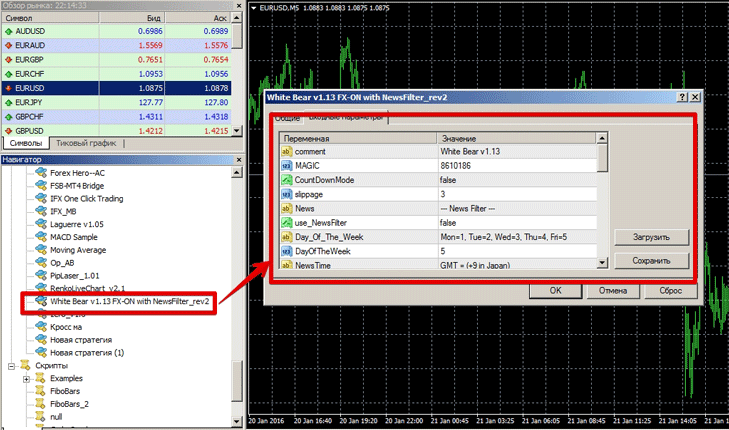
Advisor settings for deposit acceleration.
To get the most out of the market and adjust the advisor's performance promptly, you need to be familiar with its settings. In terms of trading strategy, "White Bear" uses the standard RSI indicator as a signal to enter a position .
The expert advisor uses a moving average as a trend filter, comparing trend direction across three different periods. A notable feature is that the advisor does not include a martingale, and scalping occurs with a clearly defined profit target and stop loss.
The expert advisor has the option to apply a news filter. To do this, click True in the "Use News Filter" line. To limit the expert advisor's trading time before important news, enter the number of hours in the "Per Hour the News" line, and specify the amount of time the expert advisor is prohibited from opening orders after the news is published in the "Past Hour the News" line.
In the Hour of News field, you must specify the exact time of the news release. To ensure the expert advisor can fully leverage your deposit, you must set the MM field to True. Once you do this, the expert advisor will open a position based on the deposit risk percentage, and the lot size will increase as your deposit grows.
In the Risk line, specify the percentage of risk per position.
The Take Profit and Stop Loss lines are responsible for the size of the profit and the size of the loss in points per position.
In addition to the settings related to capital management, you can change the settings for RSI levels and also enable or disable exiting a position using the moving average.
Preliminary test
Before installing any advisor, and especially for deposit boosting, it's essential to conduct a detailed test in the strategy tester. The results of the expert advisor's 2014 run are shown in the image below:
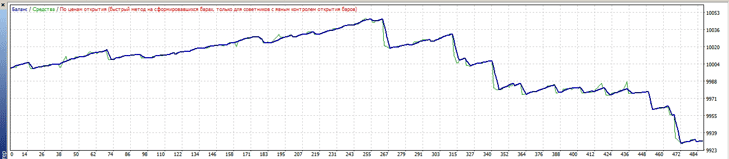 The result was quite expected. Scalpers react very strongly to the slightest market changes, so they need to be optimized before starting work. Markets typically change in the length of their waves, so the first thing to adjust is the profit and stop loss size. You can see the optimization results and the forward test for 2015 in the image below:
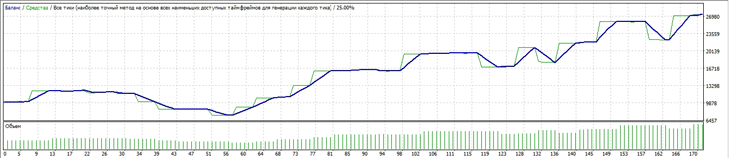 As a result of the forward test, the expert advisor managed to show a return of 160 percent, and that's far from the limit. However, when using the advisor to boost your deposit, you should clearly understand that you're taking on enormous risks. Boosting your deposit is comparable to playing roulette, so in the long run, luck will work against you.

