How to add a new asset to the trader's terminal.
The trader's terminal allows trading not only currencies but also many other assets, including oil, gas, cryptocurrencies, gold, copper, corporate stocks, and indices.
However, sometimes traders, when trying to add a chart window for a selected asset, simply don't find it in the "Symbols" window, even though the broker's website states that this asset is available for trading.
So why does the broker list a currency pair or index, but not the terminal?
Actually, this isn't entirely true; by default, only the most popular assets are added to the "Symbols" window, and cryptocurrencies or certain indices are often missing.
For example, we need to add the crypto currency Bitcoin Cash, which is often missing by default.
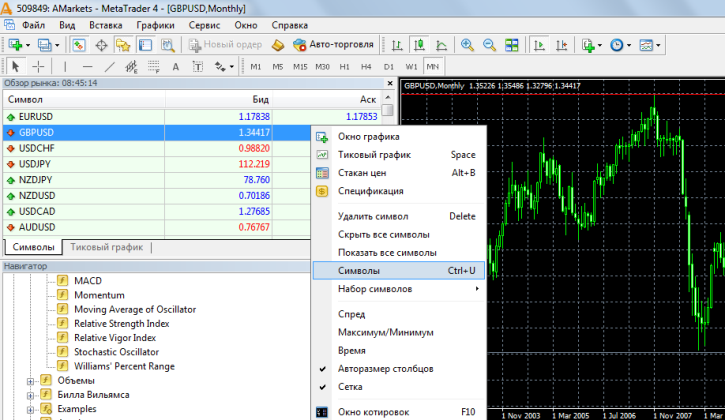
1. Hover the mouse cursor over the "Symbol" window and right-click to select the "Symbols" line from the menu that opens.
 2. Once the Symbols window opens, find Criptopairs, open it, and select BCHUSD. If the symbol is inactive, it will be gray; if active, it will be yellow. Click "Show" or simply click the selected line.
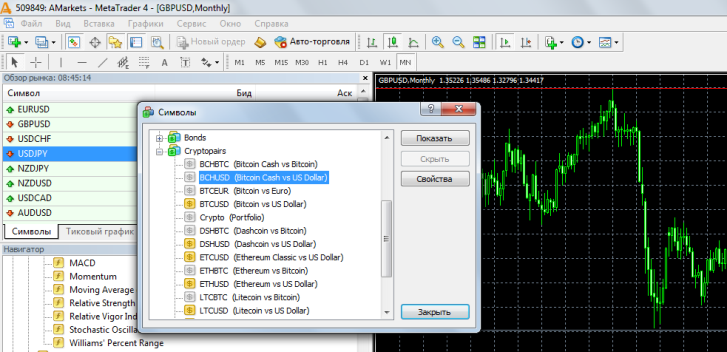 You can also view additional information by clicking the Properties button. You can read about what you can see here: http://time-forex.com/info/specyfikacyj-treydera
Once a new symbol has appeared, you can add a chart window for technical analysis and placing new orders.
Brokers typically offer the ability to trade 40 to 100 currency pairs, dozens of cryptocurrencies, energy commodities, indices, and many other assets. Unfortunately, by default, only a small selection of available instruments is included in the symbol selection.

