FractPrice indicator
Based on research by numerous traders and analysts, the price spends almost 70 percent of its time in so-called sideways or wide flats.
Market activation usually occurs after the breakout of the next extreme or support and resistance levels.
One of the first traders to recognize the importance of identifying extreme points and to refine the process by creating his own indicator was Bill Williams.
It was he who introduced the concept of Fractals to the stock and currency markets, proposing the concept of taking as a basis five candles and the highest point, which is usually in the middle of the candle combination.
Thanks to the fact that Bill published his own book in which he revealed the secrets of his trading strategy.
Despite the algorithm's simplicity, in practice, traders can use it to perform a variety of tasks. This article will focus on the custom FractPrice indicator, an improved version of Bill Williams' famous fractals.
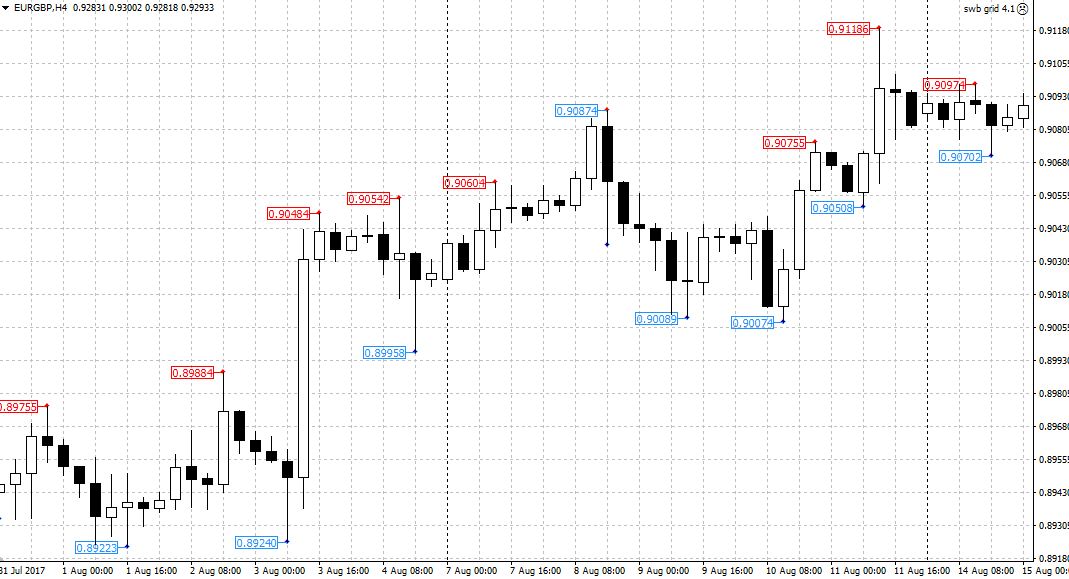
The FractPrice indicator is a technical analysis tool based on Bill Williams' fractal concept. It's worth noting that the indicator operates similarly to the standard version and identifies extremes using the same algorithm, but the visualization has been modified for ease of understanding.
Now, unlike standard fractals, traders can see the specific price on the chart, making it easier to work with orders.
The indicator itself is multi-currency and can be used on absolutely any currency pair and time frame, given that trends and extreme formations occur on absolutely all trading assets.
Installing the FractPrice indicator
The FractPrice indicator is a custom modification of the standard Fractals indicator, so in order to use it, you will need to download the tool file at the end of the article, and then install it on your MT4 trading platform.
The installation process for the FractPrice indicator follows a standard procedure and is no different from installing any other custom indicator. Specifically, you will need to copy the downloaded FractPrice indicator file to the appropriate folder in the terminal's data directory.
To access the platform's data catalog, launch your trading terminal and select the "File" menu in the upper left corner of the platform. Once the trading menu opens, you'll see a list of options, including the line labeled "Open Data Catalog.".
After launching the data directory, a list of the platform's system folders will be displayed on your monitor screen. Among them, find a folder called Indicators and drop the previously downloaded FractPrice indicator file into it.
For the trading terminal to see the installed tool, you must either restart it or update it in the "Navigator" panel. After restarting MT4, FractPrice will appear in the list of custom indicators.
To use the indicator, simply drag the instrument name onto the chart.
The principle of using indicators.
After applying the indicator to the chart, you can see red and blue dots at the locations of fractal formations, as well as their prices. It's important to understand that the red dots and labels indicate local highs, while the blue dots and labels indicate local lows.
When it comes to the indicator's application principles, they can be roughly divided into two functions. The tool can serve as both a signaling tool and an excellent assistant for managing trades.
If we talk about the indicator’s signal function, we can highlight its importance for many breakout strategies.
So, if there is an upward trend in the market and a local maximum has formed (red dot), the trader places an order at the specified price pending buy stop order, or enters at the breakout of the declared level with a market order to buy.
If a local minimum (blue dot) forms during a downtrend, you should place a pending sell stop order at the specified price, or open a market order to sell when the specified level is broken. Example:
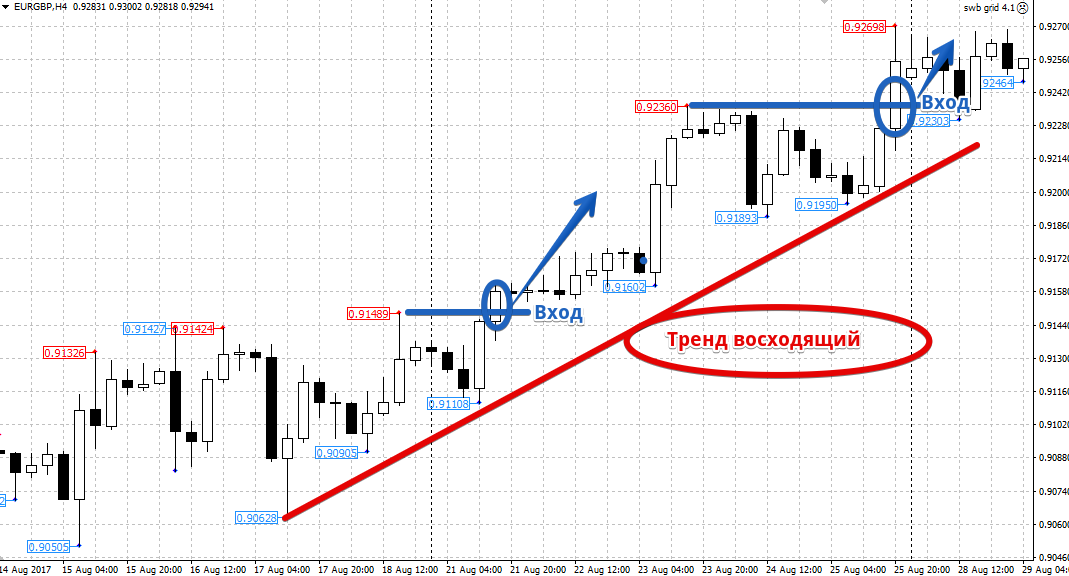
Speaking of the auxiliary function of the FractPrice indicator, it is worth noting that it allows you to find points for placing a stop order, which, as a rule, are located several points from local minimums and maximums, depending on the direction of the transactions.
It is also possible to carry out calculations based on local extrema trailing stop your position, which will undoubtedly allow you to hold the position for as long as possible.
To summarize, it's safe to say that the FractPrice indicator is a fairly universal tool and can be useful for all types of traders.
However, it is not recommended to use the indicator alone, since identifying extremes alone without the use of additional filters is not enough to build a profitable strategy.
Download the FractPrice Indicator

