Trader indicator.
Even if you're used to working without technical analysis indicators, this 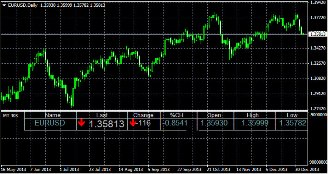 tool will be a welcome addition to your chart.
The trader's indicator doesn't overload you with unnecessary information, but simply provides the most essential data on the current trend.
Using it will help you spot changes in a timely manner, preventing you from missing a trend reversal or major correction.
Download the trader indicator.
Key indicators that will appear in the additional trading terminal window after installing the script:
Name – the Forex currency pair currently being traded.
Last – the last price, a duplicate of the current quote; much easier to monitor the price than on a standard chart.
Change – the existing deviation between Last and the market opening price; serves as the primary benchmark for determining price direction.
%CH – the same as above, but as a percentage; minus indicates a price decrease relative to the session start; plus indicates a price increase.
Open – the exchange rate at the start of the Forex trading session; serves as one of the primary parameters for calculating the deviation.
High – the maximum price for the current session; can be used as a benchmark for choosing a trade direction. If the price is below the specified maximum and is currently moving upward, it makes sense to open a buy trade.
Low – the minimum price recorded during the current session; used in a similar manner to the previous indicator.
Candle Color – trend direction; displays the direction of the existing trend, depending on the timeframe.
LocalTime – local time; it's recommended to change this setting to the operating time of forex dealing centers.
Spread – the broker's commission for this trading instrument, taking into account the number of digits in the quote.
The trader indicator is a universal tool that can be used in any trading scenario, regardless of strategy, time frame, deposit size, or other trading parameters.

