Pattern Recognition Indicator
The use of candlestick patterns began long before the advent of online stock trading. The art of candlestick analysis in European and American markets emerged quite recently, and if it weren't for Steve Nison, who happened to come across a Japanese brochure, trading might still be conducted solely on linear charts.
However, with the advent of Japanese candlestick analysis, many traders' trading has been transformed, as, unlike indicator strategies, Japanese candlesticks provide signals that never lag.
This is due to the fact that the price is the main source of signals when Forex technical indicators they only make calculations based on it.
However, despite all the advantages of using candlestick analysis, there is one huge drawback - the subjectivity of the trader.
Unfortunately, traders tend to see things that are not really there, not to mention that in many cases, this or that figure is used incorrectly.
The Pattern Recognition indicator is an informational technical indicator that identifies and displays a number of the most popular candlestick patterns directly on the chart. The Pattern Recognition indicator allows beginners to quickly grasp candlestick analysis, while more experienced traders can monitor multiple currency pairs simultaneously and detect the strongest signals.
Candlestick analysis is considered equally effective on all currency pairs and charts, but it was initially used on higher time frames, since that is where there is the least unnecessary market noise.
Setting up the Pattern Recognition indicator
Pattern Recognition was created by developers for only two trading platforms: MT4 and MT5. Since MT4 is currently the most popular and functional platform, we will describe the installation process only for it. (There is no fundamental difference between installation on MT4 and MT5.).First, you'll need to download the indicator file from our website. Once you've downloaded the indicator, you'll need to place it in the appropriate folder in your data directory. To open the data directory, go to the File menu in your platform, then open "Data Directory" from the list of options that appears.
After launching the catalog, you'll see a series of system folders. Find the "indicators" folder and drop the Pattern Recognition component into it. Then, restart the trading terminal or go to the navigator panel and update the components using the additional menu.
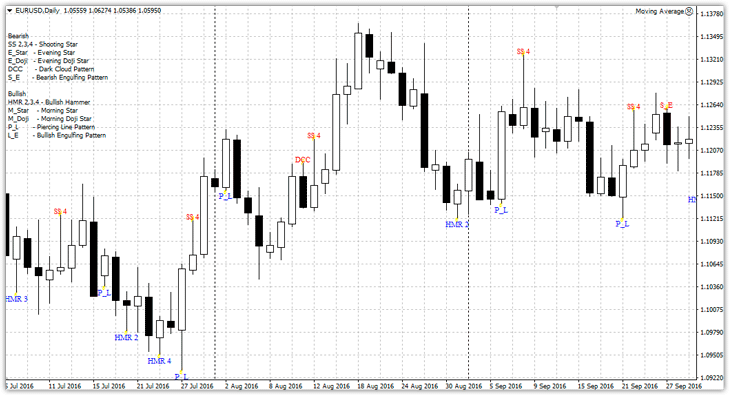
After the update, Pattern Recognition will appear in the list of indicators, and to use it, simply drag the indicator onto the chart.
Explanation of symbols. Settings
The indicator displays abbreviated names of candlestick patterns on the chart, rather than the actual names. The abbreviations can be found in the upper left corner of the chart. It's worth noting that the candlestick pattern names are written in English, but they shouldn't be difficult to decipher.
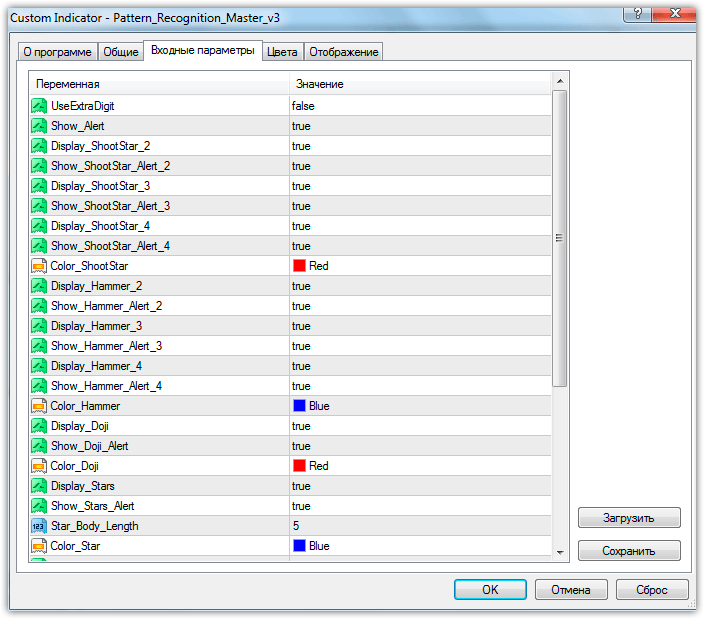
The indicator settings offer a variety of options, but the vast majority relate to enabling or disabling specific patterns and sound alerts. For example, in the Show Alert line, you can enable or disable sound alerts for all candlestick patterns, and in the Show (pattern name) Alert lines, you can enable or disable sound alerts for each pattern.
The Display parameter (pattern name) allows you to enable or disable the display of the candlestick pattern abbreviation on the chart.
In conclusion, I'd like to emphasize that the Pattern Recognition technical indicator is merely an informational tool that displays the appearance of candlestick patterns on a chart. Therefore, to use it successfully, you should at least be familiar with the basic patterns candlestick analysis.
Download the Pattern Recognition indicator

