ZoneTrade indicator
Successful trading in financial markets requires a comprehensive analysis of assets. This often involves the use of various tools that can clearly determine the direction, strength, and acceleration of a trend.
It is the integrated approach that provides clear signals, since determining the trend itself without a number of other parameters is practically useless.
For example, many of you have encountered a situation where, after buying a certain asset on a clearly defined upward trend, the price stagnates for several days, or even weeks, practically in place, resulting in swap losses.
This situation haunts most traders, since many other factors besides the direction of the forex market at the time of the signal were not taken into account.
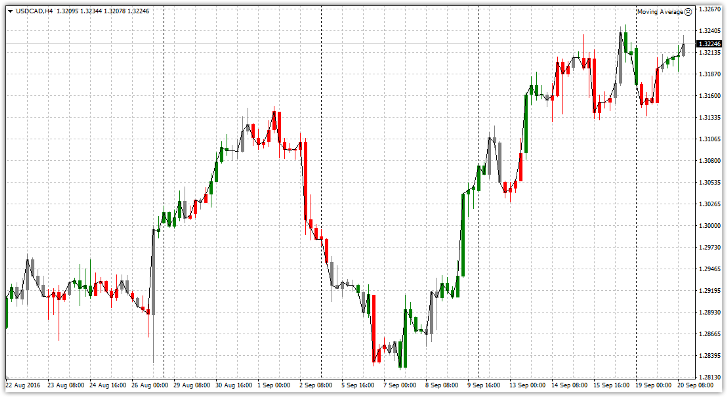
The ZoneTrade indicator is a professional technical analysis tool that displays zones of an upward or downward trend directly on the chart, as well as those gray zones that are commonly called flat.
The ZoneTrade indicator does an excellent job of serving as a primary filter against false signals and can also serve as a signaling tool for virtually any trend-following trading strategy.
Installing the ZoneTrade indicator
The ZoneTrade indicator was developed by programmers for trading in MT4 trading platform, so to use the indicator, you will first need to download it from the end of the article on this site, and then install it directly into the trading terminal.To install the indicator on your trading platform, you'll need to access your MT4 system folders. Open your trading terminal and go to the File menu.
In the menu that appears, find the "Data Catalog" line and launch it. You'll see a number of system folders. Find "indicators" among them and drop ZoneTrade into it. After you restart the trading terminal, the ZoneTrade indicator will appear in the list of custom forex indicators.
To start trading, change the chart type from candlestick to line chart and drag ZoneTrade onto it. You'll get a chart like this:
Indicator Construction Principle. Trading Signals
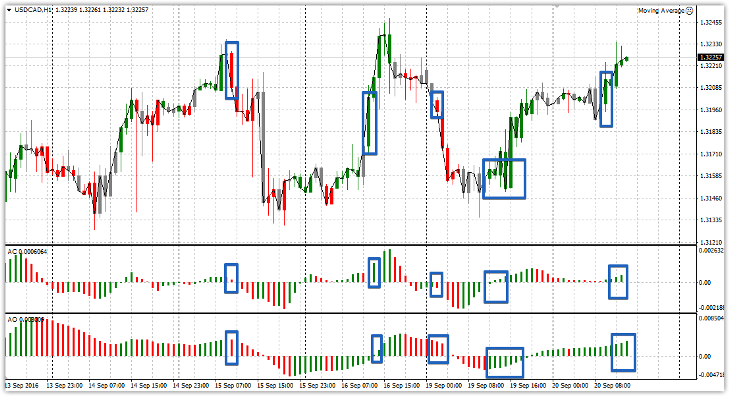
The ZoneTrade indicator is based on Bill Williams's zone trading principle, based on his two indicators, AC and AO. The AO indicator displays market strength and direction (trend type), while the AC indicator displays market acceleration.
Thus, Bill William, based on two histograms, identified a green zone when the bars on both indicators were green, a red zone when the bars on both oscillators were colored red, and a gray zone when the colors of the bars did not match.
The ZoneTrade indicator was developed based on this theory, and the correspondence between the colors of the AC and AO zones and the ZoneTrade indicator can be seen in the image below:
Since ZoneTrade consists of two Bill Williams indicators, it can be used either alone or in combination with others Forex technical analysis toolsSo, let's look at the signals when using the indicator without additional tools.
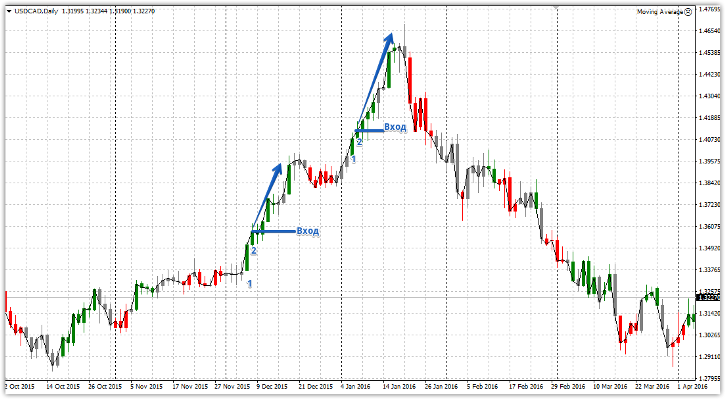
Buy signal:
1) The ZoneTrade indicator displays the candle in green.
2) The closing price of the second candle is higher than the closing price of the previous one and is colored green.
You should only enter a position when the candle closes, as the indicator repaints. You exit the position when the indicator changes from green to gray or yellow. Example:
Sell signal:
1) The ZoneTrade indicator displays the candle in red.
2) The closing price of the second candle is lower than the closing price of the previous one and is colored red.
Entry into a position only on a closed candle. For more details, see the example below:
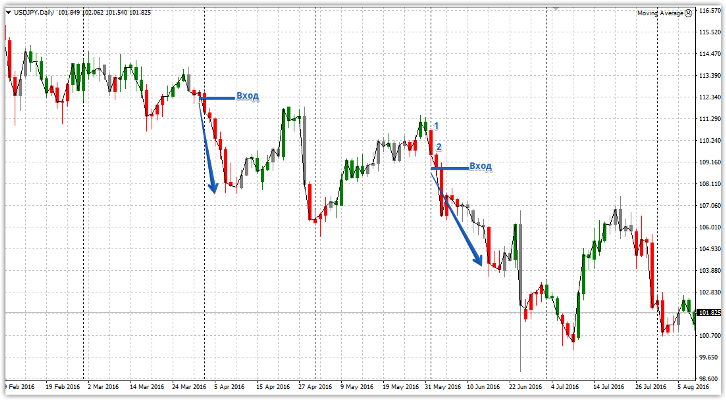
ZoneTrade can also be used as a filter for the main signal, ensuring that the Forex strategy signal corresponds not only to the trend direction, but also to the acceleration required to quickly achieve profit.
In conclusion, I would like to note that the ZoneTrade indicator is an excellent adaptation of Bill Williams' zone approach, which significantly simplifies trading using this method.
Download the ZoneTrade indicator

