Truly News Indicator (auto trading)
Almost every trader who trades on the Forex market is somehow connected with the news and fundamental analysisThe fact is that news often acts as gasoline, causing prices to move, sometimes even inappropriately.
Therefore, any professional, no matter how much they oppose news trading, still checks the time and date of important statistics releases. Some take the released statistics into account, while others simply stop trading and close previously opened positions.
Traders who use various advisors based on mechanical trading strategies are particularly susceptible to the influence of news, as the price behaves erratically at the moment of news release, and the advisor can open a bunch of useless orders and enter into a trade with a wide spread, which naturally leads to losses.
There are different ways to follow the news. Typically, traders have to look at news from various information sources, broker pages.
The Truly News Indicator allows you to stay up-to-date on important economic news, read information directly from the chart, and receive sound alerts when statistics are released.
A special feature of the Truly News Indicator is its ability to disable automated trading by advisors a certain time before a news release.
Installation in the trading terminal. Preliminary MT4 settings
To use the indicator, you'll first need to download it from our website and install it on your MT4 trading terminal. To do this, access the trading platform's data directory via the File menu and drop the Truly News Indicator app into the "Indicators" folder.
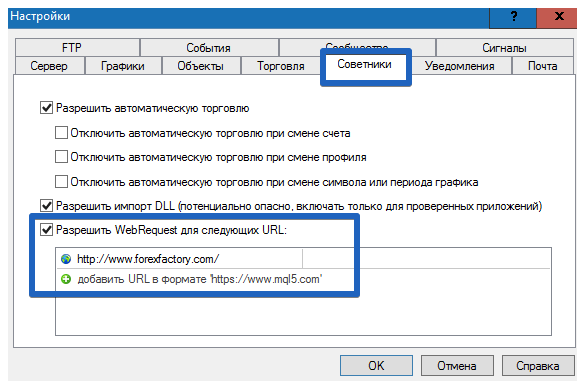
After restarting the terminal, Truly News Indicator will appear in the list of custom indicators. Since Truly News Indicator reads data from the ForexFactory economic calendar, we'll need to grant the trading terminal access to external data. To do this, go to Settings and open the "Expert Advisors" tab.
In the list of options that appears, check the box to allow reading information from Internet resources and add the site http://www.forexfactory.com/.
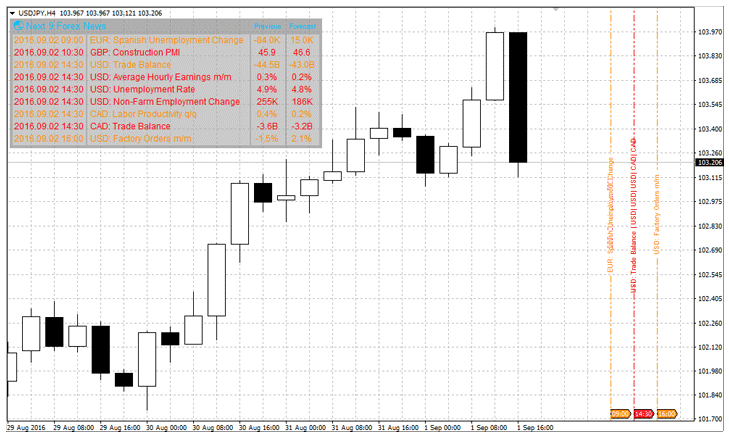
After restarting the platform, go to the list of custom indicators and drag the Truly News Indicator onto the price chart. The left side of the chart will display a list of news items, the time, the previous value, and the forecast.
On the right side, you'll see vertical lines that indicate the exact time certain news releases occurred. For example:
Indicator settings. Enabling and disabling auto trading
Despite the fact that you have a simple news indicator in front of you, it contains an element of an advisor or script, which allows you to press the auto-trading button and also turn it on.
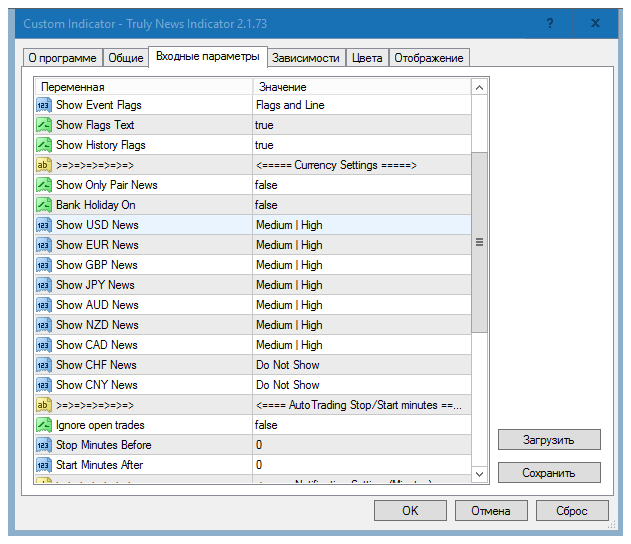
To take advantage of the option to disable advisors before news releases and enable them after publication, find the "Auto Trading Stop/Start" settings block.
In the Stop Minutes Before field, specify the time before the news is published for the indicator to disable the expert advisors. In the Start Minutes After field, specify the time after the news is published for the indicator to enable automated trading. You can also enable or disable ignoring existing positions.
So, if the line specifies False, the indicator will not turn off automatic trading until either the advisor or you close open orders.
In addition to the above settings, you can customize the graphical display and enable the display of specific news items by importance and currency. To do this, next to the "Show USD, EUR..." lines, select the news items by importance or disable their display on the chart entirely.
In conclusion, I would like to note that Truly News Indicator is an extremely useful tool when news tradingIts only drawback is the English-language news and interface.
Download Truly News Indicator

