FlatTrend indicator
Determining the current market state is the most important task for every practicing trader. It's no secret that the market can only exist in two phases: trending and flat.

A trending market is typically characterized by a clear, directional movement in a specific direction, either up or down. This is why, in professional circles, you often encounter terms such as a bullish trend (buyers push the price up) and a bearish trend (sellers push the price down).
The second market phase, known as "flat," is characterized by an uncertain price movement, which increasingly resembles a saw's teeth, scattering the price in different directions while maintaining a horizontal position.
All these phases of trend movement are equally important to a trader, as a long-term trend generates a flat because the market is running out of steam, and a flat generates a trend because players accumulate strength and capital, which begins to move the price with renewed vigor.
The FlatTrend indicator is a custom technical analysis tool designed to address every trader's primary need: determining the current market phase, namely, whether it is trending or flat.
In addition to determining market conditions, the FlatTrend indicator helps determine the current trend direction, making it suitable as a signaling tool. FlatTrend is most often used as an additional tool to filter out false signals against the current trend. It's worth noting that FlatTrend is used on various time frames and currency pairs, making it a versatile and indispensable tool for many trend- and non-trend-based traders scalping trading tactics.
Installing the indicator
As we've already noted, FlatTrend is a custom indicator, so to use it, you'll first need to download it from our website and then install it on your MT4 trading terminal. To install, open your MT4 trading terminal and go to the File menu. In the File menu that appears, find "Data Catalog" and launch it. You'll see a list of your trading platform's system folders. Find the "Indicators" folder and download FlatTrend to it.
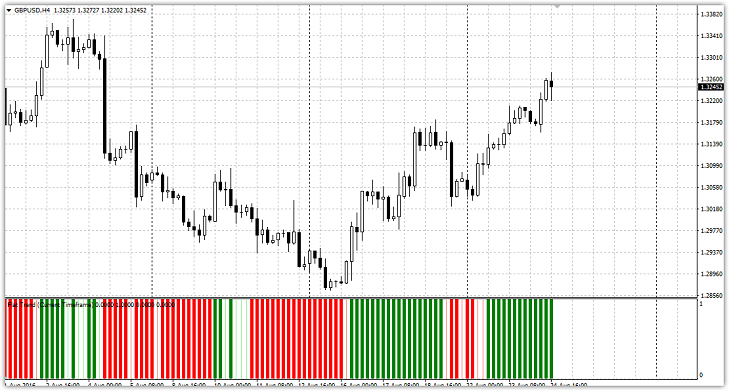
After closing the Data Catalog, go to the navigator panel and refresh the data by right-clicking on the "Indicators" section and opening the additional menu. After the refresh, FlatTrend will appear in the list of custom indicators, and you can simply drag it onto the chart of any currency pair.
The essence and settings of the FlatTrend indicator
The FlatTrend indicator is an improved version of the well-known Parabolic SAR trend indicator. Unlike the original version, FlatTrend takes price changes into account, making the indicator more flexible and allowing for tracking market trends.
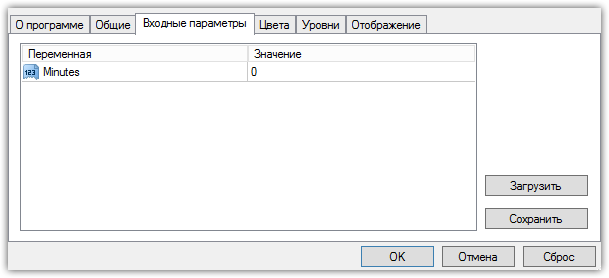
The FlatTrend indicator settings only include one variable: Minutes. If you leave the default value of 0, the indicator will automatically calculate based on the time frame the indicator is set to. However, if you enter a higher or lower time frame, the indicator will display information occurring within the interval specified in the settings. This means you can read information occurring on a higher time frame on a lower time frame, and vice versa.
Application Methods: Trading Signals:
As mentioned earlier, the FlatTrend indicator can be used in two ways: as a filter or as a signal indicator. If you choose to use it as a filter, buy trades should only be opened if the bar is green, and sell trades if it is red. It's important to understand that if the line is thin, the market is flat, and the trade should be postponed.
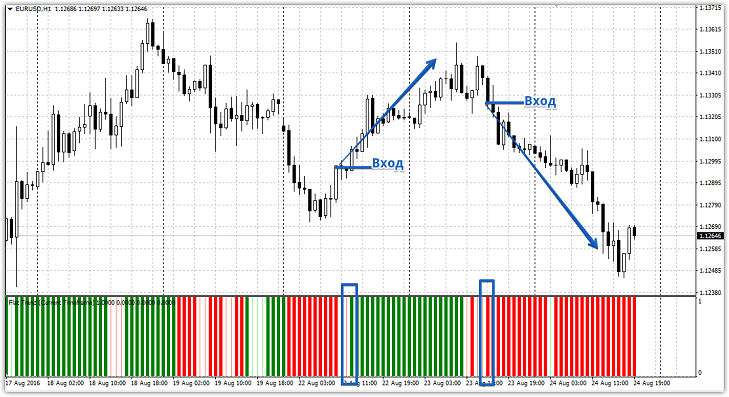
If you choose to use the indicator as a signal tool, you should trade on trend reversals. Thus, you enter a buy position if the red bars change to green, and a sell position if the green bars change to red. A position should only be opened on a closed candle. See below for more details:
In conclusion, the FlatTrend indicator is a multi-purpose universal indicator. However, it's important to understand that a single indicator is not enough for successful trading, so we recommend using it in conjunction with other Forex indicators.
Download the FlatTrend Indicator

