Scalper Dream indicator
Scalping techniques require traders not only to fully engage with the market and strictly adhere to all strategy rules, Money Management,  but also to use stable technical analysis tools that do not tend to change their readings during trading.
Of course, many argue that the key to success in scalping is being cool-headed when making decisions, as this can lead to dozens of losing trades a day, which can seriously damage your self-esteem.
However, in most cases, at the initial stage of choosing instruments, everyone makes a simply huge mistake, choosing oscillators that, to put it mildly, are only good in historical terms and redraw their indicators during trading.
In fact, for a scalper, the main enemy is instruments that repaint.
Scalper Dream is a versatile tool, so it can be used on any currency pair. It's worth noting that profitable scalping is only possible during strong movements, so the indicator is best used during the American and European trading sessions.
Installing Scalper Dream
For full functionality, Scalper Dream must be installed on your MT4 trading platform. After downloading the archive , you'll find that you have two indicator files. This is because the first indicator works in older versions of the trading terminal, while the second works in the new version.
Installation depends on the build you're using. There's nothing new in the installation process. To do this, open the terminal and go to the File menu and open the data directory. Then, in the opened directory, find a folder called indicators and paste the files downloaded from the website into it.
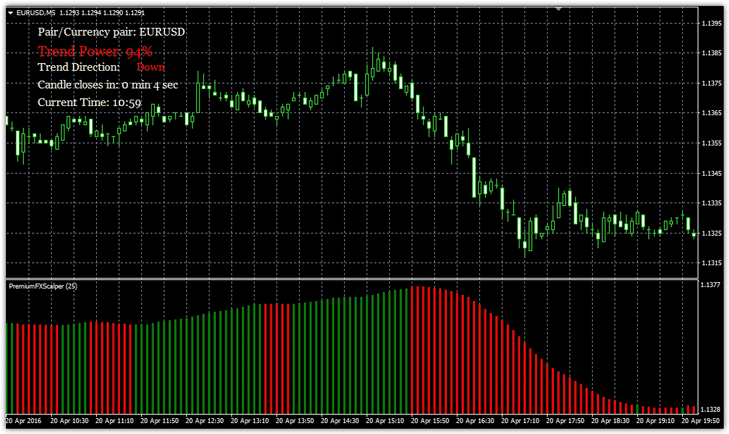
After restarting the platform, the indicator should appear in the "Custom" section. To make the indicator appear on the chart, drag Scalper Dream to the 1-minute or 5-minute chart.
Scalper Dream Indicator Settings and Features
When you launch the indicator, you'll see a histogram with green and red bars. In addition to the indicator itself, an information window will appear in the upper left corner. It displays the trend strength as a percentage, the trend direction, and the time and number of minutes remaining until the bar closes.
Many traders ignore this window, but it contains one of the most important values – the strength of the trend, which you will need when trading.
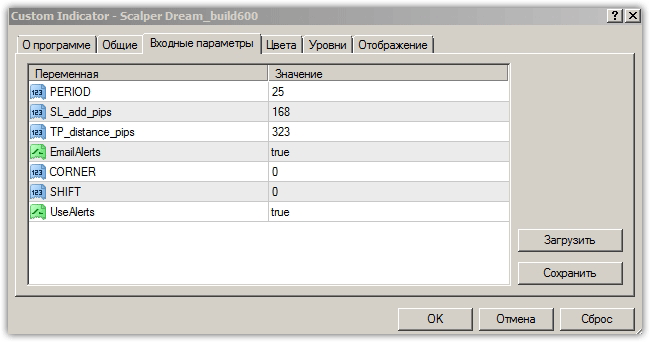
The Scalper Dream indicator has a fairly wide range of settings. The most important parameter, which determines the accuracy of signals, is called Period. Increasing this value reduces the number of signals and increases their accuracy, but at the cost of delay.
Decreasing this parameter will significantly increase the number of signals, but also the number of false ones. When a signal occurs, the indicator will automatically indicate the stop order and profit size with an audible alert.
In the SL add pips settings, you can set the stop loss offset in pips, and in the TP distance pips line, you can set the profit offset in pips. It's important to note that these settings are for five-digit quotes, so if you have four digits, you should change them by removing the last digit.
The EmailAlerts line allows you to enable or disable email notifications when a new signal appears. The CORNER line specifies the placement of the information window on the chart, and the UseAlerts line enables or disables sound alerts.
In the SHIFT line, you can shift the histogram to the right relative to the chart. For example, if you enter the number five, the Scalper Dream histogram will shift five bars to the right.
Scalper Dream Signals
The indicator's main signal occurs when the histogram color changes, and the trend strength from the left additional window is used as confirmation.
Purchases:
1) The Scalper Dream histogram has changed from red to green.
2) In the upper left corner, the indicator indicates that the trend strength is over 65 percent.
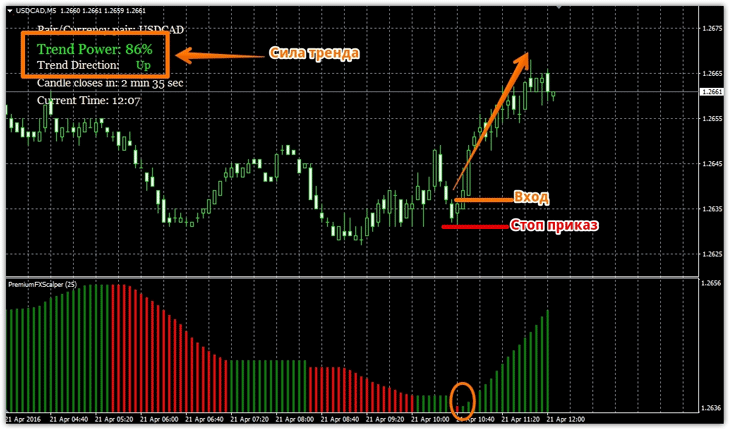
A stop order can be set based on recommendations from sound alerts, or it can be dynamic. We recommend placing a stop at the local low. Exit the position when a signal appears in the opposite direction.
Sell:
1) The Scalper Dream histogram has changed from green to red.
2) In the upper left corner, the indicator indicates that the trend strength is over 65 percent.
A stop order can be set based on recommendations from sound alerts, or it can be dynamic. We recommend placing a stop at a local high. Exit the position when a signal in the opposite direction appears.
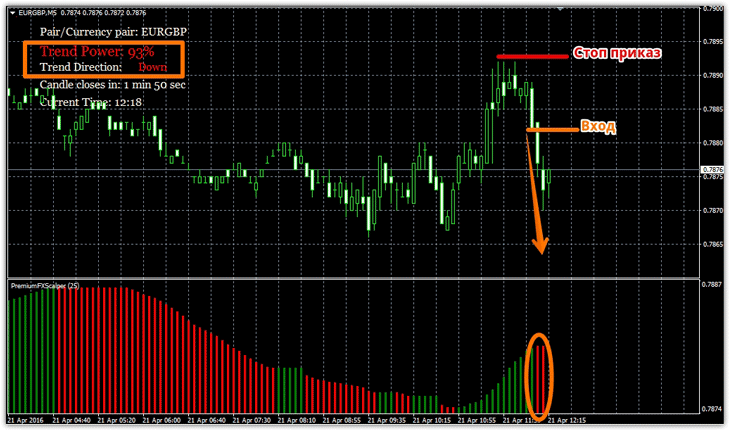
Despite the fact that Scalper Dream has fairly clear market entry signals, it clearly lacks some kind of filter that would filter positions in the direction of the global trend.
Therefore, to increase the profitability of the indicator, it is better to use it in combination with other technical analysis tools.

