VKW Bands – a new generation oscillator
In recent years, virtually all new products in the form of trading indicators, strategies, and advisors for the Forex market have become information products that are more profitable to sell to consumers than truly working trader tools.
That's why, when reading reviews of certain indicators, you increasingly come across a popular phrase that effectively kills the indicator: "it redraws."
Unfortunately, the automation niche is filled with shady salespeople who routinely scam people by selling various indicators whose signals suddenly disappear when the market goes in the wrong direction.
Ultimately, each trader decides for themselves whether to work with signals that redraw at their own risk or continue searching for something new and effective.
VKW Bands is a complex oscillator that uses an additional custom indicator, Metro, to generate signals for traders. VKW Bands can be safely applied to any currency pair or CFD, and the choice of time frame depends entirely on the trader and their trading style.
Installing VKW Bands in a trading terminal
VKW Bands, like its complementary Metro indicator, are proprietary developments for the MT4 trading platform, so before beginning the review and familiarizing yourself with the signals, you should install them on the platform.
By downloading the file at the end of this article, you'll see three indicators: an older version of VKW Bands, a newer version, and Metro itself. Some users have experienced issues with one version or the other, so we've decided to share both.
To install, launch the trading terminal and use the File menu to open the platform data directory, which contains the main working folders. In the window that appears, find the "indicators" folder and copy all the previously downloaded files into it.
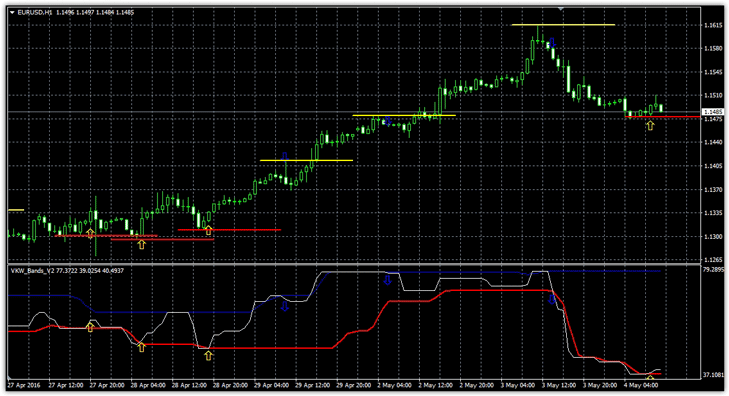
After restarting the trading terminal or updating the Navigator panel, the indicators will appear in the list. By dragging an indicator onto a currency pair chart, you'll get a working chart similar to this:
Operating Principle. Signals.
The chart shows how VKW Bands draws levels with arrows on the chart and in an additional window. It's worth noting that the levels don't repaint, nor do the arrows that appeared in the first additional window. So, let's look at the signals themselves:
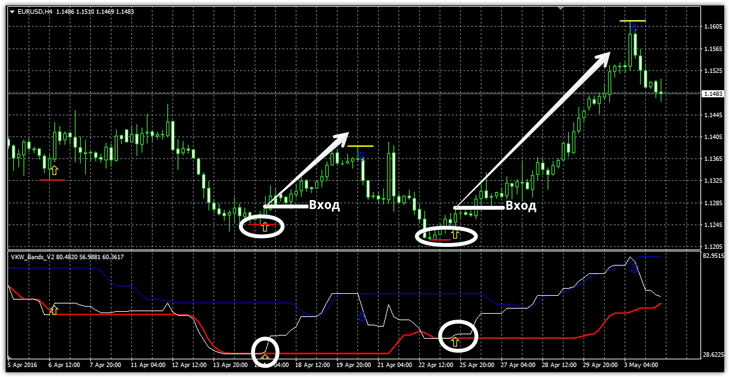
Buy signal:
1) In the first additional window, the white line crosses the red line from top to bottom and then from bottom to top.
2) At the moment of the crossover, the price should bounce off the red support line.
Typically, the appearance of the arrow on the chart and the arrow in the first additional window coincide, so when two yellow arrows appear, we open a buy position.
Sell signal:
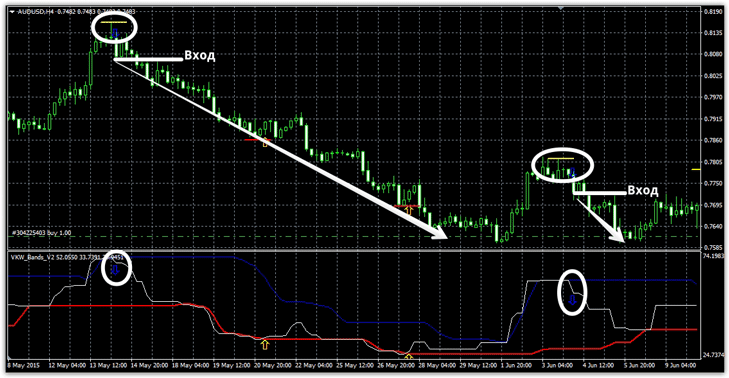
1) In the first additional window, the white line crosses the blue line from bottom to top and then from top to bottom.
2) At the moment of the crossover, the price should bounce off the yellow resistance line.
Typically, the appearance of the arrow on the chart and the arrow in the first additional window coincide, so when two yellow arrows appear, we open a sell position.
An Expert Advisor Based on VKW Bands.
After printing the archive at the end of the article, you'll be pleasantly surprised to see an Expert Advisor based on the VKW Bands indicator.
The operating principle is completely identical to that described in the strategy, with the only exception being that the Expert Advisor can open multiple simultaneous orders based on signals if an additional signal appears and the previous one hasn't been closed by profit or stop loss.
By default, the Expert Advisor closes an order when a signal in the opposite direction appears. A preliminary test of the strategy for the EUR/USD currency pair is shown below:
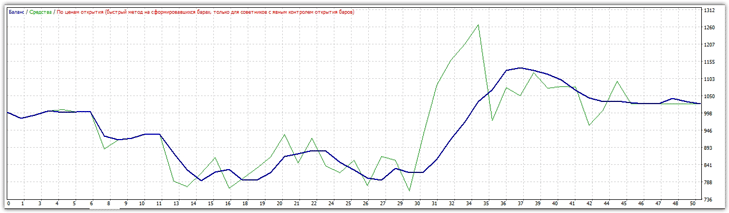
In conclusion, it's safe to say that the VKW Bands oscillator is a truly effective tool, and preliminary testing of the EA has confirmed its effectiveness.
However, it's important to understand that any technical analysis tool, including VKW Bands, has its drawbacks, so it's best used in conjunction with a trend indicator, which will help you avoid entering the market against the main trend.
In the next article, we'll take a closer look at the EA's settings and conduct both optimization and thorough testing.
Download VKW Bands

