Multicharts indicator
Working with a single instrument on the Forex market, namely one specific currency pair, greatly limits a trader's profitability.
For example, if you're a day trader and your strategy typically trades five times per currency pair , the time you spend waiting for the right opportunity to enter the market can be measured in hours, or even days.
To improve their efficiency, most traders prefer to work on multiple currency pairs and stick to multi-currency trading.
However, working with multiple currency pairs on a single monitor can be a real hassle.
To analyze the situation on multiple currency pairs simultaneously, many traders, especially professionals, buy additional monitors, surrounding themselves with charts on all sides. This solution is clearly not cheap, and given that the forex market often serves as a supplementary source of income, it's downright luxurious.
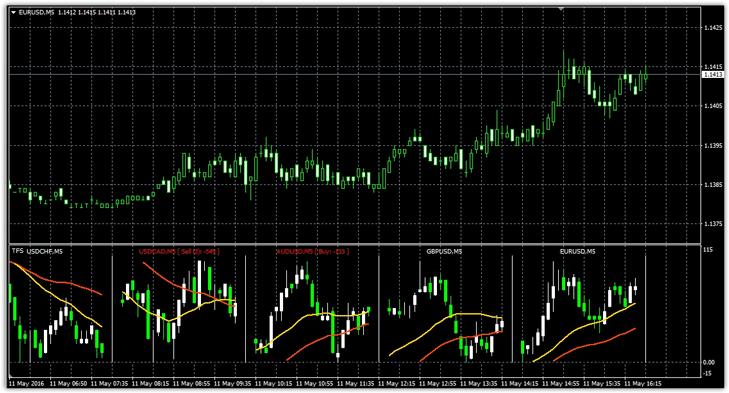
The Multicharts indicator is able to solve the problem of simultaneous analysis of various instruments and brings five additional windows to the chart for various currency pairs, where you can track price dynamics, apply a couple of indicators, and see information on open positions.
Installing Multicharts
The Multicharts indicator is a custom development, so to use it, you first need to install it in the Meta Trader 4 trading terminal. First, download the indicator from the end of this article.
We've included two versions of this tool in the file. The first version is installed as a standard indicator by dropping the file into a folder called indicators, which can be accessed through the File menu and opening the root directory.
The second version is installed as an installation file, where you need to specify the path to the indicators folder in the root directory during installation. Both versions are essentially identical, the only difference being that the second version has the ability to display six additional windows instead of five.
After installation, drag Multicharts onto the chart of the desired pair:
Basic Indicator Features. Operating Principle.
The Multicharts indicator displays the following currency pairs in the first additional menu by default: EURUSD, GBPUSD, AUDUSD, USDCAD, and USDCHF. For obvious reasons, the charts are not displayed in their entirety, but rather in their most recent fragments, allowing you to monitor the current market situation.
Below the charts, in additional windows, the indicator displays the price movement as a percentage of the previous day, allowing you to identify rapidly rising or falling assets.
To improve functionality, the developers have implemented a moving average indicator, which is displayed directly on each chart. When opening positions, order placements are visually visible on the chart, making it easy to monitor the status of open positions.
Moving averages can provide signals when they intersect, but Multicharts is primarily designed for simultaneously monitoring the situation on multiple currency pairs.
Multicharts Settings
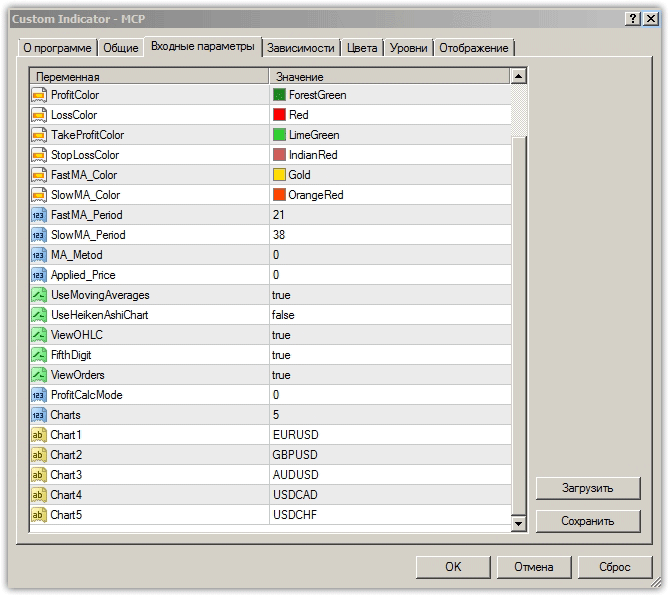
The Multicharts indicator settings can be divided into graphical and technical. Graphically, you can change the color of the bearish and bullish candles in the Bear Candle Color and Bull Candle Color rows.
You can change the color of the fast and slow moving averages in the Fast MA Color and Slow MA Color rows.
The Profit Color and Loss Color rows set the color of the stop loss and profit lines.
Technically, you can enable or disable the display of moving averages in the Use Moving Average row. You can set the fast MA period in the Fast MA Period row, the slow MA period in the Slow MA Period row, and the moving average type in the MA Method row.
You can also enable Heiken Ashi candles in the Use Heiken Ashi row. You can enable the display of OHLC prices in the Show OHLC Prices row. To enable or disable order rendering, select the corresponding option in the ViewOrders row.
trend indicators for analysis , which is clearly insufficient for full-fledged trading.
Download the Multicharts indicator.

