Install an Expert Advisor, Indicator, or Script in MetaTrader in a Few Clicks
Traders often need to use third-party scripts for the MetaTrader trading platform. After downloading these scripts , expert advisors , indicators , or templates from the internet, they need to be added to the trading platform. Previously, this process was accomplished by transferring the downloaded files to the appropriate folders in the trader's trading terminal. However, progress continues, and after updating MetaTrader, you may suddenly find that the Experts, Indicators, or Scripts folders are no longer in their usual locations. Don't worry, this has actually become much easier, and you can now install any script into your trading platform in just a couple of clicks.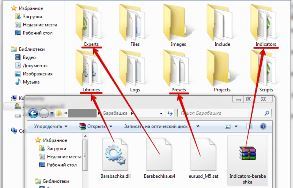
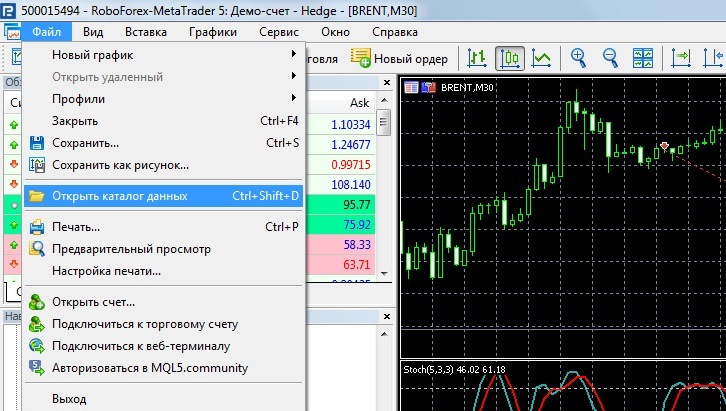
And select the line “Open data directory” from the drop-down menu:
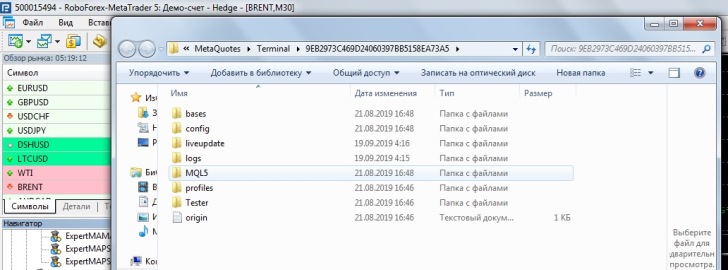
Then, if you have MetaTrader 5 installed, open the "MQL5" or "MQL4" folder when working with MetaTrader 4. Note that MT4 templates are located directly in the root folder.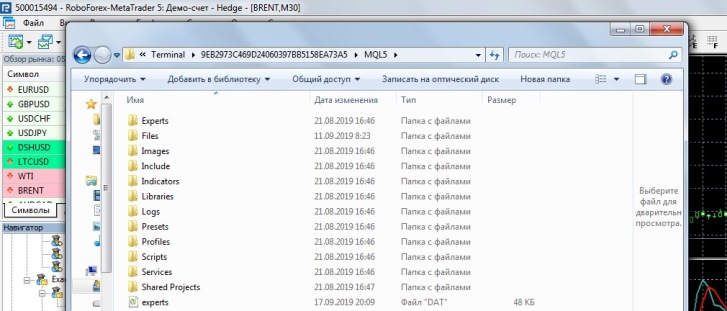
Next, move the downloaded file to the appropriate folder: Expert Advisors to "Experts," indicators to "Indicators," and scripts to "Scripts."
The final step is to restart your trading platform. After reopening, the installed scripts will appear in the navigator tab, allowing you to easily add them to a currency pair chart.
You can also perform a similar installation using the MetaQuotes editor; this option is no different from the one described above.

