Advisor Constructor
Every trader, having gone through the beginner's journey, sooner or later comes to the conclusion that for effective  trading, they need to automate their own trading tactics.
We all understand that when working manually, the human factor affects the effectiveness of a trading strategy, especially when it comes to strategies where entering a position quickly and without any delay is crucial.
Unlike humans, an advisor is immune to concepts such as fear, greed, fatigue, inattention, or distraction. Its primary task is to execute the commands you've given it, not to debate whether to buy or not.
Moreover, you will never know whether your strategy is effective or not until you program it and conduct appropriate testing according to all the rules.
Despite the need to transition from manual to automated trading, many traders are unable to do so for a number of objective reasons. Programming a strategy requires knowledge of a programming language or huge fees to programmers, and no one can tell you whether it will ultimately be profitable.
Therefore, to save your money and time, I suggest using an advisor builder, which will allow you to create advisors based on standard and popular indicators.
Forex Strategy Builder Pro
There are a large number of similar programs available online, but they are all very difficult to learn or only available in English. Therefore, as an example, we will use the simplest and most accessible expert advisor builder, Forex Strategy Builder Pro.
Before you get started, go to the end of the article and download this program from our website. The installation process is straightforward, so after the first launch, you might see something like this:
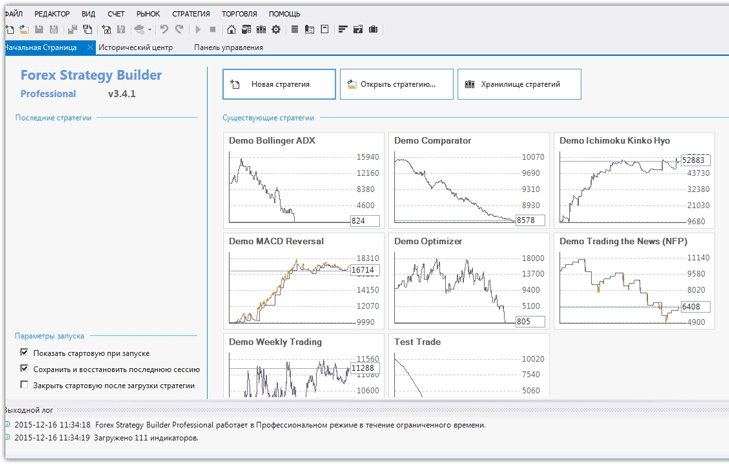 The program will initially launch in English, but the settings can easily be changed to Russian. To begin creating an advisor in the designer, click the "New Strategy" block. The workspace will appear:
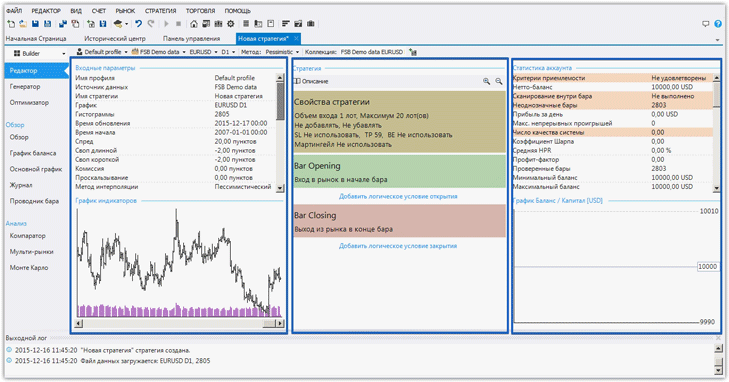 The workspace can be divided into three blocks: "Input Parameters," "Strategy," and "Account Statistics." In the "Input Parameters" block, you can see the currency pair on which the test will be performed, the time period, timeframe, quote source, spread, swap, commission, and the test interpretation method.
All these parameters can be adjusted to closely approximate real-world trading conditions. In the "Account Statistics" section, you can see all the account information resulting from testing your newly created strategy.
The most important section for us as users is the "Strategy" block, as this is where we create our future advisor. This block is divided into three sections: "Strategy Properties," "Market Entry," and "Closing Trades.".
In each section of the Expert Advisor Builder, you need to configure settings specific to your trading strategy. In the Strategy Properties section, you need to specify the lot size or percentage of the deposit to open the position, the stop order, and the profit target. You can also enable or disable martingale, as well as position management features.
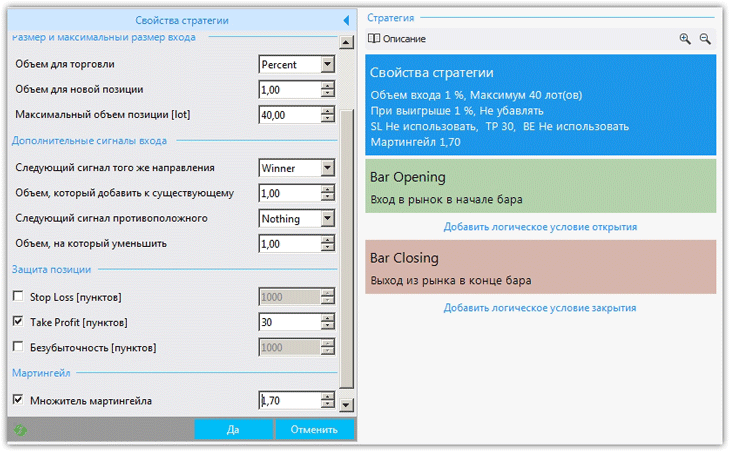 For this example, we've set the advisor to calculate the lot size based on the risk percentage and enabled martingale with a 1.7 multiplier. The next step is to set the trading conditions using indicators in the "Market Entry" section.
To do this, go to this section and select the indicators we need. We decided to use the moving average crossover and selected the MA Crossover indicator, in which we set the slow and fast MAs.
The range of signals for entering a position is simply enormous, so almost all strategies based on indicators can easily be automated.
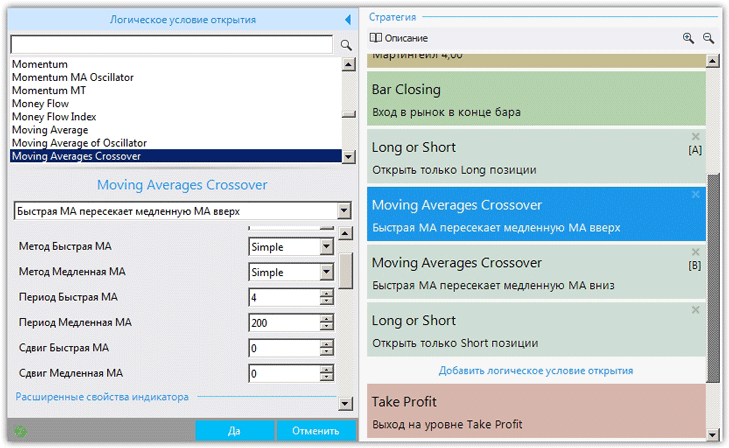 The next step after clearly defining the signals for the future expert advisor is to select the desired algorithm in the "Closing Trades" section. The system offers options for closing positions based on stop orders, profit, and various indicator readings.
You can also set a time-based position closure. For our experimental advisor, we set it to close on profit, since we had previously enabled martingale.
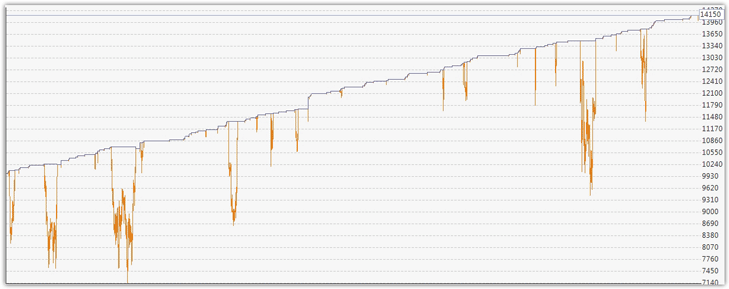
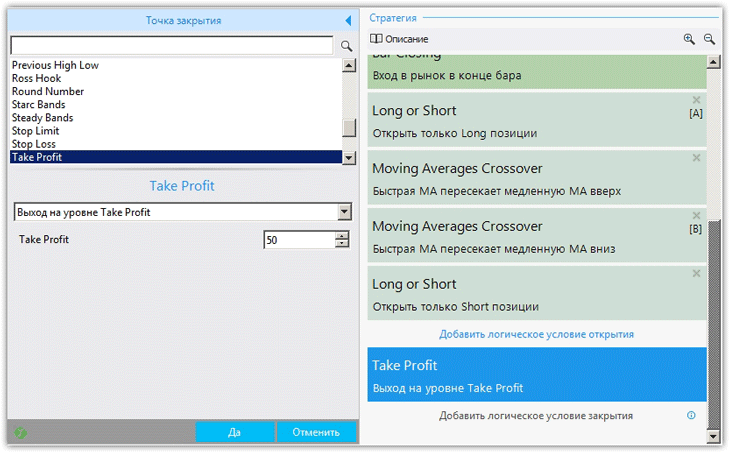 This concludes the creation of the Expert Advisor. Next, we look at the "Account Statistics" section to see how the Expert Advisor performed historically. In our case, the Expert Advisor closed with a profit, and you can see the result in the image below:
 We also have the option to test the script in multi-currency mode, which means setting up several currency pairs and getting to know the strategy's behavior on each. To do this, select Multi-Markets in the left sidebar. Then, add the desired instruments and click the "Start" button. Our robot's performance in the multi-currency tester is shown below:
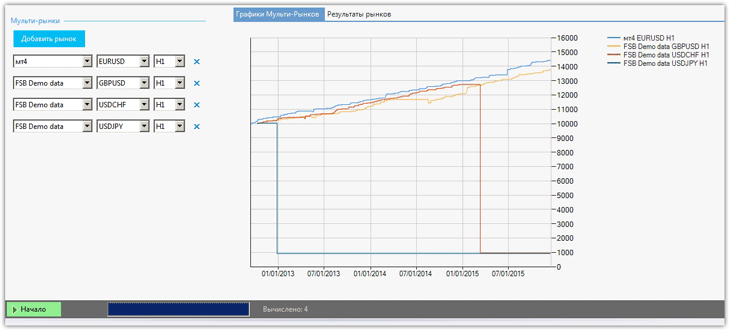 As it turned out, the trading strategy we proposed yielded profits on two currency pairs, namely EUR/USD and GBP/USD.
In addition to the advisor builder discussed above, the program includes a trading strategy generator, which automatically builds an advisor from specified indicators, and an optimizer, which allows you to optimize the expert's settings.
The result of your work can be saved as an advisor for either MT4 or MT5 by clicking the "Export Advisor" button.
Download the Expert Advisor Builder.
You can always download ready-made advisors in the section of our website http://time-forex.com/sovetniki

