Trading simulator
In any professional field, what distinguishes a beginner from a professional is the presence of experience, which allows them to apply acquired theoretical knowledge in real life.

Due to the nature of the trader's profession, gaining experience is always proportional to the amount of money lost, since the learning process is ultimately tied to trading real money.
However, online trading allows you to quickly overcome the learning process and evaluate your capabilities for free, and special historical testing simulators help us do this.
A trading simulator is a specialized Forex advisor program that allows you to test your own developments and strategies against historical data.
A notable feature of this simulator is the ability to test and hone your skills against historical data at an accelerated pace.
The advisor has an intuitive interface that any novice trader can easily handle.
It is worth noting that the trading simulator can broadcast absolutely any historical data, be it currencies, stocks or indices, as well as working on all time frames.
Installing a Forex simulator
Several trading simulators are currently being actively distributed, but most of them are either paid or severely limited in their capabilities.
In our case, the trading simulator is not only distributed free of charge, but is also included in the platform's developer library, allowing you to install it without downloading any additional files.
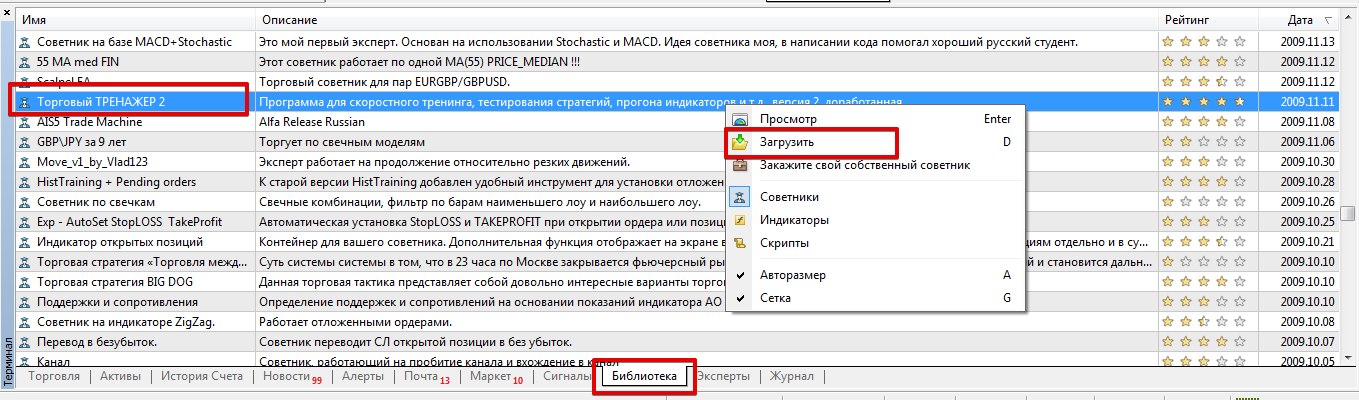
To install the simulator through the library, launch your MT4, open the "Terminal" panel, and go to the "Library" tab. Find the trading simulator in the list that appears and download it as shown in the image below:
If installing via the library presents difficulties, you can easily install the simulator using the standard method.
To do this, simply download the advisor file at the end of the article and place it in the appropriate folder in the data directory. The advisor installation procedure is described at this link: http://time-forex.com/praktika/ustanovka-indikatora-ili-sovetnika. After updating the trading terminal, the simulator will be ready for use in the navigator panel.
How to use the trading simulator:
The trading simulator is designed as an advisor that expands the functionality of the standard strategy tester.
Before starting testing, the trader must ensure that the quotes and historical data are complete and, if necessary, pre-download them.
The simulator is used in "Visualization" mode during testing in the strategy tester. After testing is launched, you will see a number of symbols in the left corner of the chart, namely BUY, SELL, Mod, and position volume.
To open a new trade, click on the icon and then drag it up slightly. To close a position early, simply move the moved button back into place.
Stop orders and profits for trades are set in points. To change the default values, double-click them, then customize the text style.
To modify open trades, drag the MOD button to change the required data.
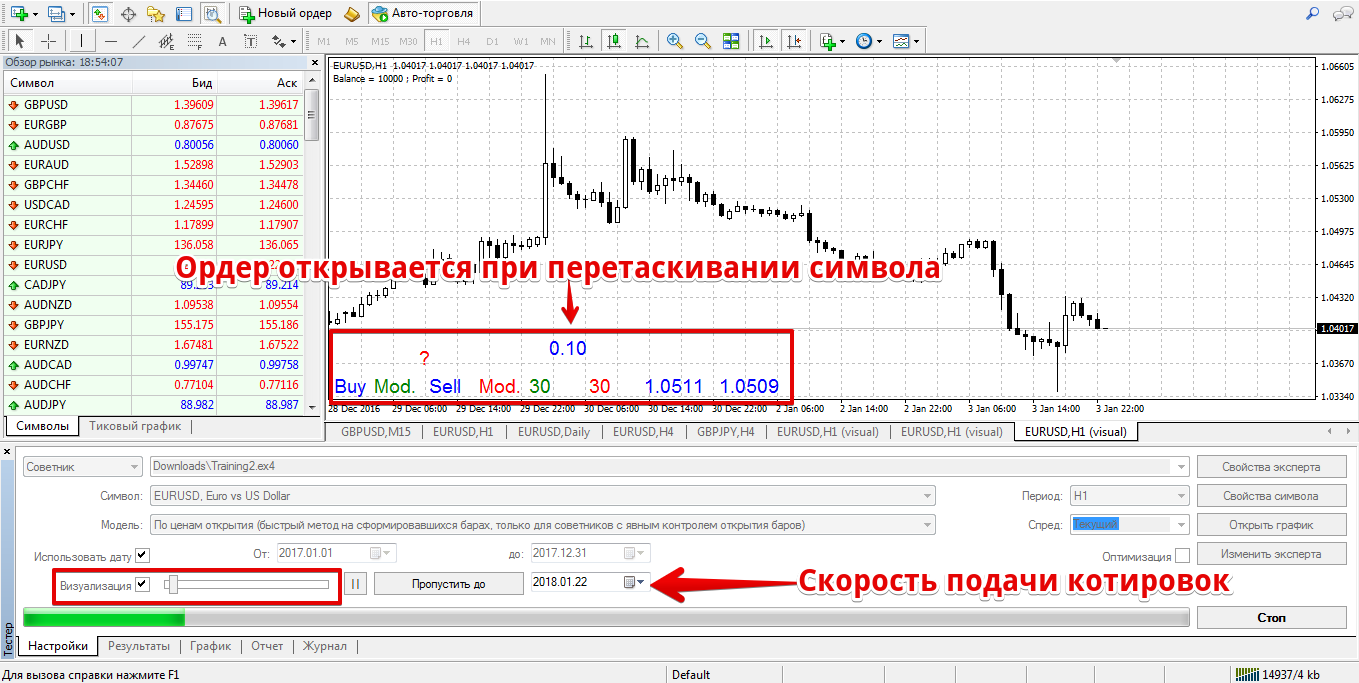
A notable feature of using the trading simulator is the fact that all positions entered into visualization mode are recorded in the journal, resulting in a report generated that is exactly the same as when testing any autonomous expert advisor.
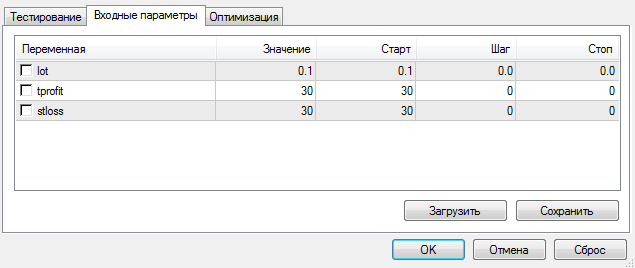
Regarding the settings, the simulator initially allows you to set three variables, which will significantly simplify the testing process.
In the "lot" line, you can specify the position volume, and in the "tprofit" and "sloss" lines, you can set the profit and stop orders in points that will be present when the simulator is launched on the chart.
manual strategy of interest without risking your own capital .
Download the trading simulator.

