Trainyourself EA: A Simple Manual Strategy Tester
Testing trading strategies allows traders to explore many nuances, experience various trading situations, understand the underlying mechanics, and, most importantly, develop an action plan.
Forex testing programs also allow you to understand the effectiveness of a chosen strategy and simulate its profitability and drawdown in the future.
However, while MT4 developers have created a robust tester for trading advisors, testing a manual strategy with the same speed using standard software is not possible.
In this article, you'll learn about one such simple manual strategy tester. Trainyourself EA is an auxiliary tester that allows you to backtest manual trading strategies in visual mode by dragging and dropping graphical objects on the chart.
It's worth noting that Trainyourself EA also has an additional feature: it allows you to automatically draw trend lines on the chart.
Installing Trainyourself EA
Typically, such testers have quite a wide range of functionality and are distributed on a paid basis.
In our case, the Trainyourself EA is a simple manual strategy tester that works exclusively with market orders. Therefore, it is not only distributed free of charge but also published in the official MT4 developer library.
Therefore, you have two options for installing this robot, namely through the library in your MT4, or using the standard method through the data directory.
To install an advisor through the library, launch your trading terminal and go to the "Tools" panel, where information about your balance is located.
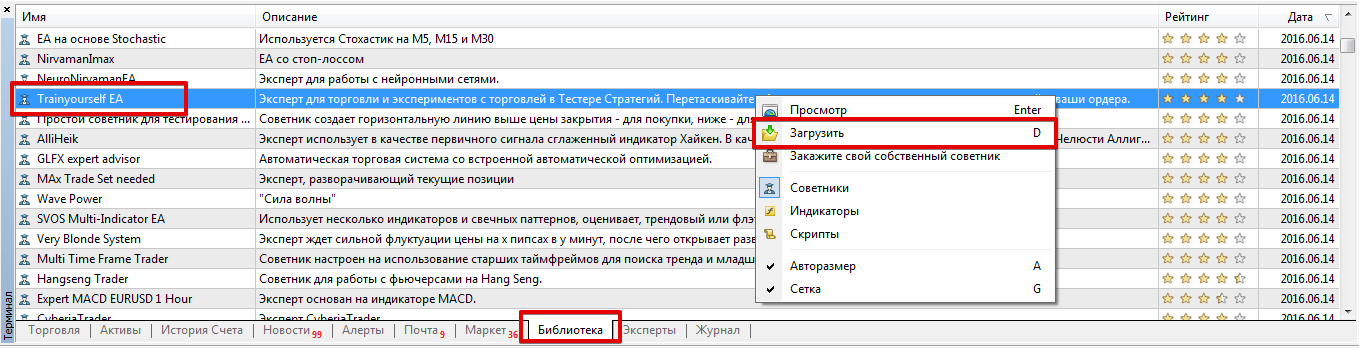
Then, the next step is to open the "Library" tab and perform a simple sorting of the received files so that only advisors are displayed in the list.
After you launch the library, find Trainyourself EA in the list that appears and use the additional menu as shown in the image below to download it.
If installing via the library is difficult, you can install Trainyourself EA using the standard installation method.
To do this, scroll to the bottom of the article and download the robot. Then, copy the downloaded file to the appropriate folder in the platform's data directory, specifically the folder named "Expert."
After installation, you need to refresh the trading terminal in the "Navigator" panel or restart it, then proceed with testing.
Working with the Manual Strategy Tester
As we already noted, Trainyourself EA is designed for testing manual strategies in the Strategy Tester.
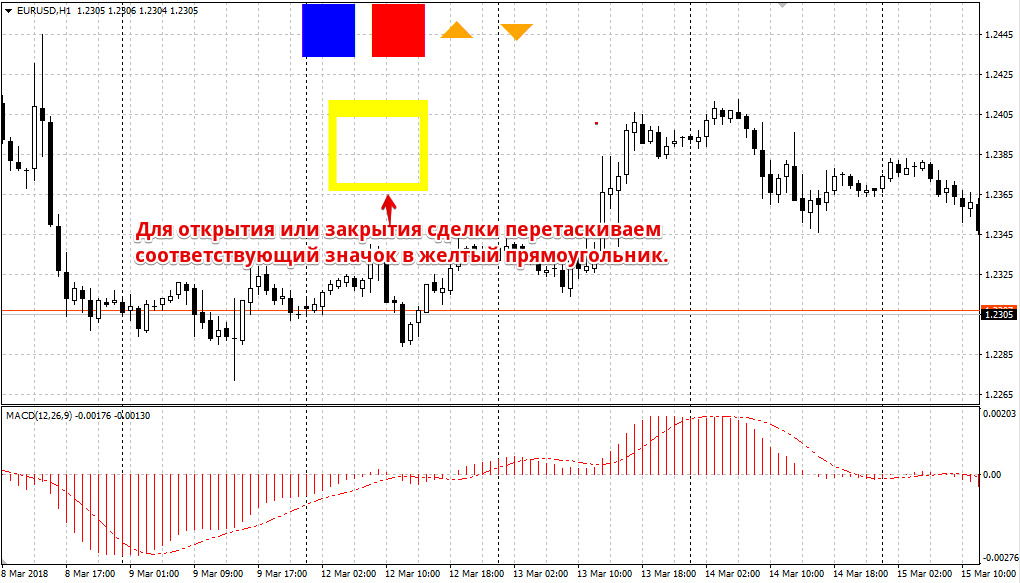
To test your strategy, launch Trainyourself EA on a historical period in the Strategy Tester in "Visualization" mode. Five icons should appear on your chart: two arrows, two rectangles, and a basket.
These arrows indicate the direction of trades: a downward arrow opens a sell position, and an upward arrow opens a buy position. The red square allows you to close open positions, and the blue one draws a trend line on the chart.
To perform any action, you need to double-click on the icon and drag it to the yellow basket.
It's worth noting that all open and closed trades are recorded in a journal, so by the end of the test, the strategy tester will generate a detailed report for you. This report allows you to examine data on your balance, drawdown, number of profitable and losing trades, and more.
The manual strategy uses statistical stop orders and profit targets, which are pre-set in the Take Profit and Stop Loss variables.
This tester also supports a mode in which the EA will open a buy position if the price is above the trend line, and a sell position if it is below. This mode can be enabled or disabled in the Trend Trade line.
In conclusion, Trainyourself EA is a simple manual strategy tester that allows you to collect statistics on your strategy or indicator. One drawback is the inability to test strategies based on pending orders!
Download Trainyourself EA

