Forex informer programs - Insider Indicator
It's no secret that the market is driven by the crowd, or, more simply, the overwhelming majority of players. Traders are conventionally divided into bulls and bears, and pricing occurs based on the principle of balancing the scales: when bullish orders outnumber bears, the market rises, and when bearish orders outnumber bulls, the forex market declines.

This arbitrary division perfectly captures the internal processes that occur during pricing, but does this model really work today?
After all these years, does the simple principle of "whoever has the most wins" really work in the age of modern technology?
Based on this hypothesis, a person who knows the number of applications and their direction could become a millionaire in a matter of days.
However, no matter how the crowd rules the market and no matter how obvious the trend, unfortunately, no more than 5 percent of traders, who are major players or those who managed to join them, make money.
The fact is that it is the crowd that feeds the big players, falling for tricks in the form of unexpected surges that rip out our stops.
The Insider indicator is a unique tool that visually displays the number of bullish and bearish orders, as well as zones where either bulls or bears have opened.
The Insider indicator displays the information every technical trader dreams of: it clearly shows who is currently winning in the Forex market—the bulls or the bears. The indicator can be used on any currency pair chart, and information is available for over 50 different currency pairs.
Installing the Insider Indicator:
Although the developers call this tool an indicator, Insider is actually an Expert Advisor. It's important to understand that Insider doesn't perform any functions other than displaying information on the chart, so despite its unique design, it is a standard indicator.
To use the Insider indicator, you'll need to go to the end of the article and download the archive, then install it in your trading terminal and configure some platform settings. To do this, go to the "File" menu in your MT4 and open the data directory. You'll see a series of platform system folders, so find the folder named "expert" and drop the Insider into it.
After you've dropped the indicator into the appropriate folder, update it in the Palette and Navigator, after which the Insider will appear in the list of advisors.
Since the Insider draws important data from external sources, you'll need to go to the Tools menu and open the Settings menu item. Next, find "Advisors" in the list of tabs and enter the website http://www.myfxbook.com.
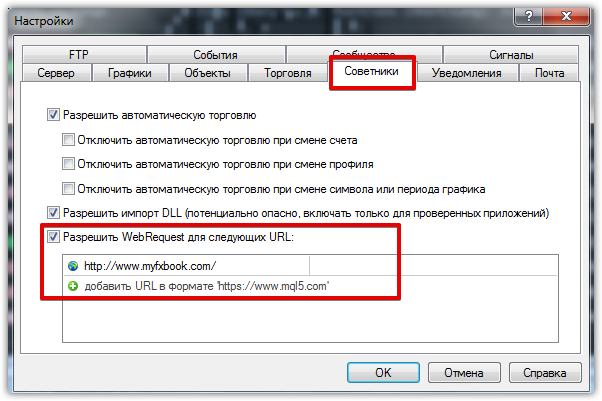
Once you've adjusted the settings, you can safely drag Insider onto the chart. However, for it to work, you'll need to enter your username and password from the website we specified in the settings. So, you'll get something like this:
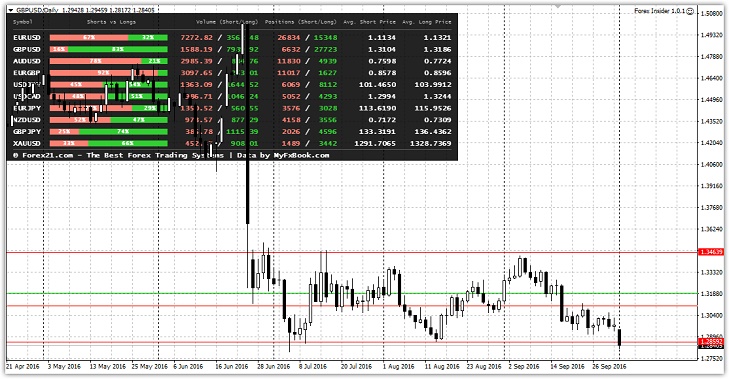
Insider Data. Application.
After using this indicator, you might be wondering: Where does the data come from? It's no secret that some brokers, such as Amarkets, Oanda, and many others, publish information on the ratio of trades within their companies. However, this data doesn't reflect the majority opinion, and a simple signal newsletter can dramatically influence the results a Forex broker delivers. Therefore
, the developers of the Insider indicator took a completely different approach. They decided to obtain trade data from the largest online monitoring service, myfxbook, which has registered traders from virtually all over the world. This way, the indicator displays more objective data than services offered by various brokers.
In terms of application, you can see two lines on the chart, one green and one red. The red horizontal line shows where sell orders are concentrated, while the green line shows where buy orders are concentrated. Although the crowd creates the market, unfortunately, it's the minority that profits, leading the crowd like a guide.
That's why the trading principle boils down to trading from the weakest signals, and the fewer of them, the greater the likelihood of a reversal. The actual application of this indicator boils down to comparing a signal from your strategy with the percentage scale when it arrives, and if the balance favors your signal, discard it.
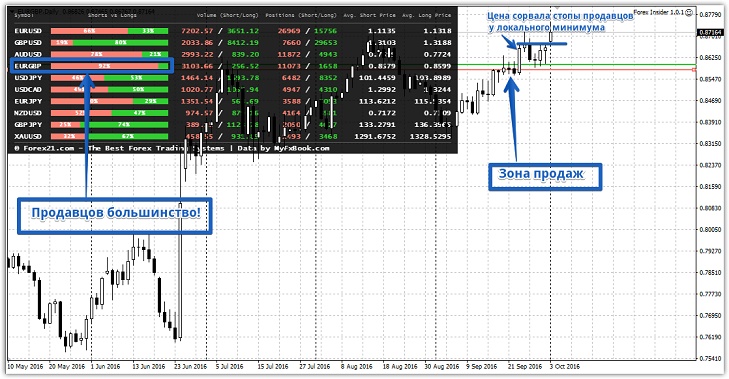
As an example, the EURGBP chart shows that 92 percent of traders are selling. Ultimately, the chart moves upward with renewed vigor and gradually triggers sellers' stop orders:
In conclusion, I'd like to note that the Insider indicator allows for a more global analysis of the forex market and allows tracking both crowd sentiment and large individual players.
Download the Insider indicator

