Trading session times, schedule, and informer
An excellent program for working on Forex, it displays trading session times. Now you don't need to check the schedule; you can immediately see which platform is currently trading.

The trading session schedule will always be at your fingertips, allowing you to develop the most effective trading strategy based on the trading instrument you use, making your work more efficient.
The main advantages of this software are that it operates independently of the trader's terminal, requires no installation, and is ready to use immediately.
You can customize your time zone, which means you can select a more accurate time that matches your broker's trading platform.
In addition, no changes are required when switching to winter time; everything will happen automatically.
After you've downloaded our website's archive, unzip it to a convenient location. The folder that appears contains a file to launch the program. You can simply copy it to your desktop and launch Forex Market Hours Monitor.
Another advantage is that the program does not require installation; it can be launched simply from a file.
A window will open in front of you, showing you when a particular Forex session will begin, depending on the set time zone.
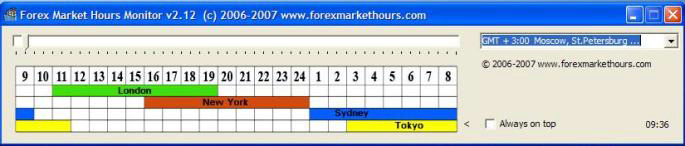
In addition, the slider above the table indicates which trading session the market is currently operating in.
For the convenience of the trader, all platforms are highlighted in different colors:
• Blue - Australian trading session and the inscription "Sydney".
• Yellow - Asian trading session "Tokyo".
• Green - European trading session "London".
• Brown - American session "New York".
The scale of numbers shows the start of trading, and in the lower right corner you can see the current time of your time zone.
Setup, trading sessions are Moscow time
The Market Hours Monitor program is quite easy to set up. After launching it, select your time zone from the drop-down box on the right. Depending on the difference with GMT and following the prompts, for example, if you live on Moscow time in winter, select GMT +3.
Always on top is a very useful feature: if you check this box, the informer will always remain on top of other working windows, meaning you won't have to switch between windows while working in the trading terminal.
The program uses virtually no computer resources, making it suitable for installation on low-powered devices.
For more information on trading during different sessions, see the article "Forex Trading Sessions."
Download Forex Market Hours Monitor.
There are also other ways to have the schedule of Forex trading sessions at hand, for example, using a special script that will allow you to control trading directly in the trading platform - http://time-forex.com/indikators/time-ii-vbo.

