Setting stop orders with a mouse.
Setting stop-loss and take-profit orders has always been a top priority when trading Forex. If you're trading a single open position, it's easy to change its parameters as the market situation changes. However, if you have multiple orders open for a single currency pair, this process can take quite a while.
This script is perfect for simultaneously changing stop-loss parameters for multiple open positions.
Using this script, you can pre-set stop-loss and take-profitand then adjust them as needed using the mouse.
This means that if the price is confidently moving toward profit and you don't want to lose your existing profit, you can double-click on the desired line and move it a certain distance. This will lock in your existing profits and expand your prospects for achieving your intended profit.
While testing the script for setting stop orders with the mouse, I discovered that when launched, it adds four horizontal lines to the currency pair chart. Stops are separate for short and long positions. The stop-loss and take-profit values you set must match the minimum values set by your Forex dealing center.
The lines are easily moved using the mouse, but I couldn't get the script to work. Perhaps you can make the appropriate adjustments to its operation, or your trading terminal will be more suitable for this program.
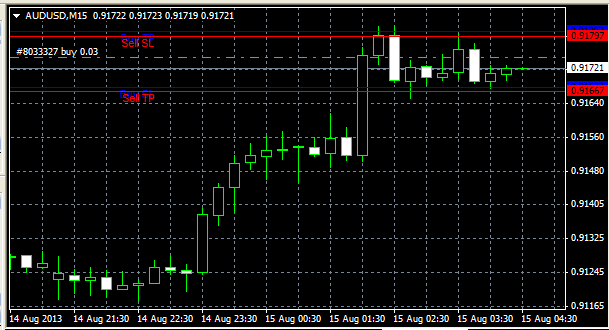
Overall, the script's creators' idea is quite interesting, and even the existing version can be used as a reference point when placing new Forex orders. The script allows you to set the distance in points from the current price, while in the order settings you only need to specify the trigger price.
Download the script for placing orders with a mouse.

