Automatic Forex lot calculation using a calculator
When trading on Forex, it is quite important to correctly calculate the volume of the upcoming transaction in accordance with the amount of funds in the trader's account.

The optimal indicator is considered to be when the size of an open position is no more than 10% of the amount of funds in the trader's account.
This approach will allow for the most optimal ratio between the transaction volume and the size of the trader's deposit.
The easiest way is to automate all calculations and entrust them to a special script that is installed on the MT4 trading platform.
Calculating a Forex lot size using a calculator allows you to immediately set your planned collateral level and, in just a few seconds, obtain the maximum allowable transaction volume.
To install the calculator, simply copy the downloaded file to the "scripts" folder of the installed trader terminal, then launch the terminal and double-click the "Lot Calculator" script.
The program settings window will then appear. Switch to the second "Input Parameters" tab and set the desired margin level. The default is 10, which is essentially the maximum allowable value for medium-term strategies:
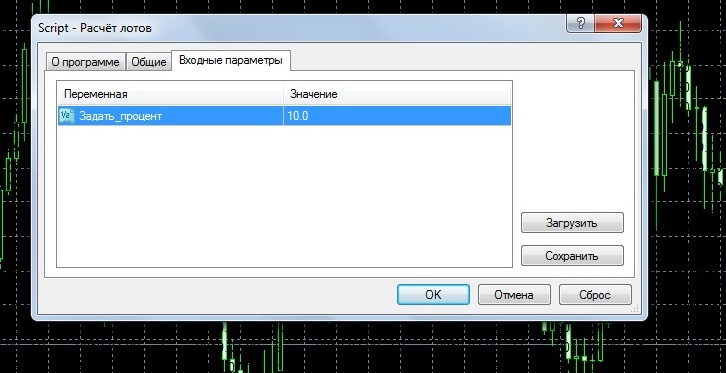
Click "OK" and see the volume of a trade that is currently allowed on Forex, taking into account the indicator we set.
The calculation is accompanied by a pleasant ringtone, and you receive the calculator's result on the screen:
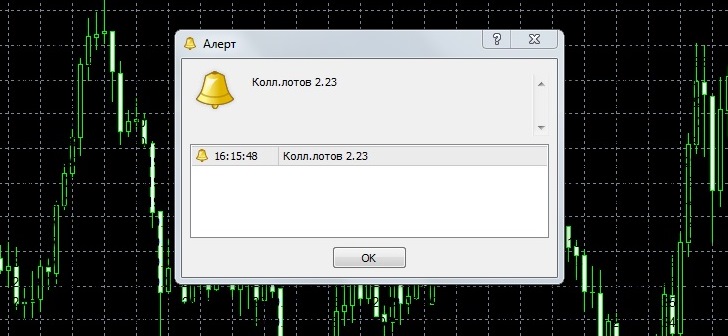
To minimize the script, simply click the OK button again. After this, the calculator window will minimize and the next lot calculation will need to be started again.
If we consider the tool's operation using a specific example, with a deposit of $5,000 and a collateral level of 10%, it was recommended to open a transaction with a volume of 2.23 lots.
After a 2-lot trade was opened, the script recommended opening an order with a volume of no more than 2 lots, meaning that previously opened positions were also taken into account.
When setting the "Set Percentage" value, the following rule applies: the lower the percentage, the lower the risk. Conversely, increasing the percentage increases the risk per trade. For scalping, you can use a value higher than 10%.
Download the Forex lot calculation script.
As an alternative to this script, you can use the trader's online calculator.

