TrailinRobot – a trader's indispensable assistant!
Sometimes routine tasks can be incredibly time-consuming. Setting a trailing stop and trying  to move it as closely as possible to follow the trend is one of them.
I'd never previously thought about trailing stops or their importance in trading, much less used them very rarely. However, I encountered a situation where I had about ten open orders, which at the time formed a well-structured pyramid.
In order to squeeze the maximum out of the market, I needed to move the stop order beyond the price of each order, and this needed to be done at a precisely specified distance so that the outer orders of the grid were 100% brought to a breakeven point.
Naturally, in all the hustle and bustle of orders, I made a huge mistake by forgetting to move some stops, which ultimately backfired after the price reversed.
All the spoken and unspoken rules of trading and money management tell us that after the price has moved an acceptable distance from the opening price, the position should be moved to breakeven.
This feature is implemented in the MT4 trading terminal through the use of a trailing stop. By the way, have you ever wondered what the primary and most important function of a trailing stop is? It's primarily necessary to move our stop order along with the price movement, so that in the event of a sharp price reversal, the trader can lock in a small profit rather than being left with nothing. Essentially, it's your safety net, which will always help you preserve a portion of your earned profits.
TrailinRobot is a universal expert assistant whose primary function is to set a trailing stop and monitor its price movement. The developer of this expert advisor is Rita Lasker, a world-renowned seller of various trading innovations. Frankly, almost all of her experts are designed for sales, not successful trading, but TrailinRobot is perhaps the only product worth considering.
The expert advisor monitors all positions and moves your stop order according to the settings you specify. To begin examining the expert advisor settings, you need to install it in your MT4 trading terminal. To do this, download the archive containing the expert advisor at the end of this article. In the File tab of your trading terminal, open the data folder and place the expert advisor in the "expert" folder.
The next step is to restart the terminal for the expert advisor to appear in the list. Then, go to the Expert Advisors section and drag TrailinRobot onto the chart of the currency pair you traded. You'll see a settings window, which I'll briefly describe below:
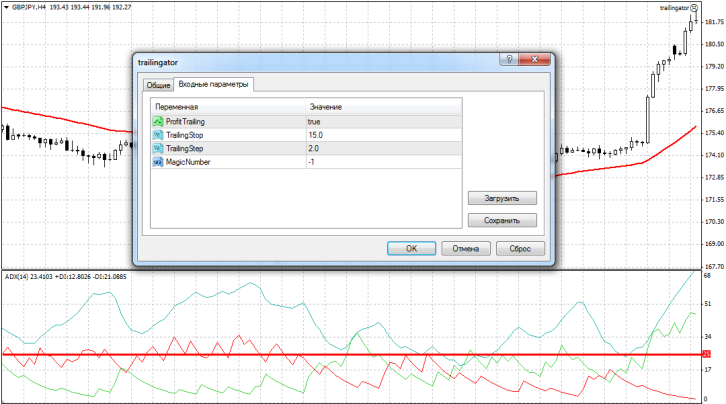
The Expert Advisor's author offers only four settings, but trust me, this is quite sufficient for an effective assistant. In the ProfitTrailing line, you can enable the Expert Advisor to set a trailing stop and track it whenever your position has at least one point of profit. If you disable this feature, the Expert Advisor will simply move your trailing stop by a specified distance in points.
In the TrailingStop line, you can specify the distance in points at which your stop order will be moved. In the TrailingStep line, you can change the trailing step. The idea behind this setting is that when the price moves the distance specified in the TrailingStop settings, the expert advisor will begin moving your stop order by the number of points you set in the TrailingStep line.
Simply put, if you set a step of 2 points, then every two points the expert will move the stop order following the price.
The MagicNumber line specifies a special number to prevent the EA from confusing orders. If you leave the default value of -1, the EA will trail all open positions without exception.
In conclusion, I'd like to point out that using TrailinRobot will help you forget about the problem of setting a trailing stop forever. Thank you for your attention, and protect your profits!

