Advisor Assistant Zero1.0
We've all heard many times that there are not only advisors that work  independently, but also various assistants that can greatly simplify the work of manual trading.
Of course, automated trading experts will always be indispensable, since full automation of the trading process completely eliminates the human factor.
However, studying the stories of successful traders, you realize that it is precisely human qualities that allow them to rise to the top, because emotions can have a detrimental effect on an account, and, conversely, create precedents that are later described in various books.
However, despite all the advantages of manual trading, many processes become beyond human control.
Unfortunately, you won't be able to stay focused and attentive all the time, and trivial mistakes, such as forgetting to drag and drop profits, correctly calculating a series of orders, and closing them in the black at a certain profit, can seriously affect your success.
To avoid silly mistakes and simplify standard trading functions, various advisor assistants are created, and one of them will be discussed in this article.
The Zero1.0 Advisor Assistant is a script implemented as an advisor for continuous monitoring of open orders. The beauty of this assistant is that it monitors open orders and visually displays the break-even point on the chart as a line.
In addition to its simple and intuitive function, it is also capable of closing positions at a specified profit. Zero1.0 can work with a single order, display the break-even point for a series of orders, and close a series of positions upon reaching a specified total profit for all transactions.
Essentially, this assistant is simply indispensable if you work manually with grid strategies and various averaging models such as Martingale, since the simplicity of calculating the break-even point and profit allows the expert to close all orders instantly without your intervention.
Installing Zero1.0
Despite the unique nature of this assistant, its installation is no different from installing standalone advisors. The file downloaded at the bottom of this article should be placed in the "expert" folder of your terminal, which you can access through the data folder in the File menu.
After installation, click "Update" next to the advisors in the "Navigator" panel and drag them to the chart of the currency pair you've opened or will open positions on. A settings window will appear, which we'll discuss below:
 Speaking about the operating principle of Zero1.0, it is safe to say that it reads transaction data directly from the chart, so it will only process those orders that are visible directly on the chart of one currency pair.
As mentioned earlier, the EA displays the break-even point for a series of orders in different directions. To understand which orders the EA has processed, you'll see the levels of these trades on the chart as dotted yellow lines, instead of the usual red. The EA colors the break-even line red, and the profit line purple.
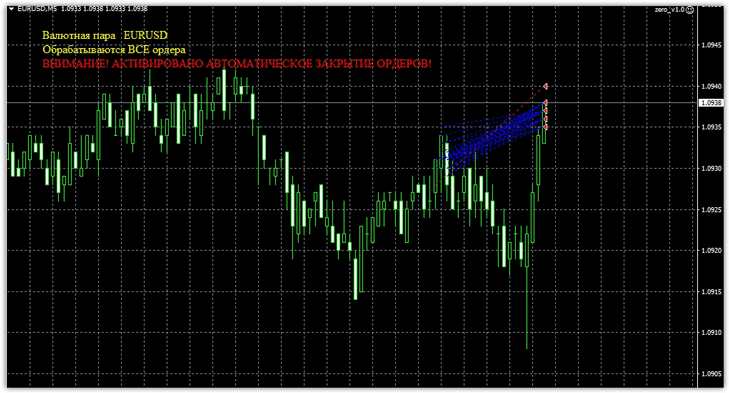
You're probably wondering how the expert advisor actually closes trades at a profit, and how does it find it? The developers have made everything extremely simple, calculating profit based on the number of points the price moves from the breakeven point previously found by the advisor. Let's take a closer look at the advisor's performance on a chart:

Closing a series of trades at a specified profit:
Zero1.0 Settings
Unlike various scripts that allow you to work with orders, this advisor has the ability to work with all open orders, as well as with orders assigned a separate identifier.
Thus, you can connect this expert advisor to modify the order processing of any other expert advisor. To do this, set the "Orders ALL" line to "false," and in the "ID" line, enter the expert advisor's Magic Code, which is assigned to orders. You can also use the filter to specify which orders to process: buys, sells, or both buys and sells.
To do this, set the Mode line to 1 if you want the EA to track only sell orders, 2 if only buy orders, and 0 if both buy and sell orders. In the Profit line, you can specify the profit size of the order series in points (calculated using the formula: breakeven + number of points).
If you leave it at 0, the expert will not close orders at profit, but will only display the break-even point on the screen.
In conclusion, I would like to add that the expert does not open orders independently, but serves to easily perceive the break-even point of a series of open transactions and their closing at a specified profit.
Simply put, it works with already open orders and is an excellent assistant for all traders practicing grid strategies and averaging.

