ArgoGuardian Assistant Advisor
The most common trader affliction, which causes dozens or even hundreds of accounts to be wiped out, is a lack of  discipline in capital management.
It should be noted that, regardless of whether a trader uses an advisor or trades personally, the error of taking profits and losses in a timely manner is common to everyone.
I would like to separately touch upon advisors, which in most cases use highly risky capital management models such as martingale or averaging, which lead to the immediate loss of all funds.
Traders who have ever encountered such robots know that in the event of a significant drawdown, they must make a tough decision and lock in the loss to avoid losing all their money. However, the simple hope that opening the next order with an inflated lot will lead to the expected resolution of the force majeure situation actually ends up worsening it.
The ArgoGuardian advisor is an expert assistant that allows you to tightly control your account equity and promptly limit predetermined risks. In addition to the standard loss limitation feature, the advisor features a special setting that automatically releases the autotrading permission button, preventing a losing bot from continuing to trade.
Installing ArgoGuardian
ArgoGuardian is an automated advisor, a script assistant that must be installed on the Meta Trader 4 trading platform. To do this, download the ArgoGuardian file at the end of this article and access your platform's data directory via the File menu.
The next step is to place ArgoGuardian in a folder named "expert" and update it in the navigator panel of the installed file. After the update, simply drag ArgoGuardian onto the chart of any currency pair and configure the necessary settings:
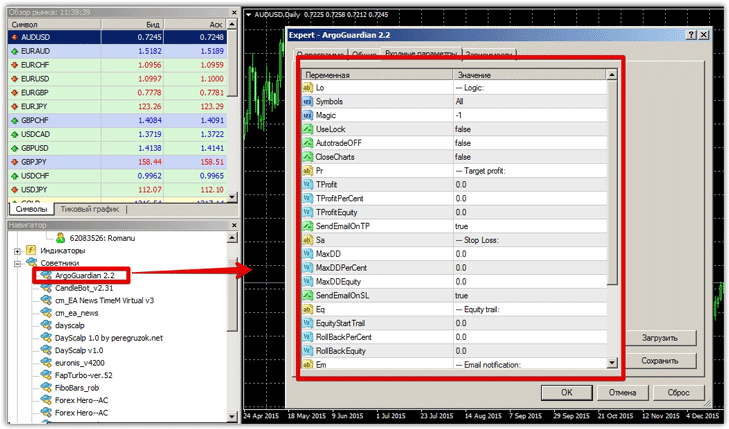
ArgoGuardian settings and functionality
ArgoGuardian settings can be divided into six main blocks, namely Logic, Target Profit, Stop Loss, Equity Trail, Email notification, and Misc (data update frequency).
Logic Block Settings
In this block, you can configure how losses will be limited and fixed, currency pair selection, profit fixing, and determining the advisor's order magic number.
In the Symbols line, you can enable restrictions for all currency pairs. If you select ThisSymbol, the control will only apply to the currency pair on which the advisor is located. If you switch to MaxDDSymbol, the advisor will only record losses on currency pairs with the maximum drawdown.
In the UseLock line, you can enable risk limitation using a lock (opening a counter order of the same volume).
In the AutotradeOFF line, you can enable automatic shutdown of the advisor upon reaching a specified profit or loss.
By enabling the CloseCharts feature, ArgoGuardian will close all charts except its own before taking a profit or loss.
Target Profit Block Settings
This settings block is used to select the option for locking in your profit. In the TProfit line, you can set the profit lock amount in the deposit currency.
In the TProfitPerCent line, you can set the percentage of profit from the deposit that will be recorded by the ArgoGuardian script.
In the TProfitEquity line, you can clearly specify the amount of funds upon reaching which the advisor will close orders.
Stop Loss block settings
This block contains settings for limiting losses, or more precisely, options for fixing them.
In the MaxDD line, you can set the maximum drawdown in the deposit currency, upon reaching which the advisor will close orders.
In the MaxDDPerCent menu, you can set the drawdown amount as a percentage of the deposit, upon reaching which ArgoGuardian will close all orders.
The MaxDDEquity line specifies the equity level upon reaching which the advisor will automatically fix the loss.
Equity Trail Block Settings
In the EquityStartTrail line, you can set the equity value at which the EA will begin trailing positions. In the RollBackPerCent menu, you can set the rollback percentage of equity after which all orders will be closed.
All other blocks are auxiliary and have no significant technical significance. Overall, ArgoGuardian is a real cure-all that will permanently cure you of the annoying problem of forgetting to record your profits and losses in a timely manner.

