What can the Task Manager tell you in MT5?
Many traders who have been using MetaTrader 5 for years are not even aware of some of its interesting features.
It was a revelation for me that this program has its own “Task Manager,” with similar functionality to the standard Windows Task Manager.
Unlike the usual dispatcher, this one displays information only on the MetaTrader 5 trading platform, allowing it to be optimized for minimal computer resource consumption.
The MT5 Task Manager is a script that allows you to monitor how much and which of the trading platform's processes are consuming your computer's resources.
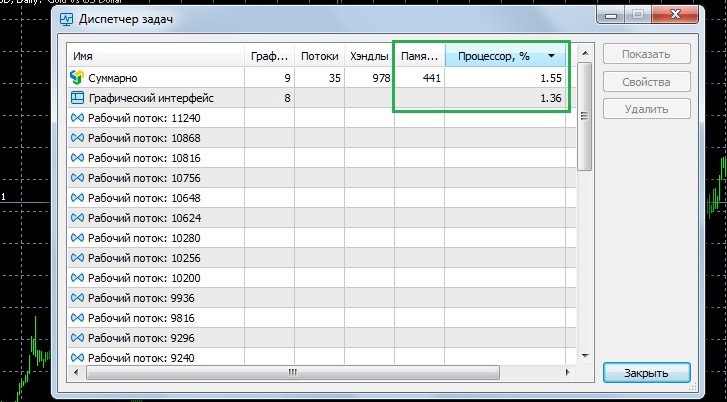
It's all quite simple here, for us the most important are only three columns:
Name – the first, widest column, which displays the names of running processes, i.e. information about open chart windows, running advisors and scripts, as well as work threads.
Memory. MB– the amount of RAM consumed, separately for each process and in total by the entire trading platform.
Processor, % - this column shows how much your platform is loading your computer, as well as which process is the most resource-intensive.
This application not only allows you to monitor processes, but also quickly stop an advisor or script that is too resource-intensive:
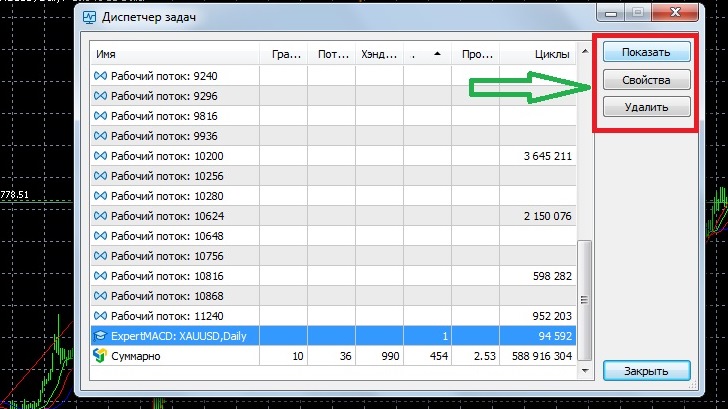
To do this, simply click on the desired object with the mouse and select delete in the upper right corner of the task manager.
Unfortunately, not all running processes can be managed. If the Show, Properties, and Delete buttons remain disabled when selecting a process, you'll need to use another method to terminate it.
Thanks to the dispatcher, you can now quickly identify the cause of your trading platform freezing and resolve the issue promptly. You can also find out exactly what specifications your new computer should have to run MetaTrader 5 smoothly.

